Google’s XR Blocks Gem for the Gemini web app lets you rapidly build interactive mixed reality WebXR experiences by simply describing what you want with text.
“Vibe coding”, if you’re unaware, refers to building an application by conversing with an AI that generates the code for you, rather than writing the code yourself.
While Gemini can already tackle this out of the box, the XR Blocks Gem – Google’s name for extensions that give Gemini custom instructions and resources to better suit specific tasks – provides the AI with context about how to use the company’s XR Blocks WebXR SDK, including code examples in the context window for it to learn from.
After providing it with a text prompt detailing what kind of experience you want, in less than 60 seconds, after performing its reasoning step, Gemini will produce the necessary HTML, CSS, and JavaScript, populating it into the Canvas feature, a view that appears beside the chat thread and gets updated as you request changes.
The generated WebXR experiences can include a user interface, hand interactions, and physics, with Google claiming that Gemini itself is “physics-aware”. Google calls the entire workflow “Vibe Coding XR”.
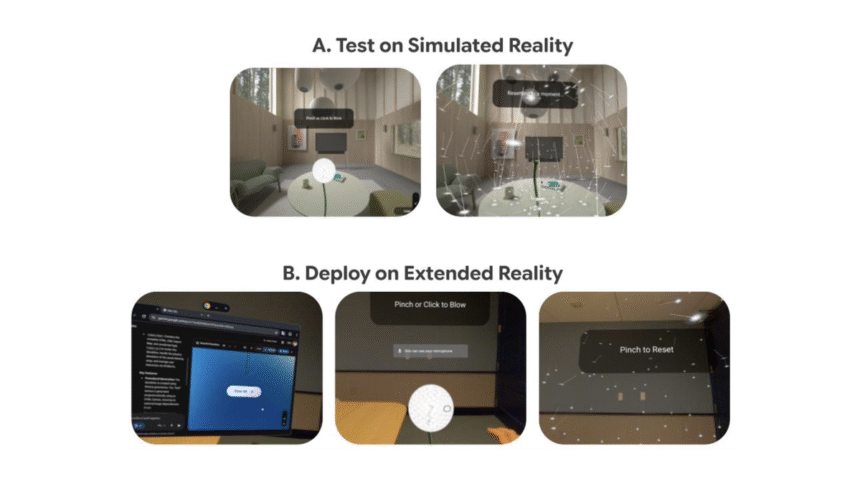
Because XR Blocks has a built-in flatscreen desktop simulator feature, complete with a virtual home environment to substitute for passthrough. If you preview your generation on a PC web browser, you can use the WASD keys and your mouse in three modes: User Mode, Navigation Mode, and Hands Mode. It’s a rather complex way to map the limited inputs of flatscreen mouse and keyboard to the high-bandwidth input dynamic inherent to XR, but useful for testing without needing to be in a headset.
How “Vibe Coding XR” is really meant to be used, though, is in a headset. Google, naturally, recommends the Samsung Galaxy XR, but I found it works just as well in a Meta Quest 3 or Apple Vision Pro. In your headset’s web browser, you can instantly launch into the created WebXR experience with no need to compile anything. It’s the lowest friction path for building and developing truly custom interactive XR experiences yet, letting people with little or no coding experience build them in seconds.
Of course, from your headset’s web browser, typing isn’t exactly convenient by default. Vibe coding with the floating virtual keyboard would be a pain. Instead, make sure to connect a Bluetooth keyboard, Quest 3’s Surface Keyboard feature, or speech-to-text.
Here are some examples Google provided of what’s possible with some example prompts. You can click the name of each to bring up a hosted demo.
Physics Lab: “Create an interactive physics experiment: given different objects on each side of the scale, use different weights (with labels on them) to balance the scale.”
XR Sports: “Let me play volleyball with hands and collide with my environment. Volleyballs are textured and launched from a red ring slowly and easier to bounce with the hand.”
Immersive Chemistry: “Create an interactive chemistry lab that users can pinch to ignite and observe three experiments: Ignite methane in air and place a dry, cold beaker over the flame: the flame is pale blue, and liquid droplets form on the inner wall of the beaker. Ignite ethylene in air: the flame is bright, black smoke is produced, and heat is released. Ignite acetylene in air: the flame is bright, thick smoke is produced, and heat is released.”
Math Tutor: “Visualize Euler’s theorem in geometry. Explain vertices, edges, and facets concepts with highlighting using different examples.”
Schrödinger’s Cat: “An aesthetically pleasing depiction of Schrödinger’s cat in XR. Finger pinch makes a cat (detailed 3D model) go into the box. Approaching the box within 50cm makes the box become two that move to the left and right and the box’s front wall becomes transparent. You see both versions of the cat inside (dead and alive), demonstrating the quantum state. When you pinch again, one of the states becomes reality. The box opens and you see it either alive or dead. With another pinch you can start again.”
XR Dino: “Create the Chrome Dino game in XR. Dino is voxelized in front of the user, with every cactus rushing towards the user on a semi transparent lane. Add audio.”
An important note is that the quality of the WebXR result, and how long it takes, will depend on which model you select, and therefore whether or not you have a paid Gemini subscription.
In Gemini, as of the time of writing, there are three ‘modes’ available to select from the dropdown: Fast, Thinking, and Pro. Fast uses Gemini 3 Flash with reasoning set to ‘Minimal’, Thinking uses it with a higher reasoning budget, and Pro, as you might expect, uses the vastly more intelligent Gemini 3.1 Pro. Google recommends only using Pro for Vibe Coding XR, stating that it produces an error-free result around 95% of the time, compared to around 87% for Thinking. How many Thinking and Pro requests you can use depends on your Google AI plan, so you’ll need to subscribe to get the best results.
You can try out Google’s XR Blocks Gem in Gemini here. For the best experience, do so inside a headset.