By using this site, you agree to the Privacy Policy and Terms of Use.
Accept
GamexploreGamexplore
  • Home
  • News
  • PC Game
  • Mobile
  • VR News
  • Hardware
  • Guides
  • Reviews
  • Upcoming
Reading: Best Steam Deck dock 2026
Share
Notification
GamexploreGamexplore
Search
  • Home
  • News
  • PC Game
  • Mobile
  • VR News
  • Hardware
  • Guides
  • Reviews
  • Upcoming
Follow US
© 2025 All rights reserved | Powered by Gamexplore
Gamexplore > My Bookmarks > Hardware > Best Steam Deck dock 2026
Hardware

Best Steam Deck dock 2026

January 24, 2026 23 Min Read
Share
23 Min Read
Best Steam Deck dock 2026
SHARE

Table of Contents

Toggle
  • Jsaux Upgraded 5-in-1 Docking Station
  • UGreen Steam Deck Dock
  • Anker USB-C Hub
  • JSAUX M.2 Steam Deck dock
  • Syntech 6-in-1 docking station
  • Valve Steam Deck Docking Station
  • Bases 6-in-1 Steam Deck Dock
  • Belkin USB-C Hub
  • Invzi Docking Station
  • How to chose the best Steam Deck dock
  • Steam Deck dock FAQs
    • Can you dock the Steam Deck like a Nintendo Switch?
    • Does a Steam Deck dock improve performance?
    • Do third-party Steam Deck docks work?

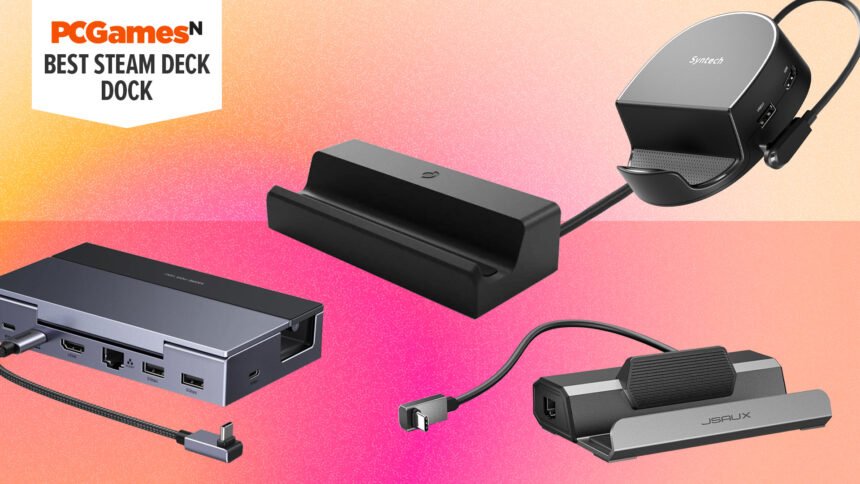
What is the best Steam Deck dock? A gaming handheld dock can transform your portable device into a hybrid gaming PC. Valve’s official docking station isn’t the only option, and we’ve tried and tested an array of portable and cheap docks that come with everything you need to hook up a monitor, keyboard, and mouse to get gaming on your big screen.

Our top choice is the Jsaux Upgraded Steam Deck Dock that offers loads of connections and a decent build for a great price. The UGreen Steam Deck Dock is another top choice if you have a larger handheld, while the Anker USB-C Hub offers the connection basics for a very low cost, though it doesn’t hold your handheld up. For plenty more options, see below, and also be sure to check out the how to choose and FAQ sections of this guide to help you in your Steam Deck dock decision.

Why you can trust our advice ✔ At , our experts spend hours testing hardware and reviewing games and VPNs. We share honest, unbiased opinions to help you buy the best. Find out how we test.

Best Steam Deck dock 2026:

Recent updates
01/23/26: I’ve added the newly-reviewed Jsaux Upgraded 5-in-1 Docking Station as my new top choice of Steam Deck dock. It improves upon Jsaux’s original dock with better rubber support for a variety of handhelds and is cheaper than ever.

Jsaux Upgraded 5-in-1 Docking Station

Best Steam Deck dock overall

Jsaux Upgraded 5-in-1 Docking Station specifications:

USB ports2
Power delivery100W
HDMI ports1
EthernetYes
Pros

  • Amazing value
  • HDMI can deliver 4K @ 120fps
  • 100W power delivery
Cons

  • One less USB port than Valve Steam Dock
  • Side Ethernet placement

If you’re simply looking for a cheaper alternative to the official Valve Steam Deck dock but don’t want to miss out on the core functions, the Jsaus Upgraded 5-in-1 Docking Station is it. At less than a third of the price of Valve’s option but still well-built, it’s a great buy that’s compatible with a wide range of other handhelds.

Equipped with HDMI, two USB-A ports, Ethernet, and a USB-C power delivery port able to push 100W of juice to your handheld, this dock does technically have one fewer USB port than Valve’s dock, but two USB-A ports are enough for most setups.

With a premium-feeling solid metal build and robust yet cushioning rubber pads, this dock will safely support the Steam Deck, Steam Deck OLED, ROG Ally/X, Legion Go, and MSI Claw. It will also connect to the XBox Ally X, but the large grips on that handheld mean it doesn’t sit properly in the dock.

Read our Jsaux Upgraded 5-in-1 Steam Deck dock review for more information.

UGreen Steam Deck Dock

Best dock for wide handheld PCs

PCGamesN Score 9/10
UGreen Steam Deck Dock specifications:

USB portsUSB-A x 2, USB-C x 1
Power delivery100W
HDMI port1
EthernetYes
Pros

  • Works with other handheld PCs too
  • Handy USB-C connection.
  • Wide cradle
Cons

  • Obstructs Steam Deck vent
  • Pricey

Specs-wise, there’s not a lot that sets the UGreen Steam Deck Dock apart from the likes of the Jsaux Steam Deck Dock – but there is one very important distinction. Its cradle is quite a lot bigger, which means that the Steam Deck fits in more easily – this is good news for anyone who keeps their Deck in a protective case because now you won’t need to take it off when you need to dock.

Notably, this dock also works for the Asus ROG Ally – I know we’re talking about Steam Deck docks here, but I’m sure some readers will have the Asus ROG Ally, or have thought about getting it in future. Our reviewer was certainly pleased with the addition.

Speaking of pleasing additions, this dock features a convenient USB-C port. These aren’t standard to all docks, so if you’ve got any peripherals that use that type of plug, then the addition of this port will save you from having to buy an adapter.

Our only real problem with this dock stems from the fact that the back support partially obstructs the vent on the back of Steam Decks. It’s only a partial obstruction for sure, it’s not going to suffocate, but it is going to hinder its cooling capabilities. If you like to push your Steam Deck to its limits, that is something that you’re going to have to be very conscious of, but it shouldn’t be too much of a problem for most players.

See also  Midnight Murder Club system requirements

We think that the benefits of this dock far outweigh the negatives. Its versatility and port selection make it easy to justify its slightly higher price tag.

Read our UGreen Steam Deck dock review.

Anker USB-C Hub

Best cheap Steam Deck dock

Anker USB-C Hub specifications:

USB ports3
Power delivery100W
HDMI ports1
EthernetNo
Pros

  • Three USB ports
  • 100W power delivery
Cons

  • Design hinders cable management
  • No Ethernet

Anker’s USB-C Hub is cheap, but it holds up against the top Steam Deck docks on the market. This option crams two USB 3.0 ports, HDMI, and an SD card slot into a wallet-sized device, and it even includes Power Delivery 3.0 support.

Sadly, the Anker USB-C hub lacks Ethernet, so you’ll have to make do with Steam Deck Wi-Fi. Not exactly a deal breaker, but if you rely on wires to get online, you may have to come up with a workaround.

Despite its size, Anker’s ant-sized solution boasts power delivery, and it’ll provide 100W to connected devices. Just like Jsuax’s dock, you’ll have to either use the power adapter included with the Deck or buy another, providing you don’t already have one stowed away.

Valve’s official version costs a lot more than this cheap and cheerful alternative, and Anker’s hub will play nice with other USB-C devices. That said, its dongle design might bother enthusiasts who prioritize desk cable management, especially since its short USB-C cables make it harder to tuck away out of sight.

JSAUX M.2 Steam Deck dock

Best Steam Deck SSD dock

PCGamesN Score 8/10
JSAUX M.2 Steam Deck dock specifications:

USB ports2
Power Delivery100W
HDMI ports1
EthernetYes
Pros

  • Pricey compared to basic model
  • Gigabit Ethernet
  • Impressive SSD abilities
Cons

  • Ethernet port is still on the side
  • SSD support isn’t plug-and-play

The JSAUX M.2 dock is a souped-up version of the company’s original accessory, as it boasts built-in NVMe SSD support. While you’ll need to pay substantially more for the new dock’s solid-state superpowers, this heavy hitter hub only costs $40 USB more than the official Valve version.

Sure, you could just either buy the best Steam Deck SD card or pair the portable one with an external drive, but JSAUX’s all-in-one solution helps the handheld feel like a proper desktop PC. Being able to access up to 4TB of storage by simply plugging in the dock is an undeniable boon, and it’ll save you from endlessly deleting and redownloading Steam games.

Of course, the JSAUX isn’t just the best external SSD contender, as it provides the portable with 4K HDMI output, Gigabit Ethernet connectivity, and two USB ports. Admittedly, an extra USB port would go a long way, but that’s forgivable this time around given the dock’s built-in SSD slot.

The JSAUX M.2 dock won’t be to everyone’s tastes, especially if you’re just looking to hook up to the best gaming monitor. However, if you’re looking to transform the Steam Deck into a cheap gaming PC, this SSD docking station should do the trick.

Read our JSAUX M.2 Steam Deck dock review.

Syntech 6-in-1 docking station

Best compact Steam Deck dock

PCGamesN Score 8/10
Syntech 6-in-1 docking station specifications:

USB ports3 x USB-A 3.0, 1 x USB-C 3.0
Power delivery100W
HDMI port1
EthernetGigabit Ethernet
Pros

  • Compact curved designed
  • Reasonably priced
Cons

  • Some ports can be harder to access
  • Slightly blocks the Steam Deck fan intake

Need a compact Steam Deck dock to fit into a little nook in your gaming space? Look no further than the Synthtech 6-in-1 Steam Deck Docking Station. An option that is as small and portable as it is affordable.

While it’ll no doubt be the best choice for several setups, the curved design can be a slightly double-edged sword. What we mean is that because the ports are on the curved side, some of them are easier to access than they would be on a rectangular counterpart, but also some of them are slightly more awkward to access.

It also partially obstructs the Steam Deck’s fan intake, but aside from that, there’s very little to critique. It has a lot of ports, which makes us happy, and essentially does all the same things as the official Steam Deck dock, and all at about half the price. It’s hard to say no to that.

See also  Grab a Razer BlackShark V2 wireless gaming headset for just $59 in this mind-blowing Black Friday deal

Read our Syntech 6-in-1 Steam Deck docking station review.

Valve Steam Deck Docking Station

The official Steam Deck dock

PCGamesN Score 9/10
Valve Steam Deck Docking Station specifications:

USB ports3
Power delivery100W
HDMI ports1
EthernetYes
Pros

  • Designed with Steam Deck in mind
  • Better specs than alternatives
  • SteamOS firmware updates

The Valve Steam Deck Docking Station is one of the priciest docks we’ve tried, but it’s got more going for it than you’d think. If you’re not a fan of third-party solutions, the official accessory will deliver in terms of quality and functionality, and it feels like a perfect premium fit for the portable.

Unlike other options out there, the Valve Steam Deck dock is made of the same high-quality plastic as the handheld PC itself. It also cradles the baby PC with love, as subtle design elements like its lip sit flush against the portable’s base. That’s not to say other docks by the likes of JSAUX fail in this regard, but we’d argue that the official docking station feels tailor-made for Valve’s device.

In addition, you’ll be able to easily update the official docking station’s firmware using SteamOS, rather than having to connect it to a Windows PC. That boon alone makes the dock feel more like a natural extension of the handheld, something that ultimately helps it feel more like a hybrid on par with the Nintendo Switch.

If you’re hung up about the dock’s high price, it’s worth noting that the package includes an additional USB-C charger. While there’s a Jsuax model that offers a similar setup for a bit less, the extra power adapter will save you from disconnecting wires when you want to go adventuring with your Deck.

Read our Valve Steam Deck docking Station review.

Bases 6-in-1 Steam Deck Dock

Best for docking with a case

Bases 6-in-1 Steam Deck Dock specifications:

USB ports3 x USB-A, 1 x USB-C
Power delivery100W
HDMI ports1 x HDMI 2.0
Ethernet1000MBps
Pros

  • Highly adjustable cradle
  • Well-made
Cons

  • No front USB port
  • Hard to find in the UK

If you’re someone who likes to mix it up and play on-the-go as well as docked, the Baseus 6-in-1 Steam Deck Dock has an adjustable cradle that makes it possible to dock your Steam Deck even when it’s in a case or protector. This saves the frustrating task of disrobing your Steam Deck every time you want to play it on a monitor.

In addition to that, its adjustability means that it hasn’t just been made to fit the Steam Deck, and you can just as easily dock something like the Asus ROG Alley too. Though you probably don’t have both, it means that you could share a dock with any ROG Ally owners in your home, or that you could continue to use the same dock if you ever switched in future.

On top of that, the port selection is good (even if we do wish it had a USB port on the front) and its aesthetics are pretty swish too. It’s a well-made product with a high build quality. It’s likely to last you a long time, and the adjustability futureproofs it for any future handheld gaming PCs of different dimensions that you might get your hands on.

It’s not that easy to find in the UK, so readers in that region may have to opt for another choice. Meanwhile, there are definitely cheaper options out there, but it performs very well (you can play in 4k at 60fps if you want), and the adjustable cradle gives it a solid edge over many other contenders.

Belkin USB-C Hub

Best versatile Steam Deck dock

Belkin USB-C Hub specifications:

USB ports3
Power delivery100W
HDMI ports1
Ethernet portsYes
Pros

  • Nice wedge shape to place Deck
  • Expansive IO
Cons

  • Quite large
  • Built with laptops in mind

Belkin’s USB-C Hub is built with laptops in mind, but its wedge-shaped design could cater to Steam Deck desk setups. Placing the handheld on the dock’s rubberized surface simulates the look of an official product while somewhat concealing any connected cables.

Speaking of connectivity, Belkin’s angular dock features an impressive array of ports, including three USB-A connections, HDMI, Displayport 1.2, and support for both MicroSD and full-sized SD cards.

You could argue that while Belkin’s bruiser of a hub caters more to laptops, it’s not necessarily a bad thing. After all, you might want to invest in the best gaming laptop down the line and integrate it with your desktop setup.

See also  Save up to $129 on my favorite gaming chair and desk in this early Memorial Day sale

Admittedly, if you’re just looking to enjoy some Steam Deck games at your desk, this hub is overkill, but it could still help you squeeze every drop of functionality out of your new handheld PC.

Invzi Docking Station

Best discrete Steam Deck dock

Invzi Docking Station specifications:

USB ports3
Power delivery100W x 2, 30W x 1
HDMI ports1
EthernetYes
Pros

  • Conceals cables away from desk
  • Extra USB-C power delivery ports
Cons

  • Need to be plugged into an outlet
  • Expensive

Docking stations usually sit proudly on top of your workspace, and they traditionally cradle your connected device. However, the Invzi Docking Station deliberately stays away from your desk setup by plugging straight into a wall power socket.

Aesthetically, this hub looks almost like a big phone charger, but it’s equipped with HDMI, Ethernet, and three power delivery USB-C ports. Again, keeping the dock away from your desk will ultimately help you manage cables, especially if you’ve already got a rig living on your surface.

Invzi’s Steam Deck compatible dock plug thing only comes with one USB A port, so you’ll need to use an additional hub if you want to hook up your keyboard and mouse. While this would usually hamper desk cable management, the fact that this device is effectively a wall plug means you can confine it to the realm under your desk, something that should prevent any spaghetti monsters from reaching your surface.

How to chose the best Steam Deck dock

A dock is one of the best Steam Deck accessories you can buy for the Steam Deck and Steam Deck OLED, as it gives you more ways and places to experience your handheld. It’ll let you play the best Steam Deck games on a big-screen TV, or play while charging inside the best Steam Deck cases. However, if you’re feeling daunted by all the choices, we’ve broken down the key factors for you to keep in mind while making your decision:

Pricing: You could go all-out and get an expensive option, like the official dock from Valve. However, while that might give you the peace of mind that comes from knowing you’ve got a well-optimized bit of hardware that will always be compatible, it’s not going to be such a good choice for anyone on a tighter budget. Many of the cheaper options can do everything the official dock can do, so we included a few reliable budget options too.

Ports: Got lots of accessories that you want to have plugged in while you have your Steam Deck docked? Look out for the number of ports. We’ve used three as a kind of middle-of-the-road benchmark here (though we’ve included a couple with two) and while you can find options with even more, we don’t think many people are going to need more than four.

Portability: Do you travel around a lot and like to dock your Deck wherever you go? If so, you’ll want a small, compact dock that can easily fit inside your bag. Meanwhile, those with a fairly small gaming space will want to ensure that they get something compact that won’t clutter it too much. We’ve tried to include a nice selection of small but powerful docks here.

Compatibility: Obviously, Valve knows the Steam Deck better than any other manufacturer. While there are many third-party docks out there on the internet, some of them might have issues with Steam Decks not fitting in properly, blocking cooling vents, and so forth. We’ve not included anything with any severe compatibility options, and we advise you to research thoroughly before considering any third-party options not on this list. They are cheaper, but if you’re not careful, they’ll come with a different kind of cost.

Steam Deck dock FAQs

Can you dock the Steam Deck like a Nintendo Switch?

Yes, you can dock the Steam Deck, and compatible accessories work a lot like the Nintendo Switch docking station. However, rather than using a connector at the bottom of a cradle, Steam Deck docks feature a built-in USB-C cable that provides the handheld with power and arms it with HDMI output and USB connectivity.

Does a Steam Deck dock improve performance?

Mostly no. For the Steam Deck and most other handhelds, a dock doesn’t unlock extra performance as such. However, some handhelds do hold back their highest performance modes only for use when they’re plugged in. So, using a docking station can allow you to get the most from your handheld, but you’ll have to make sure it doesn’t try to run at the higher resolution of any displays you’ve connected it to, as this will actually reduce the frame rate you get.

Do third-party Steam Deck docks work?

Absolutely. If they didn’t, this would have been a pretty short list! Indeed, there are several third-party choices that have features not seen in the Valve model. Don’t get us wrong, the official model is fantastic, but we know there are people that will be better off with other options.


You Might Also Like

This dual-mode Asus gaming monitor is ideal for everything from CS2 to triple-A, and it just hit its lowest ever price

Asus launches more scalper bait with gold Nvidia GeForce RTX 5080 graphics card

Nvidia GPU supply for graphics cards slashed by up to 20%, with "no new product in 2026," says fresh leak

This gorgeous all white gaming PC build is a masterpiece of clean design

Modder turns their RTX 5090 into a 1,500W space heater, but please don't try this at home

TAGGED:Hardware
Share This Article
Facebook Twitter Copy Link
Previous Article Meta CTO Explains Layoffs & Strategy Shift: "VR Is Growing Less Quickly Than We Hoped" Meta CTO Explains Layoffs & Strategy Shift: "VR Is Growing Less Quickly Than We Hoped"
Next Article The Super Mario Galaxy Movie The Super Mario Galaxy Movie Direct Set for January 25th
Leave a comment Leave a comment

Leave a Reply Cancel reply

Your email address will not be published. Required fields are marked *

Latest News

Grand Theft Auto 6_Ultimate Edition (1)
Grand Theft Auto 6 Extended Look Announced for August 27th
Upcoming August 7, 2026
Fantasy Online 2 is an early access pixel art MMO for Steam, browser, and Android
Mobile August 7, 2026
nintendo switch 2
Nintendo Switch 2 Sells 23.68 Million Units Worldwide
News August 7, 2026
Viture Pro 2 is the Company’s Thinnest & Lightest AR Glasses Yet, Priced at $300
VR News August 7, 2026
Dream Hackers VR Is The Game I'm Most Excited For In 2027
VR News August 7, 2026
Gears of War E-Day_02
Gears of War: E-Day Beta’s Early Access Starts, Studio Confirms Known Technical Issues
PC Game August 7, 2026
Marvel Tokon Fighting Souls Review-in-Progress: Beautiful But Busted
PC Game August 7, 2026
gamexplore gamexplore

Welcome to Gamexplore, your go-to destination for everything gaming. We are dedicated to delivering the latest updates, in-depth insights, and expert analysis from the ever-evolving gaming industry.

Editor Choice

Little Nightmares 3 Review – Mesmerizingly Terrifying
Resident Evil Requiem’s Minigame Development is Nearing Completion, Might Be Out After Golden Week
You might've forgotten about True Detective season 5, but it's shooting soon and will be set in a far more familiar location
The best game for Zelda fans in 2025 is Pipistrello and the Cursed Yoyo

Trending News

Wanderer: The Fragments Of Fate Roadmap Reveals Combat & Quest 3 Upgrades
MOUSE: P.I. For Hire Introduces Sci-Fi Weapons in New Gameplay Trailer
Meta’s Goo Goo Dolls Concert Reminds Us Why Live Music Fits VR So Well
Monster Hunter Wilds event quests schedule and DLC roadmap
  • About Us
  • Contact Us
  • Disclaimer
  • Privacy Policy
  • Terms of Service
Reading: Best Steam Deck dock 2026
Share
© 2025 All rights reserved | Powered by Gamexplore
Welcome Back!

Sign in to your account

Lost your password?