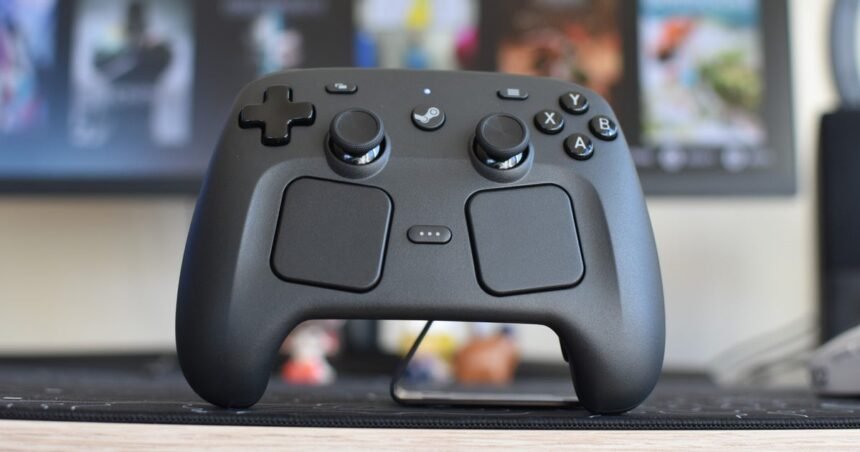
Well, one out of three ain’t bad. The second-generation Steam Controller is upon us, the sole survivor of Valve’s delays on its RAM-troubled new hardware. “Go on without us,” the Steam Machine and Steam Frame VR headset presumably whispered to a reluctant Controller, which could only blink back tears of thumbstick lubricant as both were buried under the pile of money that it now takes to buy two DDR5 sticks.
Still! You don’t need a Steam Machine, or indeed any SteamOS device, to have a good button-bashing time with the Steam Controller. It’s a comfortable and highly functional pad that’s much more accessible than the owl-faced 2015 original, while managing to feel even more like a focused, specialist PC tool for traditional Windows rigs.
You still get dual trackpads and some back buttons, but the addition of a D-pad and a second thumbstick instantly makes this a more inviting Steam Controller for those who’ve only ever stuck to conventional peripherals. Or, are familiar with the Steam Deck and Steam Deck OLED, from which the Steam Controller initially appears to have lifted most of its inputs.
Inside, however, are upgrades, and tangible ones. The D-pad is firmer and more stable than either of the handhelds’, while the thumbsticks improve on the Deck OLED’s with TMR (Tunneling Magnetoresistance) mechanisms that promise Hall Effect-style stick drift protection and, should you make it so with settings changes, a significantly shrunken deadzone. The result: a heightened, some might even say twitchy, degree of responsiveness. The original Controller’s loud haptic motors have also been replaced with subtler ones for the trackpads, while each grip includes a beefier motor for general rumbling.
It’s a lot of stuff to cram into a controller, even one as visually weird as this. Yet it’s not bloated, or misshapen. If anything, it’s much, much easier to use than it looks. Nothing so far has caused me fatigue or discomfort: not hours of robot hacking in Pragmata, not a dangerously overconfident return to Hollow Knight: Silksong, not a deep Hades II run, and not the near-constant accelerator abuse of Screamer races. Even the relatively closely-spaced, almost cross-eyed stick placement can be acclimatised to in moments, and the whole thing is much lighter than you’d expect from something with so many goddamn buttons.
Maybe, mind, it might be a little too light? The Steam Controller doesn’t achieve, or even really seek, the elevated sense of substantial comfort and mechanical precision that a truly premium gamepad – like the Xbox Elite Wireless or Razer’s Wolverine V3 Pro – deals in. It’s almost all simple, matte plastic, with functional but not especially advanced-feeling shoulder buttons and triggers. The four rear buttons, while a generous addition to the input count (and astutely placed for easy pressing), also feel slightly hollow.
Vibrational feedback could still be more refined, too. The new motors work well most of the time – with varying levels of intensity when, say, driving over different terrain Forza Horizon 5 – but in Silksong, I’d sometimes hear a small high-pitched ping sound ring out from between my hands, as if one of the motors caught a finger in a deckchair hinge.

More generally, though, you could never say the Steam Controller is a corner-cutter. There’s plenty else for those who seek the tactile pleasures: the thumbsticks, for instance, are grippy, solid, and responsive, even if you never bother to tighten the deadzones. The D-pad genuinely does feel sharper and springier than that of the Steam Deck OLED, and while the main vibrate-o-matics aren’t perfect, the trackpads still hum with a satisfying haptic buzz as you drag a thumb over them.
Thus, when used as an utterly orthodox, thumbsticks ‘n’ face buttons controller, Valve’s new model performs admirably, with further frictions avoided through its long wireless range and a battery life that will comfortably see you through days of heavy use – or weeks of lighter prodding. On that alone, the Steam Controller is a decent gamepad. What makes it a good one, if not great, is how enthusiastically it embraces its home platform. It is not a console controller being made to work on PC: it is a PC controller. For PCs.
You can see this quality in how the Steam Controller enables the PC tenets of openness and flexibility. If the original Steam Controller was too focused on trackpads, and traditional gamepads only offer console-style inputs, this new model earnestly wants to do a good job with both, hence the combination of smooth sticks and those tightly engineered, haptic-backed pads. To be upfront, I don’t personally click with the latter for FPS aiming or 3D camera control – my attempts to learn always end with a defeated return to the right thumbstick – but I don’t see how they’d come up short for those who do. Each square is big enough for reasonably enthusiastic thumb movements, and the downwards click action (also haptic, rather than mechanical) actually achieves the pleasant crispness that the rear and shoulder buttons lack. And even a pad pleb like me could get to grips with them in games that usually want a mouse for cursor control, rather than camera movement; popular MOBA and leading Dunning-Kruger simulator Dota 2 is surprisingly playable on the Steam Controller, at least once you apply one of the community-made input layouts through Steam’s controller settings menu. Oh hey, that’s more PC openness right there.

The oft-overlooked third option, gyro controls, has also never been better represented than on the Steam Controller. Again, this isn’t my jam, despite my envy of those who can harness its potential. But gyroscope accuracy appears dead-on, and the customisation options run off the page. The chief upgrade: capacitive “Grip Sense” sensors in both the left and right grips, removing the need to hold down a button or rest a thumb on a stick to activate those swooshing motion inputs. And as much as I suck, I still enjoyed trying these sensors out. Freeing up a thumb makes perfect sense for a control scheme where you’re waving the gamepad around, likely shifting it around in your grip, and the sensation of only holding one edge of the Steam Controller to jerk my aim around in Team Fortress 2 is the closest I’ve come to having that ‘extension of the body’ feel of virtual reality recreated on a desktop monitor. These sensors can still serve even if you never try gyro controls, too – Steam treats them as inputs that can be freely rebound like any button or trigger.
The new Steam Controller is also unusually well-readied to handle PC usage outside of playing games. I’m sure you can sort-of replicate this on other controllers with apps and settings tweaks, but out of the box, the Steam Controller immediately seems to know its way around Windows, let alone the SteamOS cube it was supposed to launch with. The right trackpad is a capable cursor pusher. The left pad scrolls through web pages. The shoulder buttons make left- and right-clicks. Nudging the left thumbstick seeks through YouTube videos. On no other controller have I found it so effortless to cock up seven successive Savage Beastfly attempts before quitting, firing up Chrome, and skipping back through old William Osman videos to calm down, not once having to switch to a mouse in the process.

This is important, even if you beat Savage Beastfly ages ago. The Steam Controller might be an exceptionally fitting PC gamepad, but it will still need to operate outside the most common setup of a chair and a desk. Whether you’re saving for a Steam Machine, already have a little living room PC of your own, or occasionally dock up a Steam Deck to your TV, it also needs to accommodate those sofa situations where a mouse and keyboard aren’t to hand. A built-in keeb is one thing the Steam Controller doesn’t make room for, but when what’s on-screen isn’t geared specifically for gamepads (as, say, Steam Big Picture Mode is), its trackpads and mouse-aping abilities can easily handle navigation.
The only catch behind all this versatility is that the Steam Controller relies heavily on the Steam Input software layer, which can cause weirdness outside of Valve’s ecosystem. Try to play a game through the Epic Games Launcher, or Battle.net, and it won’t actually recognise the Steam Controller as a controller – it’ll think you’re still using a mouse and keyboard, so short of some creative rebinding, most buttons simply won’t work. The answer is to reroute these games to launch via Steam, using the app’s Add a Non-Steam Game function, upon which they’ll gain the powers of Steam Input at the cost of dragging you even deeper into Valve dependence. This also won’t work, period, with the more locked-down games of Microsoft’s Xbox app, including Game Pass games; perhaps a rare example of a controller joining a boycott.

If that isn’t a dealbreaker, then it’s hard to find something else that could be. The Steam Controller Mk.II is far easier to use than the original, and for every blemish that remains, it exhibits three or four little triumphs of function and design – many of them unique to this one gamepad. I haven’t even mentioned what might be my overall favourite quirk: how the wired charging puck magnetically jumps onto the Controller’s rear contacts when you wave the latter over it, clinging in place and refuelling the battery without ever having to manually insert a wire into a port.
I have decided that this is how all controllers should recharge from here on, and will quietly judge any future competitors that fail to adequately copy it. Which could be many, as it’s no big stretch to imagine waves of Windows-focused, overtly PC-first gamepads following this one, just as the Steam Deck sparked a rush of rival handhelds. Unfortunately, for any trackpadded copycats in the works, there’ll always be that shrugging, doubtful retort: “Yeah, but the Steam Controller did it first.”