By using this site, you agree to the Privacy Policy and Terms of Use.
Accept
GamexploreGamexplore
  • Home
  • News
  • PC Game
  • Mobile
  • VR News
  • Hardware
  • Guides
  • Reviews
  • Upcoming
Reading: Quest’s Latest PTC Update Turns Web Photos Into 3D
Share
Notification
GamexploreGamexplore
Search
  • Home
  • News
  • PC Game
  • Mobile
  • VR News
  • Hardware
  • Guides
  • Reviews
  • Upcoming
Follow US
© 2025 All rights reserved | Powered by Gamexplore
Gamexplore > My Bookmarks > VR News > Quest’s Latest PTC Update Turns Web Photos Into 3D
VR News

Quest’s Latest PTC Update Turns Web Photos Into 3D

May 15, 2026 5 Min Read
Share
5 Min Read
Quest’s Latest PTC Update Turns Web Photos Into 3D
SHARE

Table of Contents

Toggle
  • Browser Photos Pop Into 3D
  • Upload 3D Photos From Your Phone
  • Faster Access To Useful Controls

Quest 3 can now add 3D depth to almost any 2D photo, thanks to the latest Horizon OS Public Test Channel (PTC) update.

Beyond the visual treat, Meta moved two buried controls into quick settings, making them much more convenient: Power options and seated VR are now just a click away.

Browser Photos Pop Into 3D

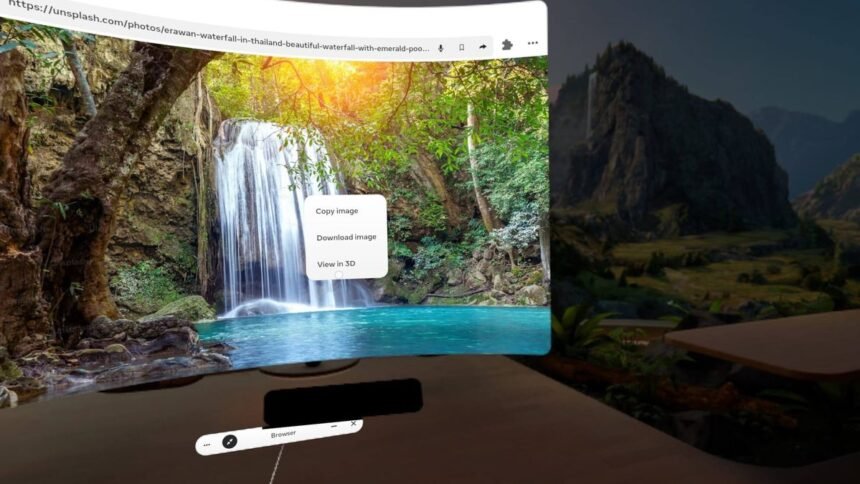
The most impressive feature is browser-based 3D conversion. You can turn almost any website image into a stereoscopic 3D photo with a few clicks, or pinch when using hand tracking.

I can simply point at an image in the Quest browser, select and hold, and a new “View in 3D” option appears. After a few seconds of processing, the flat image transforms into a stereoscopic scene that floats beyond the frame with convincing depth.

A 2D waterfall photo from Unsplash hovers in front of my browser in 3D.

Meta is playing catch-up with this capability and still lags behind in terms of video. Android XR offers a real-time 2D to 3D option for Samsung’s Galaxy XR headset, while Viture and Xreal extend real-time 3D conversion to smart glasses. XR manufacturers are increasingly leveraging the inherent 3D capability of headsets and glasses.

Upload 3D Photos From Your Phone

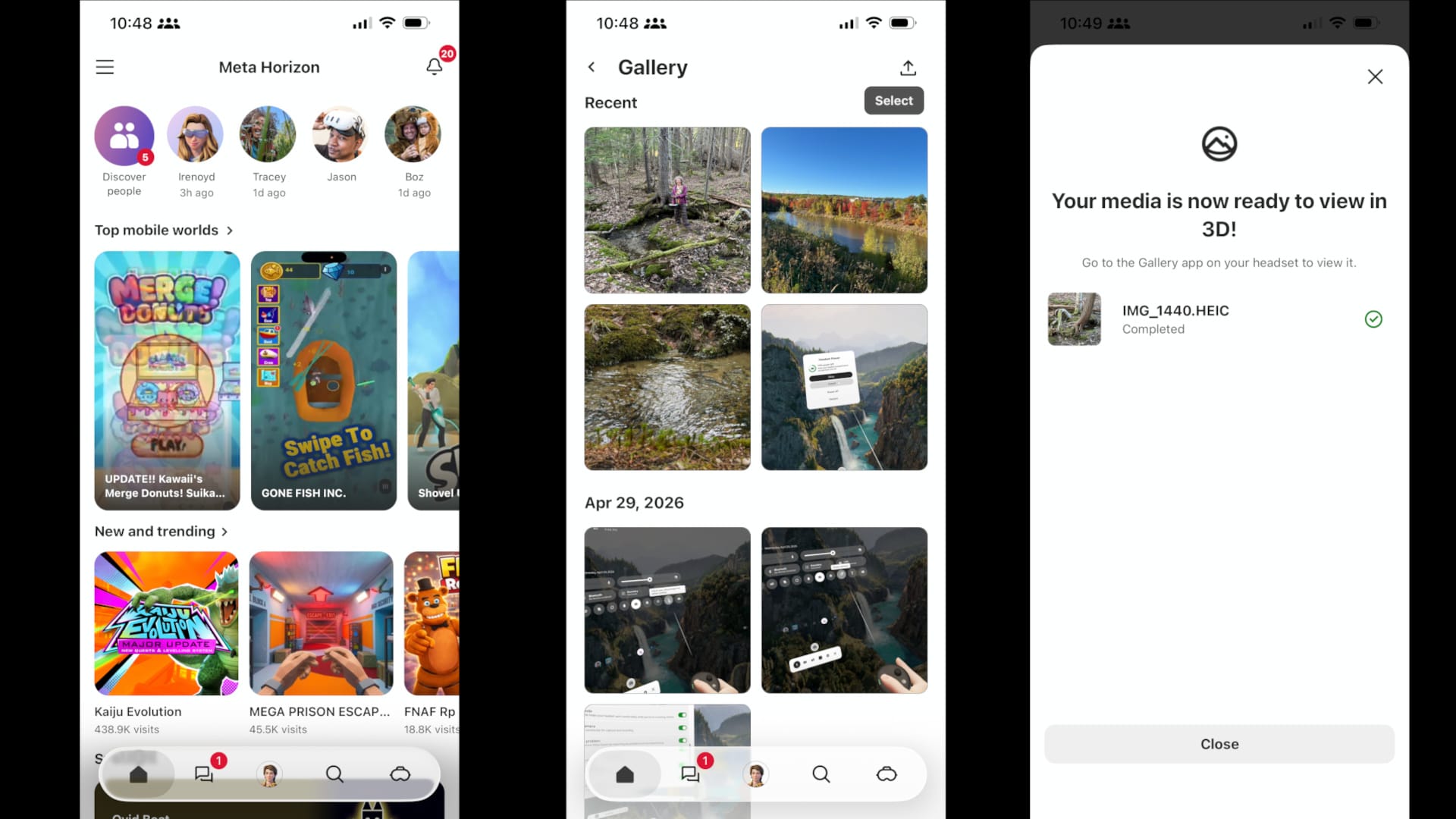
The Meta Horizon mobile app gained a related feature that makes it easy to upload photos from your phone and convert them into 3D images for Quest viewing.

Just open the app menu, tap Gallery, then select photos from your phone’s camera roll, and tap the upload button. Meta processes the images into stereoscopic 3D photos that can later be viewed inside your Quest headset’s gallery.
See also  Out There Is Apple Vision Pro's Best Story, And You Can Try On Quest 3 Too
Screenshots from the Meta Horizon mobile app show how to upload photos as 3D images.
Meta’s Horizon mobile app automatically uploads my phone photos as 3D images.

The workflow is surprisingly simple. There’s no special camera mode or export process. It feels more like uploading ordinary cloud photos, except the result has depth when viewed in VR. That matters because 3D photos simulate real depth in a VR headset, a different image to each eye. That’s not possible on phones, TVs, or movie screens.

As James Cameron has pointed out over the years, modern VR headsets solve many of the brightness and viewing-angle limitations that held back earlier waves of 3D entertainment. Meta has already been leaning into that idea through its partnership with James Cameron for Quest 3D entertainment content.

Faster Access To Useful Controls

The other additions in this PTC update are less flashy but arguably more practical. Meta added new Quick Settings toggles for both Power Options and Boost Height. When enabled, they appear on the right side of the Quick Settings panel for easy access.
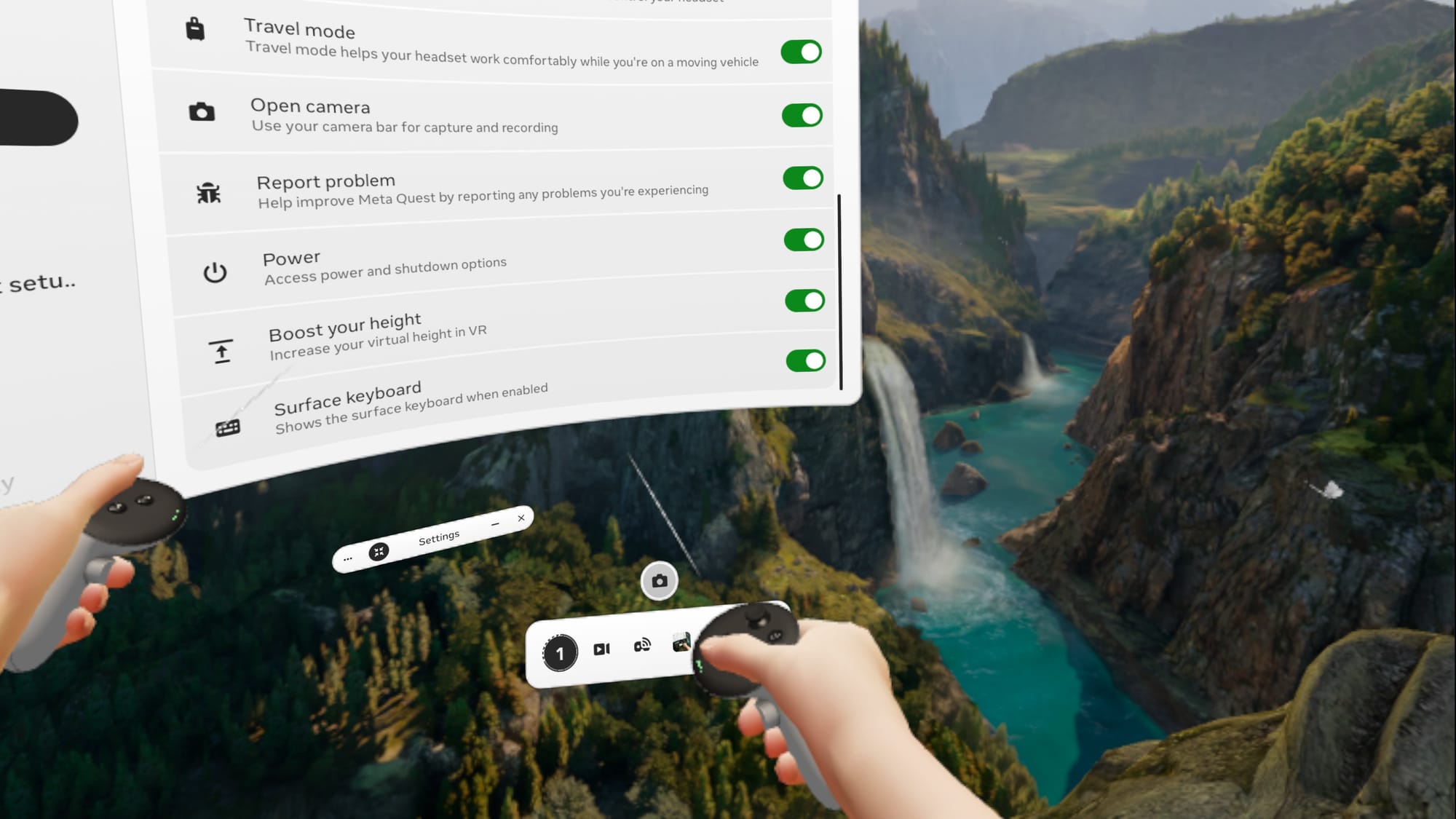
A Quest screenshot shows two new toggles in Quick Settings: Power and Boost your height.
I found two new toggles in Quick Settings: Power and Boost your height.

Power Options opens a compact system window that shows the remaining battery level along with buttons for Sleep, Cancel, Power Off, and Restart.

Boost Height is a common need, so this addition has a bigger impact. The control acts like a switch, raising (or lowering) my virtual viewpoint by about 16 inches. One click and I feel like I’m standing even if I’m seated. I can also use it while standing to grow taller, a fun but usually impractical twist.
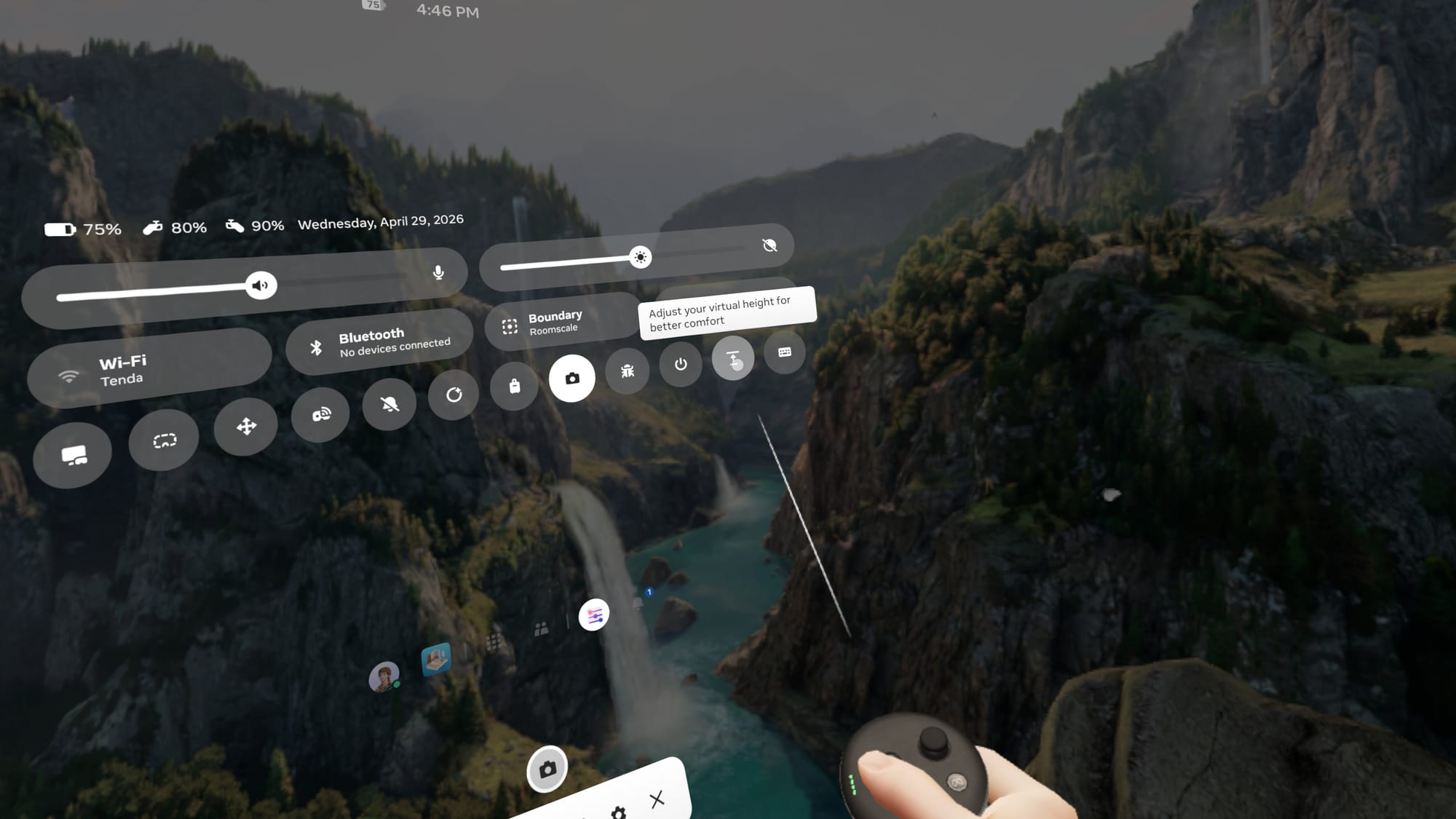
Seated play is easier with the height boost in Quick Settings.

Some games and apps already offer accessibility height adjustments internally, but having a universal system-level shortcut is much more convenient.

See also  visionOS 2.4 Will Bring Apple Intelligence, Spatial Gallery, iPhone App & Guest Flow

While Quest headsets still receive a steady stream of new VR games each month, Meta’s recent Horizon OS updates increasingly focus on spatial media, everyday utilities, and lightweight computing features outside traditional gaming. Features like AI-generated 3D photos and quick-access system control make the Quest feel increasingly designed for everyday spatial computing instead of purely gaming.


You Might Also Like

‘Teenage Mutant Ninja Turtles’ VR Game is Getting a Steam Demo Ahead of Spring Launch

The Best Quest 3 Soft Head Straps For Reclined & Lying Down Use

Earthbending VR Adventure ‘Adepts Arena’ is Coming to Quest & SteamVR, Trailer Here

Apple’s Vision Pro is getting the M5 chip, but that’s not what it really needs

Dungeons Of Eternity Gets Halloween Update With New Cosmetics, Map Changes & More

TAGGED:Virtual RealityVR
Share This Article
Facebook Twitter Copy Link
Previous Article Moss: The Forgotten Relic brings two of VR's best games to consoles Moss: The Forgotten Relic brings two of VR's best games to consoles
Next Article ‘The Boys: Trigger Warning’ Comes to PSVR 2 in June, Promising “community requested” Improvements ‘The Boys: Trigger Warning’ Comes to PSVR 2 in June, Promising “community requested” Improvements
Leave a comment Leave a comment

Leave a Reply Cancel reply

Your email address will not be published. Required fields are marked *

Latest News

‘The Boys: Trigger Warning’ Comes to PSVR 2 in June, Promising “community requested” Improvements
VR News May 15, 2026
Moss: The Forgotten Relic brings two of VR's best games to consoles
PC Game May 15, 2026
Order of the Sinking Star is Bringing Its 1000+ Puzzles to Nintendo Switch 2
News May 14, 2026
007 First Light Introduces Strategist and Mentor Greenway in New Character Trailer
PC Game May 14, 2026
Before Alien: Isolation 2, the underrated Aliens: Fireteam Elite is getting a sequel
Aliens: Fireteam Elite 2 Gameplay Showcases the Entire Pulse-Pounding Prologue
Upcoming May 14, 2026
VR Platformer ‘Moss’ is Getting a Flatscreen Port Following Cancellation of “major project”
VR News May 14, 2026
Buddies and better base building: Previewing Subnautica 2’s newly launched early access
Mobile May 14, 2026
gamexplore gamexplore

Welcome to Gamexplore, your go-to destination for everything gaming. We are dedicated to delivering the latest updates, in-depth insights, and expert analysis from the ever-evolving gaming industry.

Editor Choice

Coatsink Reveals Its Next VR Project, Skytail
Resist PS VR2 Update Adds 120Hz Refresh Rate On PS5 Pro
Battlefield 6's latest update dubbed the game's simultaneously best and worst patch as it runs into all kinds of issues
Fallout 4 Update Promises Fixes and Free Quest, But Fans Worry About Mods Breaking Again

Trending News

Heartopia captures the hearts of Animal Crossing and The Sims fans to become the No.1 free download across 50 countries
Hollow Knight: Silksong price and release time confirmed
YouTube Launches Official Apple Vision Pro App
A new 24GB Nvidia GeForce RTX 5090 is reportedly coming, and it has "a surprise"
  • About Us
  • Contact Us
  • Disclaimer
  • Privacy Policy
  • Terms of Service
Reading: Quest’s Latest PTC Update Turns Web Photos Into 3D
Share
© 2025 All rights reserved | Powered by Gamexplore
Welcome Back!

Sign in to your account

Lost your password?