By using this site, you agree to the Privacy Policy and Terms of Use.
Accept
GamexploreGamexplore
  • Home
  • News
  • PC Game
  • Mobile
  • VR News
  • Hardware
  • Guides
  • Reviews
  • Upcoming
Reading: Nvidia's new gaming monitor tech is inspired by old CRTs, making 250Hz feel like you're playing at 1,000Hz
Share
Notification
GamexploreGamexplore
Search
  • Home
  • News
  • PC Game
  • Mobile
  • VR News
  • Hardware
  • Guides
  • Reviews
  • Upcoming
Follow US
© 2025 All rights reserved | Powered by Gamexplore
Gamexplore > My Bookmarks > Hardware > Nvidia's new gaming monitor tech is inspired by old CRTs, making 250Hz feel like you're playing at 1,000Hz
Hardware

Nvidia's new gaming monitor tech is inspired by old CRTs, making 250Hz feel like you're playing at 1,000Hz

January 8, 2026 5 Min Read
Share
5 Min Read
Nvidia's new gaming monitor tech is inspired by old CRTs, making 250Hz feel like you're playing at 1,000Hz
SHARE

Nvidia has just unveiled its latest G-Sync technology aimed at making gaming monitors as responsive and smooth-feeling as can be. Nvidia G-Sync Pulsar combines the refresh rate/frame rate-syncing tech of G-Sync with a new type of monitor backlight strobing, which works a bit like old CRT screens, to provide ultra-smooth, low-motion-blur gaming.

I’ve long been a fan of G-Sync technology, even if few options on our best gaming monitor guide still use an official G-Sync module. Unlike some Nvidia tech, such as DLSS upscaling, frame gen, and RTX, which have not always had the most obvious beneficial impact, G-Sync just worked. Every single game running on your monitor immediately looked better if you had a G-Sync monitor and an Nvidia graphics card. Now, G-Sync and its free equivalents – adaptive sync and Freesync – are effectively ubiquitous, but with Nvidia Pulsar, the company has come up with a new reason to make you consider buying a proper G-Sync Pulsar-certified display.

The way this technology works is that it takes advantage of the already established technique of black frame insertion, which is where the pixels (of an OLED) or backlight (of an LCD) turn off for a split second between each frame. This flushing of the image has two benefits.

First, the black frame reduces the effect of eye-tracking motion blur (where your eye expects the image to move, but each frame is technically static), and second, for LCDs, the black frame helps mask the period where an LCD pixel is changing from one state (color) to another. This hides the ghostly, smeared trails that you can otherwise see on LCD monitors with slow pixel response time.

See also  Is the UK government planning to ban VPNs?

This sort of backlight strobing has been around for a long time, but has tended to come with two downsides, which are a significant drop in brightness and incompatibility with G-Sync/adaptive sync/Freesync. That meant that you either had to choose the more responsive feel of backlight strobing or the image tearing and stutter-reduction of G-Sync et al. Asus had developed its Extreme Low Motion Blur Sync (ELMB Sync) tech, as seen in the Asus TUF Gaming VG27AQ, which combines the two technologies, but up until now, it was the only company to offer this combination.

nvidia g-sync pulsar 02

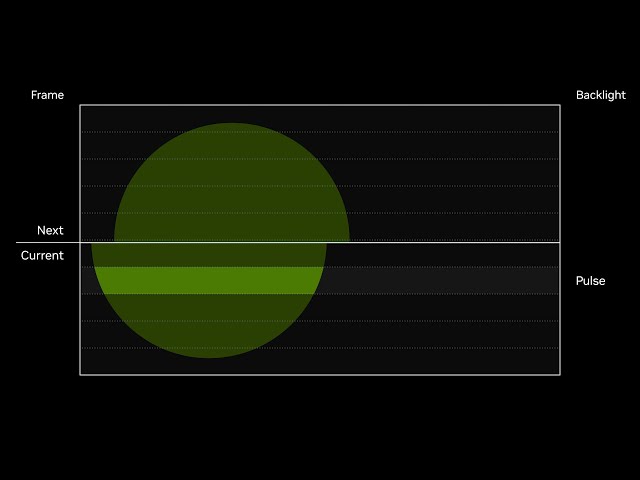
G-Sync Puslar, then, finally brings G-Sync and backlight strobing together to offer truly smooth and responsive gaming. However, it also goes a step further. Not only does G-Sync Pulsar flash the backlight, but it does so in rows that pulse four times for each frame.
YouTube Thumbnail

This splitting up of the backlight into rows creates a similar scanline effect to old CRT displays, which were coveted for their smooth gaming thanks to the image being created by a single beam constantly scanning back and forth and up and down across the whole screen. Nvidia claims this strobing technique is so effective that a 250Hz display running Pulsar feels like using a 1,000Hz display.
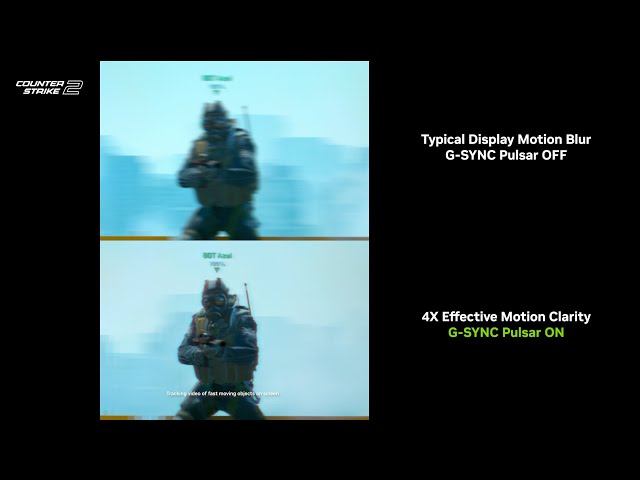
YouTube Thumbnail

Along with this pulsing tech, G-Sync Pulsar displays (see what they did there) must at least offer a 1440p resolution and 360Hz refresh rate, so we’re talking about the most elite gaming displays.

Note that Pulsar isn’t for OLEDs. These panels have a much faster response time, so are inherently better than LCDs most of the time, but OLEDs can’t do the same scanline-mimicking backlight trick, so a G-Sync Pulsar LCD running at 360Hz should feel significantly smoother than a 360Hz OLED. Based on my experience with previous backlight strobing LCD monitors, I’m inclined to trust Nvidia with this claim – it really is that effective.
YouTube Thumbnail

See also  My favorite portable party Bluetooth speaker just got a $70 discount in this amazing early Black Friday deal

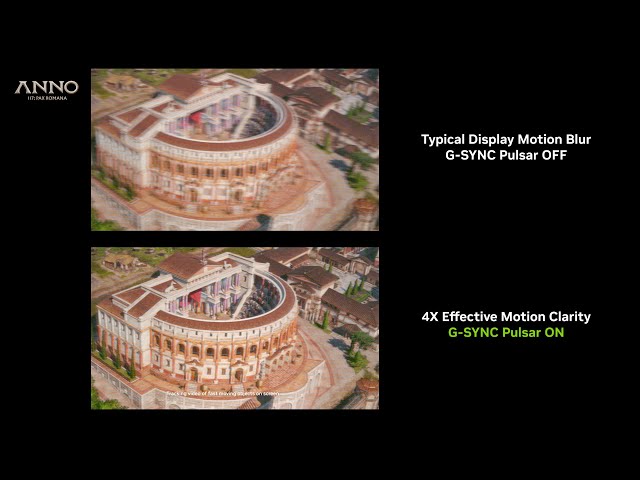
Four fresh G-Sync Pulsar displays launch today, January 7, which are the Acer Predator XB272U FS, AOC Agon Pro AG276QSG2, Asus ROG Strix Pulsar XG27AQNGV, and MSI MPG 272QRF X36. These are all 27-inch models that start at $599, so unlike some previous G-Sync tech launches, these aren’t ludicrously expensive options. That said, they’re still pricey for 27-inch displays, and they’re very much aimed at ultra-competitive gamers playing the likes of Apex, CS2, and Valorant, even if their smooth motion can benefit other games too, as shown in the Anno 117: Pax Romana video above.

You Might Also Like

Nvidia GeForce RTX 5050 guide: Everything we know about the new GPU so far

Is FM26 Steam Deck compatible?

Win a free Steam Deck OLED, thanks to Nvidia

Your Intel GPU could see a 4x frame rate boost soon, thanks to this new tech

AMD Radeon RX 9070 and 9070 XT release set for “early March” says CEO

TAGGED:Hardware
Share This Article
Facebook Twitter Copy Link
Previous Article Fallout 3 Fallout 3 is Getting The Elder Scrolls 4: Oblivion Remastered Treatment – Rumor
Next Article Vanya, the love child of a MUD and idle RPG, claims 1100 concurrent players Vanya, the love child of a MUD and idle RPG, claims 1100 concurrent players
Leave a comment Leave a comment

Leave a Reply Cancel reply

Your email address will not be published. Required fields are marked *

Latest News

Google’s Leading AR Glasses Partner XREAL Raises $100M
VR News January 12, 2026
Apple's Open-Source On-Device AI Instantly Turns Images Into Volumetric Scenes
VR News January 12, 2026
'Snap and Salvage' quest walkthrough in Arc Raiders
PC Game January 12, 2026
Crimson Desert_02
Crimson Desert Will Feature Boss Fights That Force Players to Change Their Standard Tactics
News January 12, 2026
Hytale
Hytale is Coming to PC Tomorrow, Pre-Purchase Has Fully Funded Studio for Two Years
PC Game January 12, 2026
The Sims developer vows "our values are unchanged," as it teases multiple projects from post-Saudi-owned EA
News January 12, 2026
Clair Obscur’s Ending Choice: Which Ending Fits the Story Best?
Upcoming January 12, 2026
gamexplore gamexplore

Welcome to Gamexplore, your go-to destination for everything gaming. We are dedicated to delivering the latest updates, in-depth insights, and expert analysis from the ever-evolving gaming industry.

Editor Choice

Monster Hunter Wilds, Monster Hunter Stories 3 Appearing at New Showcase on December 8th
The Elder Scrolls 4 Oblivion Remastered Guide – How To Sell Stolen Goods
Hands-On: Successor Brings Tactical Tabletop RPG Combat To Mixed Reality
Is Doja Cat really beefing with Fortnite right now?

Trending News

Grounded 2 Story Trailer Reveals the Return of Omniment and a Shadowy Teen
Pokémon Go ‘Full Steam Ahead’ Volcanion Special Research quest
A top VPN provider is suing Apple over "surveillance capitalism"
Meta Plans To Launch "Half A Dozen More" Wearable Devices
  • About Us
  • Contact Us
  • Disclaimer
  • Privacy Policy
  • Terms of Service
Reading: Nvidia's new gaming monitor tech is inspired by old CRTs, making 250Hz feel like you're playing at 1,000Hz
Share
© 2025 All rights reserved | Powered by Gamexplore
Welcome Back!

Sign in to your account

Lost your password?