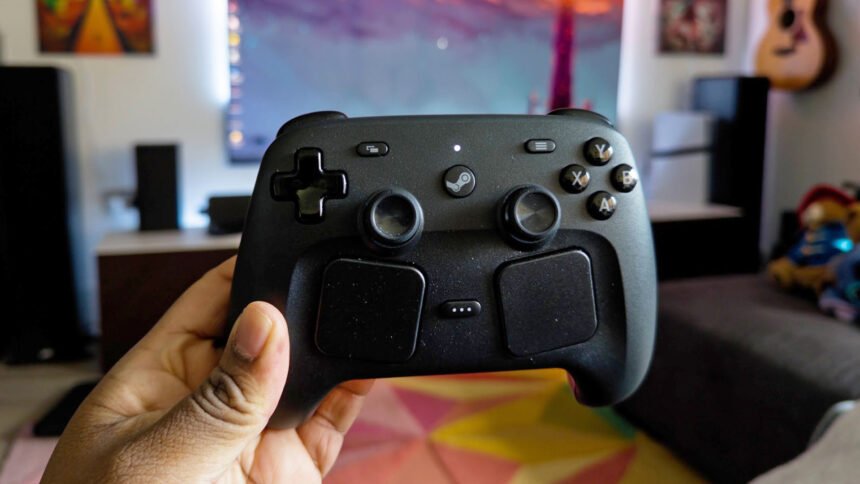
As someone who regularly uses their computer as a TV PC, the new Steam Controller looked like the answer to my prayers, finally allowing me to replace both my DualSense controller and mini multimedia keyboard with one device. After spending the past two weeks with Valve’s new controller, I think this device has so much potential, but it’s held back by unintuitive software.
What makes the Valve’s controller so appealing is the trackpads, which essentially act as a mouse and keyboard. The trackpads are far more accurate for desktop browsing compared to a joystick, with the left trackpad dedicated to scrolling and the right to the mouse pointer. With the press of a button, you can bring up the on-screen keyboard to start typing, using the trackpads to navigate each side of the keyboard.
When you turn on the Steam Controller, it defaults to its desktop configuration, assuming you don’t immediately boot into Steam Big Picture mode. The default desktop configuration isn’t easy to use, forcing you to study the button layout or create your own. To be fair to Valve, I don’t think it’s possible to create an intuitive desktop layout with any controller, so it’s best to start from scratch. Unfortunately, this is where my frustration began.
No matter what I did, Steam wouldn’t let me customize the desktop configuration. After hours of troubleshooting, I kept finding Reddit threads spanning years asking the same questions – not just about the original Steam Controller, but the Steam Deck as well. Like many others, I was having issues assigning any of the buttons to different actions, as the software would forget everything I’d done and revert to the stock layout.
I eventually discovered that switching to the ‘Web Browser’ layout would allow me to make tweaks to the configuration. I’m still unsure why this worked, but after spending so much time getting nowhere, I was just glad to finally be making some progress. The first thing I tried to do was make a Task Manager shortcut, but that didn’t work because I used ‘extra commands’ instead of ‘sub commands’. What’s the difference? I don’t know, because Steam doesn’t clarify what either of these options is.
When I do manage to bring up Task Manager using the shortcut, the Steam Controller stops responding to inputs. The same thing occurs when using Alt-Tab, forcing you to switch to a mouse or keyboard. The solution was to run Steam as an administrator, but of course, Steam doesn’t mention this anywhere, and instead, I had to find the answer buried in a random forum from years ago. Adding to my woes, when I start to run Steam using Compatibility Mode to resolve this issue, the app warns me that it may encounter problems in this mode.
In theory, Guide Button Chords should be all I need, but they simply don’t work as intended. I would chalk it up to the Steam Controller’s pre-release software, but as I’ve pointed out, I can see other people having similar issues with different controllers in Steam. As for Action Sets, I spent ages meticulously crafting a layout for Slay the Spire 2, only to find that I couldn’t import it to other games without overwriting their base configuration. I now understand that Action Sets are game-specific, but Steam doesn’t make any of this clear, causing me to waste a bunch of time.

The Steam Controller has a dedicated Quick Access Menu button, and yet you don’t have the option to customize the way it’s used. In an ideal world, I would be able to assign this button to switch between the desktop and game layouts, yet bizarrely, that isn’t an option. I’ve pressed this button maybe twice since I’ve had the controller; it’s useless to me in its current state. For a controller that is seemingly built for customizability, Valve’s arbitrary limits on which buttons you can change feel baffling.
The entire process to get the Steam Controller working exactly as I envisioned for my TV PC setup took several hours, but the real problem is that even if everything worked bug-free, this would still be an arduous experience. Valve desperately needs to do a better job explaining how to use Steam Guide Button Chords and Action Layers because they fundamentally change the way the controller can be used. It’s infuriating how many useful features are hidden away; it seems like no one truly understands how to unlock the Steam Controller’s full potential.
The only saving grace is that the controller, when used without any of the customization options, is genuinely fantastic, as you’ll learn in our Steam Controller review. The battery lasts ages, there’s virtually no input lag, and it’s so comfortable that it’s replaced all of my go-to controllers. I just wish Valve would put the time into making the customization options more accessible to open up its potential to a wider audience.