By using this site, you agree to the Privacy Policy and Terms of Use.
Accept
GamexploreGamexplore
  • Home
  • News
  • PC Game
  • Mobile
  • VR News
  • Hardware
  • Guides
  • Reviews
  • Upcoming
Reading: How to customize armor appearance with Palworld’s transmog system
Share
Notification
GamexploreGamexplore
Search
  • Home
  • News
  • PC Game
  • Mobile
  • VR News
  • Hardware
  • Guides
  • Reviews
  • Upcoming
Follow US
© 2025 All rights reserved | Powered by Gamexplore
Gamexplore > My Bookmarks > PC Game > How to customize armor appearance with Palworld’s transmog system
PC Game

How to customize armor appearance with Palworld’s transmog system

July 21, 2026 2 Min Read
Share
2 Min Read
How to customize armor appearance with Palworld’s transmog system
SHARE

Players can customize their armor appearance in Palworld following March 2025’s update v0.50, which also introduced crossplay and the Global Palbox.

The cosmetic armor system will allow you to change the appearance of your armor without affecting any of its stats.

However, the system does come with its own limitations — such as not being able to change the color of your armor pieces, and only being able to change your armor’s appearance to that of another armor piece in your inventory.

The cosmetic armor system can be a little confusing and hard to find, so here’s how to customize your armor appearance in Palworld with the cosmetic armor system.

Update (July 21): We’ve updated this guide with the changes made in Palworld 1.0.


How to customize your armor in Palworld


How to customize armor appearance with Palworld’s transmog system
Image: Pocketpair via gamexplore

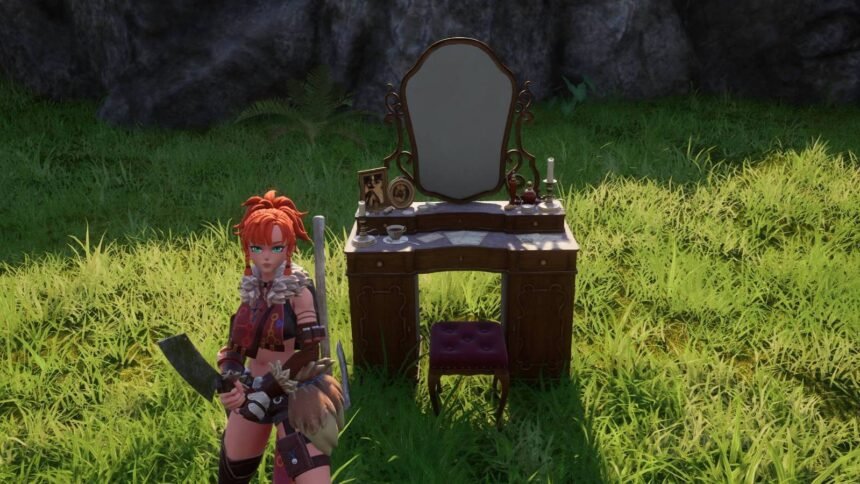
To customize your armor appearance in Palworld with the cosmetic armor system, you’ll need an Antique Dresser.

An Antique Dresser can be unlocked at level 22 for one ancient technology point, and built with 20 wooden boards, 20 fiber, and 30 stone.

Once you have an Antique Dresser, get close to it and select the “Edit Character Outfit” option. In this menu, you’ll be able to edit the appearance of your head, body, and glider equipment.

If you want your equipment appearance to be modeled after a specific armor piece, you’ll need to have the armor in your inventory before interacting with the Antique Dresser. For example, if you want your armor to look like Pelt Armor, you’ll need a Pelt Armor in your inventory.

See also  Sony will stop selling PS5 games on PC because they're not selling

After you’ve set your equipment appearance, this is what your character will look like from now on — even if you change your equipment. Additionally, you can get rid of any cosmetic armor pieces in your inventory as your appearance will stay the same.

To change your appearance, you can return to the Antique Dresser and customize your armor again.

You Might Also Like

“It's modding on steroids” Skyblivion project lead talks progress towards a 2025 release, those official Oblivion remake rumours, and if Fallout: London offers any lessons

Fortnite fans who used 20,000 bots to make money sued by Epic

Killing Floor 3 is Out Now, Year 1 Roadmap Includes New Maps, Specialist, and Weapons

Battlefield 6’s Former Campaign Lead Disappointed at Lack of Credit for Ridgeline Games

Marathon Will Launch With 3 Maps, 6 Playable Runners

TAGGED:pcPC Game
Share This Article
Facebook Twitter Copy Link
Previous Article Controversial ex-blockchain MMO Soulbound Online has officially entered early access Controversial ex-blockchain MMO Soulbound Online has officially entered early access
Next Article Palworld 1.0 Guide – Where And How To Farm The 2 New Ores Soralite And Paloxite Palworld 1.0 Guide – Where And How To Farm The 2 New Ores Soralite And Paloxite
Leave a comment Leave a comment

Leave a Reply Cancel reply

Your email address will not be published. Required fields are marked *

Latest News

Gentle Monster Plans Massive North America & Europe Retail Expansion Amid Smart Glasses Rollout
VR News July 21, 2026
Palworld 1.0 Guide – Where And How To Farm The 2 New Ores Soralite And Paloxite
PC Game July 21, 2026
Controversial ex-blockchain MMO Soulbound Online has officially entered early access
Mobile July 21, 2026
Marvel Tōkon: Fighting Souls Showcases Magik and Thinking With Dark Portals in New Trailer
News July 21, 2026
Is Game Pass Still the Right Strategy for Xbox?
Upcoming July 21, 2026
The Blood of Dawnwalker
The Blood of Dawnwalker’s Big Bad Isn’t a ‘”Mwahaha’ Supervillain,” Says Narrative Director
PC Game July 21, 2026
Reader Feedback Wanted: Thoughts on Our New Article Format
VR News July 21, 2026
gamexplore gamexplore

Welcome to Gamexplore, your go-to destination for everything gaming. We are dedicated to delivering the latest updates, in-depth insights, and expert analysis from the ever-evolving gaming industry.

Editor Choice

Capcom Has More Games to Reveal Before April 2027
Gears of War: E-Day Direct is a “Fantastic, Full 30 Minutes of Stuff to See,” Says Xbox’s Matt Booty
Saros Players Record 6.63 Million Hours and 13.13 Million Deaths in Its First Month
Hellsweeper VR Refreshes Combat In Reckoning Update

Trending News

The Division 2 Teases Winter in Washington D.C., More Details Coming at Gamescom
Fable’s Leaked Concept Art Shows Bloodstone, Sewers, and a Swamp Town Before and After a Flood
Darts VR2: Bullseye Targets An April Release Date
Dragon’s Dogma 2: Dark Arisen Offers 25+ Hours of Content, Says Producer
  • About Us
  • Contact Us
  • Disclaimer
  • Privacy Policy
  • Terms of Service
Reading: How to customize armor appearance with Palworld’s transmog system
Share
© 2025 All rights reserved | Powered by Gamexplore
Welcome Back!

Sign in to your account

Lost your password?