Maximizing your frame rate to provide a fast and smooth experience has long been a key goal of optimizing any FPS game, but this often means making significant compromises on image quality. It’s not for no reason that the cliché exists of Counter-Strike players running the game at potato resolution and with all the graphics settings turned down.
However, with modern shooters such as Arc Raiders and Battlefield 6, these games can look absolutely incredible when their graphics are turned up, with stunning effects and even ray tracing support in Arc Raiders, which can deliver ultra-realistic lighting and shadows. Not only is it generally more enjoyable to play these sorts of titles with great graphics, but it also hugely increases your sense of immersion. Want to really feel like you’re fighting for your life in BF6? You’ll want all those settings cranked up.
So how do you achieve this holy grail of gaming compromise, balancing frame rate with visual fidelity and responsiveness? With DLSS Super Resolution, Multi Frame Generation, and NVIDIA Reflex, that’s how.
Exclusive to NVIDIA’s GeForce RTX lineup of graphics cards, all the way from its RTX 2000 series up to the latest RTX 5000 cards, DLSS Super Resolution is a type of resolution upscaling that allows you to maximize the resolution of your game while boosting performance by rendering the game at a lower resolution and then scaling it up. Through the use of AI-enhanced upscaling that takes advantage of the RTX cores in RTX GPUs, DLSS Super Resolution can create image quality that, for many, will appear as good as native resolution, but with major boosts in frame rate.
Then there’s Multi Frame Generation. First introduced with the company’s RTX 4000 series of GPUs, Frame Generation also uses AI, but this time to insert entire AI-generated frames between each conventionally rendered frame. Those RTX 4000 cards, such as the RTX 4070, could add in one extra frame, but with the new Multi Frame Generation exclusive to RTX 5000 GPUs, you can add in up to three extra frames, effectively quadrupling your frame rate.
The final piece of the puzzle is NVIDIA Reflex, a GPU-based feature that reduces in-game latency by optimizing how all frames are rendered, from the input through to CPU and GPU, and all the way to your display. On by default when you use features like Multi Frame Generation, and available for all GeForce RTX cards, this feature makes sure you’ve maximum responsiveness when you’re lining up that headshot.
To test just how effective these technologies can be, we fired them up in both Arc Raiders and Battlefield 6.
For our tests, we used an Nvidia GeForce RTX 5070 made by Zotac. Available for under $600 / £500, this is Nvidia’s current mid-range GPU that sits just above its most affordable options, the RTX 5050 and RTX 5060, but doesn’t push to the $1,000+ / £1,000+ price range of its fastest cards.
The specific model we used was the Zotac Gaming GeForce RTX 5070 Amp White Edition, which, as its name implies, is a white card that’s ideally suited for a clean all-white gaming PC build. Its triple-fan IceStorm 2.0 cooler design ensures this powerful GPU remains cool and quiet, even when working at full power. It also features RGB lighting under its Zotac logo and has a design suited to small form factor cases that require a graphics card that’s only two slots wide and no taller than its PCIe IO plate.

To see what this capable card can do for our frame rates, we fired it up in our two chosen games and compared them at 1440p without any upscaling or frame generation, and then with DLSS 4 Super Resolution and Multi-Frame Generation turned on. To say the results are impressive would be quite the understatement.
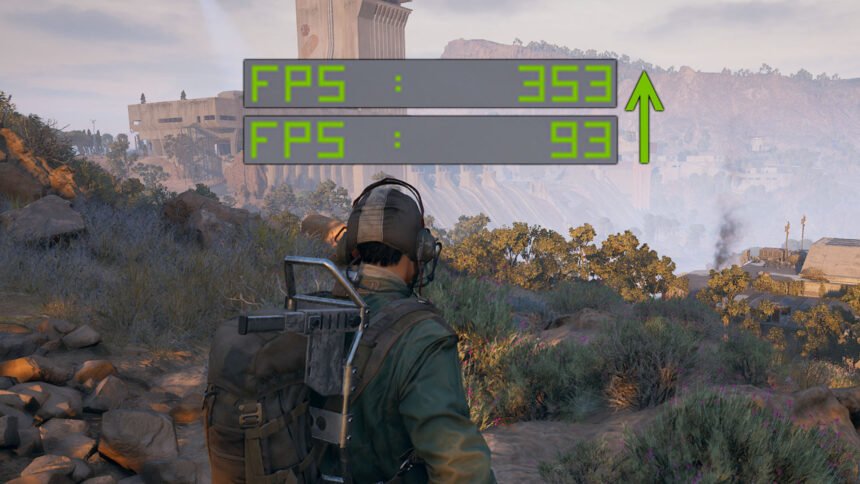
Starting in Arc Raiders, our base frame rate with this sleek and quiet card was already solid. With the game’s detail settings set to Ultra, it hit 97fps average with an impressively steady 1% low frame rate of 74fps. However, by engaging DLSS 4 Super Resolution upscaling set to Balanced (which renders the game at 1,485 x 835 before upscaling it to 1440p), it hit a massive 145fps average.

Crucially, not only did the game perform far more smoothly, but it still looked fantastic too. The upscaling algorithm of DLSS does an incredible job of retaining detail such that it’s hard to tell that the game isn’t running at its native resolution, and it can even improve the look of some details compared to native resolution.
Next, we engaged Multi Frame Generation, and this saw our frame rate leap to a frankly ridiculous 353fps. This makes for an incredibly smooth-feeling experience that is ideal for taking full advantage of fast refresh rate monitors. Got a 240Hz or even 360Hz display, but your PC can normally only hit 100fps or so? Run multi-frame gen at 4x mode, and you’ll maximize your display’s capability for a minimal loss in image quality.
The story’s much the same in Battlefield 6. This well-optimized game hit a smooth 123fps in our tests just running at native 1440p. However, when engaging DLSS Super Resolution, this jumped to an even smoother 170fps with no obvious loss in image quality.

Adding Multi Frame Generation to the mix, and again, we hit a ludicrous speed with our frame rate. How does 345fps sound for a game this good-looking?
There is one caveat to note when it comes to Multi Frame Generation, which is that if your starting frame rate is below around 60-80fps, you may find it’s best to set frame generation to only generate one extra frame (2x) rather than generating two or three extra frames (3x or 4x), as the several extra AI-generated frames can make movement feel a bit strange in fast-paced games like Battlefield 6 and Arc Raiders when your starting frame rate is low. However, if your frame rate without frame generation is already well over 80fps, you should be good to go.

You can take advantage of DLSS Super Resolution in hundreds of games with the technology supported in all Nvidia RTX GPUs. However, to enable Frame Generation, you’ll need an RTX 4000 or newer GPU, and Multi Frame Generation is exclusive to the RTX 5000 series. With prices for the RTX 5050 starting at under $250 / £225, though, you don’t have to spend a fortune to unlock these revolutionary technologies and enjoy amazing-looking games with smooth frame rates.