By using this site, you agree to the Privacy Policy and Terms of Use.
Accept
GamexploreGamexplore
  • Home
  • News
  • PC Game
  • Mobile
  • VR News
  • Hardware
  • Guides
  • Reviews
  • Upcoming
Reading: The Best Way to Sideload Games on Quest Just Got Better
Share
Notification
GamexploreGamexplore
Search
  • Home
  • News
  • PC Game
  • Mobile
  • VR News
  • Hardware
  • Guides
  • Reviews
  • Upcoming
Follow US
© 2025 All rights reserved | Powered by Gamexplore
Gamexplore > My Bookmarks > VR News > The Best Way to Sideload Games on Quest Just Got Better
VR News

The Best Way to Sideload Games on Quest Just Got Better

October 13, 2026 3 Min Read
Share
3 Min Read
The Best Way to Sideload Games on Quest Just Got Better
SHARE

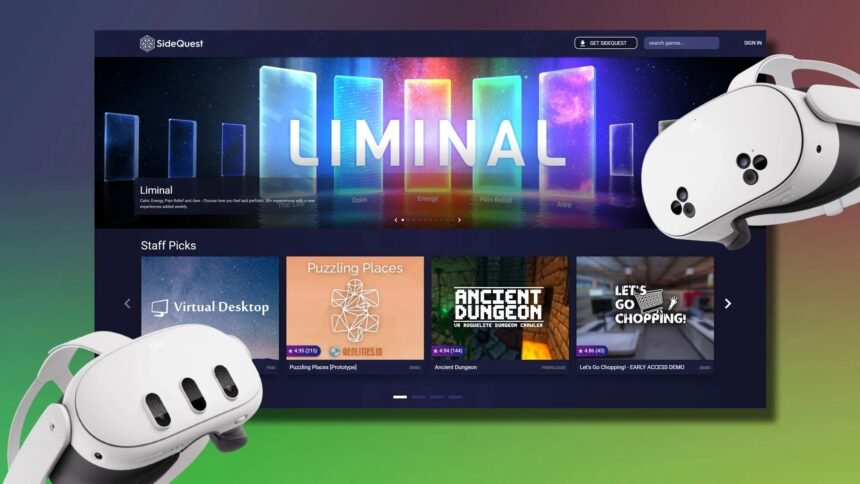
SideQuest has been the number one unofficial store for Quest games ever since its founding in 2019. Now, it just got a lot easier to download and get playing.

Downloading SideQuest used to mean going through a cumbersome setup process, although now SideQuest CEO and co-founder Shane Harris says in a Reddit post the team has effectively reduced the process down to just a few steps.

All new users have to do is sign into your Meta Account and allow SideQuest to connect over Bluetooth, enabling wireless ADB. Check out the full instructions on how to download and get started with SideQuest below.

Effectively, that means users will no longer need to all of the fiddly bits like before: sign up as a developer, create an organization, enable developer mode, connect a USB cable, and (possibly) fight to get the whole process to work.

SideQuest

Harris says that now, you “just connect and it installs SideQuest into your headset and that’s it,” further noting that users can do this both from Desktop or from your phone (link downloads apk file).

The update also includes the ability to install Steam game ports from inside your Quest, so no more dragging and dropping files from your PC to Quest. Simply sign into your Steam account from SideQuest in your headset and it will download the Steam games for you automatically. That process only includes existing game ports however, and not all Steam games.

Notably, the in-headset SideQuest experience has also changed, as it now automatically adds apps to your Quest library, which means you no longer need unknown sources toggles anymore either.

See also  BEATABLE Hands-On: Let's Tap Meets Mixed Reality Rhythm Gaming

The easiest way to get started is by skipping the old PC route entirely. Now, all you need to do is open the Meta Quest Browser and download the SideQuest apk (automatic download link).

Open the Files App and find the SideQuest apk in your Downloads/Recent folder, click the three dots and select Open With > Package Installer, install SideQuest and then click Open.

Once you do that SideQuest will ask if you want to add it to your library, and you’ll click Yes. Notably, the only thing missing from the regular PC method is the ability to tweak headset settings. You can find that and other methods of installing here.

Check out the video below for a step-by-step visual guide:

You Might Also Like

Everything Announced At The VR Games Showcase March 2026

‘Neon Genesis Evangelion’ VR Game is Still Coming, Demo Debuting at 30th Anniversary Next Month

Constellations Offers Connect The Dots Stargazing In Early Access This December

Valve Released A (Flatscreen) 4K Steam Link visionOS App

Pimax Partners with Motorsport Games Following $2.5M Investment, Bolstering Position in VR Sims

TAGGED:Virtual RealityVRVR Game
Share This Article
Facebook Twitter Copy Link
Previous Article Mothergunship: Forge Gets First Major Update In Over Three Years Mothergunship: Forge Gets First Major Update In Over Three Years
Next Article phantom blade zero Phantom Blade Zero Highlights The Hunt in New Fast-Paced Boss Fight Gameplay
Leave a comment Leave a comment

Leave a Reply Cancel reply

Your email address will not be published. Required fields are marked *

Latest News

PCGamesN
Driven Football codes (October 2026)
Hardware October 13, 2026
phantom blade zero
Phantom Blade Zero Highlights The Hunt in New Fast-Paced Boss Fight Gameplay
News October 13, 2026
Mothergunship: Forge Gets First Major Update In Over Three Years
VR News October 13, 2026
max payne 3
Max Payne 3 Writer Says He Got it “Completely Wrong”, Considers it His Failure
Upcoming October 13, 2026
Gears of War E-Day_04
Gears of War: E-Day Celebrates Critical Acclaim With New Accolades Trailer
PC Game October 13, 2026
Stardew Valley Creator's Next Game Shows New Signs of Life
PC Game October 13, 2026
Castlevania: Belmont’s Curse review - a fantastic action game, a less than stellar Metroidvania
Castlevania: Belmont’s Curse review – a fantastic action game, a less than stellar Metroidvania
Reviews October 13, 2026
//

We influence 20 million users and is the number one business and technology news network on the planet

gamexplore gamexplore

Welcome to Gamexplore, your go-to destination for everything gaming. We are dedicated to delivering the latest updates, in-depth insights, and expert analysis from the ever-evolving gaming industry.

Editor Choice

Atompunk Puzzler UnLoop Arrives Next Month On Quest & Pico
Far Cry Primal Joins Far Cry 3 and Blood Dragon in Getting 60 FPS Support for Consoles on January 21
Xbox Developer Direct games showcase announced for January 2026
Diablo 4 patch change could make it easier to find Forgotten Altars, or you could pet Dorian the Raven instead

Trending News

Little Nightmares 3 Animates Low and Alone’s Nightmarish Journey in New Trailer
Grab this 2TB Crucial Steam Deck gaming SSD for its lowest ever price
All character weight classes in Mario Kart World
Project Defiant is Now FlexStrike, New Trailer and Details Revealed
  • About Us
  • Contact Us
  • Disclaimer
  • Privacy Policy
  • Terms of Service
Reading: The Best Way to Sideload Games on Quest Just Got Better
Share
© 2025 All rights reserved | Powered by Gamexplore
Welcome Back!

Sign in to your account

Lost your password?