Published:
Verdict
A massively inflated price right now is in some ways the least of the Steam Machine’s worries, as its meagre performance and TV/controller-focused gameplay means it has plenty of other limitations too. It’s a fantastic bit of hardware with some great features, but its appeal is going to be very niche.
- Fantastic hardware design
- Runs cool and quiet
- SteamOS interface is fantastic on a TV
- Performance is good enough for 1080p gaming
- Advertised 4K gaming often doesn’t deliver
- Only certain games suit a controller/TV setup
- Price is simply too high
Everybody knows the story so far with the Steam Machine. When it was revealed, there was a great hope that it would transform living room PC gaming, bringing console ease of use for a Steam Deck-like price. However, by the time it finally landed, PC price rises had taken their toll, and the Steam Machine was arriving overpriced and underpowered. However, while that is largely the story of the so-called Gabe Cube, so much of what should determine your choice to buy one actually comes down to the games you play.
Unlike most of the best gaming PC options, the Steam Machine’s use of SteamOS and its focus on living room gaming, with the Machine connected to a TV and played via a controller, means that while it can play most of the great wealth of games that exist on Steam, it excels only at some.
Specs
| Steam Machine specs | |
| CPU | Semi-custom AMD Zen 4 six-core/12-thread (up to 4.8 GHz, 30W TDP) |
| GPU | Semi-Custom AMD RDNA 3 28CUs (2.45GHz max sustained clock, 110W TDP) |
| RAM | 16GB DDR5 + 8GB GDDR6 VRAM |
| Storage | 512GB NVMe SSD or 2TB NVMe SSD |
| Networking | 2×2 Wi-Fi 6E, Bluetooth 5.3, integrated 2.4GHz Steam Controller wireless adapter, gigabit Ethernet |
| Extras | 17 individually addressable RGB LEDs for system status and customizability |
| Front ports | 2 x USB-A 3.2 Gen 1, microSD |
| Rear ports | Rear: 1 x DisplayPort 1.4, 1 x HDMI 2.0, 2 x USB-A 2.0, 1 x USB-C 3.2 Gen 2 |
| Warranty | One year |
| Dimensions (W x D x H) | 156 x 162.4 x 152mm |
| Weight | 2.6kg / 5.7lbs |
| Price | Starting at $1,049 / £879 |
As has long been established, the Steam Machine’s specs aren’t exactly its strongest suit. While its GPU is roughly four times as powerful as that of the Steam Deck, and its CPU is ~50% faster too, the specs of this machine are modest by modern gaming PC standards.

Specifically, the semi-custom AMD CPU (i.e., a slightly modified version of an existing AMD design) is based on the company’s last-generation architecture, and while it has six cores – plenty enough for gaming – only two of these are fully optimized for speed, with the other four being slower-clocked cores aimed at more power-efficient multi-core operations.
Meanwhile, the GPU is again a previous-generation design that’s basically equivalent to the laptop version of the Radeon RX 7600. A quick look at our RX 7600 review reveals just how modest that card’s performance was, even at its release over three years ago.
Crucially, for anyone considering the Steam Machine and who would be willing to upgrade the device’s components, neither the CPU nor the GPU is upgradeable. Not only do they not use conventional desktop PC parts, but they’re in fact soldered in place.

What is upgradeable are the SSD (above left) and RAM, though the latter uses laptop RAM modules. The SSD, though, is a conventional M.2 drive, such as you’ll find in our best SSD guide, so that is an easy swap, though you’ll need to manually copy the data from one drive to the other using another PC.
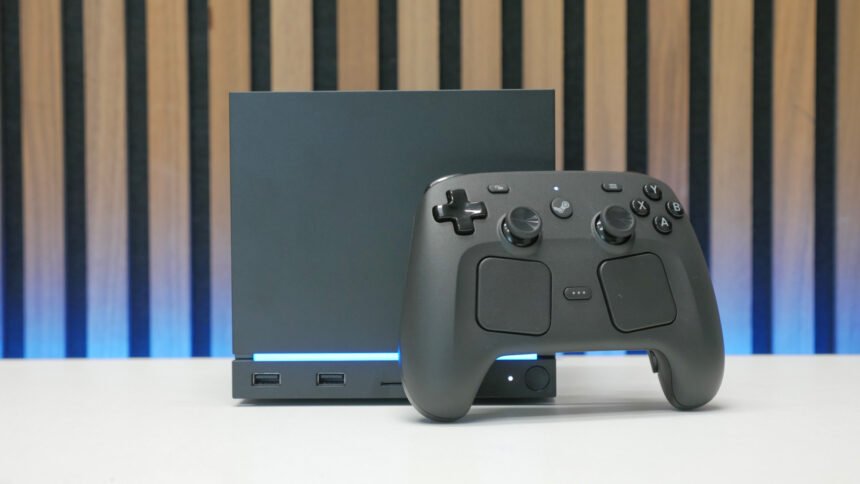
Otherwise, in terms of form factor, the Steam Machine is astonishingly tiny. At 156 x 162.4 x 152mm, it’s dwarfed by both the PS5 and latest Xboxes, and it is far smaller than any mini-ITX gaming PC. It also weighs just 5.7lbs. That’s still a decent amount of weight that makes for a dense-feeling cube, but it’s a quarter of what a typical small PC weighs.

As for connectivity, the Steam Machine provides a decent balance. The two USB-A and one USB-C ports around the back are just enough for any extra peripherals – a wireless headset adapter and emergency keyboard, perhaps – while the one HDMI and one DisplayPort should be enough for most typical single TV or single monitor setups. The use of a built-in power supply needing just a figure-of-eight mains cable means there’s no bulky power brick to hide away.
A wired Ethernet port also means you don’t have to rely on WiFi, and Valve makes a point of noting that the Machine includes dedicated WiFi and Bluetooth antennas for reliable connections. There’s also a Steam Controller adapter built right into the system.
Round the front, two more USB-A ports are enough for temporary connections, such as extra wired controllers or USB thumb drives, while a microSD slot provides a quick and simple way to expand the device’s storage. The choice of microSD, rather than full-size SD, is an intriguing one, as while it makes it easy to swap drives with a Steam Deck, I question how many people will actually want to do that.

You can pick up the Steam Machine in 512GB or 2TB versions, either with a Steam Controller or without. If you’re happy to only have one or two triple-A games downloaded at a time, and the rest of your library is smaller indie titles, 512GB is going to be enough. Otherwise, the 2TB will be enough that you almost never have to worry about uninstalling one game to accommodate another. However, considering the 2TB model costs $300 extra, and the SSD is technically upgradeable, it’s an expensive luxury.
Design and build
If there’s one area where all the fuss over the Steam Machine was entirely justified, it’s in its design. Its simple cuboid form factor is utterly charming, and while being limited to black only might disappoint a few fans of other gaming gear color schemes, the fact that you can swap out the front plate opens up what should be enough design-tweaking options for most.
What’s more, there’s loads of potential for easy modding of the cover. You could 3D print your own, add a custom paint job, apply stickers, and more, all without ever affecting the main PC unit.

Valve included a solid walnut wood and an orange flocked/felt cover with our review model, and both look good in and of themselves. However, they don’t particularly match the rest of the black cube. The wood is a dark enough color that it lacks the contrast to set off the black – a lighter wood, such as beech, seems like it would’ve worked better – while the orange again just looks a bit out of place.
It’s hard to tell based on these two plates whether it’s just those particular colors/finishes that don’t quite work, or if any of the custom plates will look a bit out of place. Time will tell on that front. However, one thing I did notice is that stacking the wooden plate on top of the black plate (the magnets embedded in them connect to each other), as you can see below, resulted in a look I found to work a little better – the slight overhang it creates somehow makes it look more purposeful.

Otherwise, the Machine is a very solidly built item with a design that’s easy to take apart for upgrades and maintenance. The device uses Torx head screws, but otherwise, all the screws are easy to access, and Valve has even gone so far as to have the rubber feet on the underside have holes in the middle, so you can access the screws below – such feet are so often used to hide screws, to limit user tampering.

Inside, a single 120mm fan is used to cool the entire system, with air pulled from underneath the device – so it isn’t suitable for placing on a carpet or other soft surface – and blowing it out the back. The device runs remarkably cool and quiet. Under full load, the CPU hit just shy of 70°C and the GPU just 75°C, all while that single fan only hit under 35dB.
The experience – SteamOS and game compatibility
The overall experience of the Steam Machine isn’t one that can be summarized purely in specs and benchmarks. Valve’s use of its own SteamOS operating system, instead of Windows, means it has some major advantages and some major disadvantages that set it apart.
On the plus side, as anyone who has used a Steam Deck will know, SteamOS is still streets ahead of Windows when it comes to providing a slick console-like gaming experience. The device boots quickly, bringing you straight to your game library, it can be put to sleep mid-game, the various menu overlays for adjusting the device mid-game all work intuitively and quickly, and there’s just generally none of the sense of this being a normal desktop PC with a flaky interface bolted on top, but rather the experience is built from the ground up to make it easy to just get gaming.

This also extends to the fact that Valve has added HDMI CEC support (which means the Machine can communicate with your TV and other AV gear to automatically switch inputs) and that the Steam Controller can power on the Machine remotely. These things aren’t down to SteamOS as such, but are features simply not available to a typical gaming PC.
The fact that this cube only needs two cables to get up and running can’t be overstated either. Being able to pick up the cube, its power cable, a spare HDMI (though even that’s often not necessary, if you have another device you can unplug from your TV/monitor), and a controller, and know that in most situations, you’ll be able to get set up at a friend’s house is just so compelling. It’s somewhat possible to do the same with an equivalent tiny PC, but the likelihood that you need to keep a keyboard and mouse with you just in case, that you need to carefully carry the WiFi antenna from your motherboard (or bring an Ethernet cable), and that such a system is likely to be at least twice as large and heavy just makes it feel so much less viable.
However, on the flip side, SteamOS and the Steam Machine experience have some major limitations. For a start, most games that have an anti-cheat simply won’t work on SteamOS. The likes of Fortnite, Apex Legends, Rainbow Six Siege, and League of Legends can’t be played on this device.

For several of those, the fact that they’re keyboard and mouse-focused titles will mean a lack of compatibility on a purely living room/TV-focused PC isn’t a major factor – the number of people wanting to play League on a TV with a keyboard and mouse balanced on their lap is presumably vanishingly small. However, the likes of Apex and Fortnite are widely played with controllers, and for more casual rounds, the setup here would otherwise be viable if it had that compatibility.
What’s more, despite the Steam Controller’s trackpads enabling reasonable mouse-like input, playing a lot of keyboard and mouse-focused games is still quite awkward. Given the choice, a PC with a desk is still going to be preferable for a lot of games.
This leaves a far from small, but still limited number of game types for which the Steam Machine feels like a device you’d naturally want to use. Third-person action RPGs, casual racing games (where a controller suffices as opposed to a racing wheel), platformers, and all the other types of games that lend themselves to a console/controller/TV experience work great, but a lot of those tend to be modern triple-A titles. If you want to fire up Forza Horizon 6, go on an adventure with Indy in Indiana Jones and the Great Circle, or you’re desperately waiting for GTA 6, all these games will work on the Steam Machine, but these experiences then bump up against the other limitation with this device, which is its performance.
Performance/benchmarks
Let’s be quite clear, the Steam Machine has enough horsepower to play basically any game on Steam right now. Just about everything will run, and for thousands and thousands of games, it will run them perfectly well, at playable and even fast frame rates at 4K. If you want to have a chill game of Balatro or Stardew Valley, or you’re looking to play through Half-Life 2 again, performance is not an issue.
In fact, even for triple-A titles that aren’t overly new, you’ll still get solid performance. However, if you’re hoping the Steam Machine can be both an easy way to play your indie/old game library and play the latest triple-A titles, well, it has its limitations.

For a start, the Steam Machine defaults to running all games at 1080p, rather than 4K. Considering Valve famously advertised the Steam Machine as being able to provide 4K gaming at 60fps – something it has since pulled back on, now simply saying you can get “Up to 4k gaming” – the fact that the device defaults to 1080p is more than a little surprising. To enable 4K gaming, you’ll have to jump into the settings to change the default resolution.
Once you’ve done this, you’ll be able to fire up your games in 4K, but when it comes to actual in-game image quality, it more often than not won’t be true 4K. That’s because, to run any reasonably modern, graphically demanding game at 4K, you nearly always have to rely on FSR upscaling, and quite aggressive upscaling at that. You’ll generally need to use FSR Performance (rather than Quality or Balanced), which upscales from 1080p to 4K, with FSR frame generation sometimes also required to get a 60fps+ frame rate.

What’s more, ray tracing in particular is a huge weakness of this device. AMD’s Radeon RX 7000 series always had relatively weak ray tracing performance compared to Nvidia’s cards at the time, and the RX 7600-class GPU here is the entry-level version of that generation of cards. As such, ray tracing is largely not a viable option, which is a major drawback as games steadily start to embrace ray tracing more and more (for better or worse).
Another point to note is that most games default to settings far lower than they need to. Forza Horizon 6, for instance, defaulted to Low settings and looked, frankly, terrible. However, the game is actually playable at medium to high settings. So, again, unlike most consoles, you may find there’s a fair amount of settings tweaking to get your games running right.
To demonstrate just where the Steam Machine’s performance sits, we fired up a few benchmarks:
Cyberpunk
Cyberpunk is notoriously still quite a demanding game, despite being a few years old now. However, it serves as a great baseline for performance testing any PC, and it really shows the limitations of the Steam Machine.
For a start, using the demanding Ultra Ray Tracing preset with which we normally test desktop graphics cards, it’s a total non-starter. At just 1080p, it struggles to 15fps average. Dropping back to just High detail settings without ray tracing, though, and performance leaps up to 80fps at 1080p.

This would suggest that using FSR to upscale from 1080p to 4K might be a breeze for the Machine. However, this wasn’t the case. At 4K with FSR performance, the game hit just 38fps average. Adding in-frame gen got this to 61fps, but by this point, the experience is quite compromised, with motion that’s not as smooth as you’d expect for 61fps to feel.
Realistically, you’re looking at dropping further to Medium settings to get a smooth 45fps+ frame rate at 4K with Performance upscaling.
Forza Horizon 6
Forza Horizon 6 is, in some ways, an ideal potential showcase for the Steam Machine. Casual racing games like this are classic console fodder that lend themselves to playing with a controller on a TV. Sure enough, it’s a very playable game, but again, only at certain settings.
Engage the game’s ray-traced global illumination mode, and you’ll experience a chugging 25fps even at 1080p. Switch this mode off, though, and just run the game at High settings, and you’ll get 69fps at 1080p.

At 4K High, you’ll get 37fps, which is actually reasonably playable, although, oddly, engaging FSR upscaling to try to get a slightly higher frame rate only got us a 1fps increase. So, again, we’re still not quite hitting really convincing 4K gaming without dropping to Medium settings or lower.
Indiana Jones and Great Circle
Another great controller and TV game is the easy-going, cinematic adventure that is Indiana Jones and Great Circle. However, this is another perfect example of where the Steam Machine isn’t entirely convincing. It copes just fine at lower settings, with our test at 1080p with Medium details delivering a steady 77fps.

However, jump up to 4K and performance tanks. At 4K Medium, the game struggles to 20fps, and 4K High is a slideshow at 7fps. Even engaging FSR set to Performance, High detail settings are a no-go, with just an 11fps frame rate. However, 4K at Medium detail settings with FSR set to Performance does finally get us to 50fps. At Medium, the game still looks decent, but there’s a clear step up with High detail settings.
Price
The Steam Machine price starts at $1,049 / £879 for the 512GB version without a controller and rises to $1,428 / £1,208 for the 2TB version with a controller, making it far more expensive than Valve ever planned it to be. Recent RAM and other PC component prices have risen so much that what was widely believed to be a device meant to launch at ~$750 / £600 has had to launch for far more.
This high price is largely the biggest limitation of the Steam Machine, with it being far more than other game consoles, and not overly competitive compared to a normal PC of similar power. There are several other factors that come into play when it comes to making your buying decision, but based on pure value alone, the Steam Machine struggles.
It’s worth noting that part of the reason the Steam Machine is so expensive is that Valve isn’t able to subsidize the cost of the Steam Machine in the same way that Nintendo, Sony, and Xbox can with their consoles, as Valve has no way to guarantee a buyer will ever actually use Steam to buy games and thus make back its money through game sales. Because it’s just a normal PC in terms of functionality, a buyer could, for instance, install Windows and only ever play Xbox Game Pass games.
However, comparably priced conventional gaming PCs can offer a lot more performance. A ~$1,050 PC can get you an RX 9060 XT or GeForce RTX 5060, both of which offer far more performance than available here.
Verdict
Much as I want to love the Steam Machine, it’s effectively DOA as a genuinely compelling, good-value mini gaming PC. Yes, the entire gaming PC industry is being affected by component price rises, but whereas most PC users can navigate that by choosing to only upgrade certain components, buying secondhand, and generally taking advantage of the swappable, upgradable platform that is PC gaming, the Steam Machine doesn’t offer that. It’s a $1,000+ lump sum, up front.
Crucially, though, it struggles in two further areas. For one, even at its originally intended/hoped-for price of somewhere around $700, it would still have been quite expensive compared to the likes of the PS5, while delivering performance that is inferior. It would have been a much closer fight, and overall been a more compelling option, but still far from the utopian ultra-budget mini gaming PC of which some might have dreamed.

Finally, there’s the fact that, even though you absolutely can use this as a desktop PC – whether by installing Windows or using SteamOS’ own Linux-based desktop interface – it is quite explicitly being sold as a living room machine as an alternative to consoles, and that simply means it bumps up against quite a different type of gaming experience and user. There’s a reason gaming PCs in the living room haven’t really taken off, and it’s not just because Windows was a poor interface for use with a controller and TV. It’s also because they just feel so fundamentally different, and most users have a game library that isn’t really meant for TV.
The impact of this will depend on the games you like to play, so if you absolutely know there’s a long list of controller/TV-friendly titles you’d like to play that are also not too graphically demanding, well then the Steam Machine could be ideal for you, if still overpriced right now. However, if you already own a PS5 for TV gaming and/or a PC for PC-focused games, there’s a good chance the Steam Machine will end up being little more than a glorified indie/casual game box.
The Steam Deck arguably had the same issue, but its compelling combination of delivering your Steam library in an easy-to-use but also portable and touchscreen form factor transcended this limitation. Plus, it could double as a TV console when docked, so it could already unlock that casual/indie/retro experience on a bigger screen.
In contrast, the big sell of the Steam Machine is that it delivers that slick SteamOS interface but with the horsepower for more demanding games, and it just falls short. Not that far short, but short enough. By the time you’re limited to playing the latest games at 1080p medium settings when spending $1,000, I think most PC gamers would compromise a fancy SteamOS interface for just spending their money on a GPU upgrade and plugging their regular PC into their TV (or streaming over Steam via their Steam Deck).