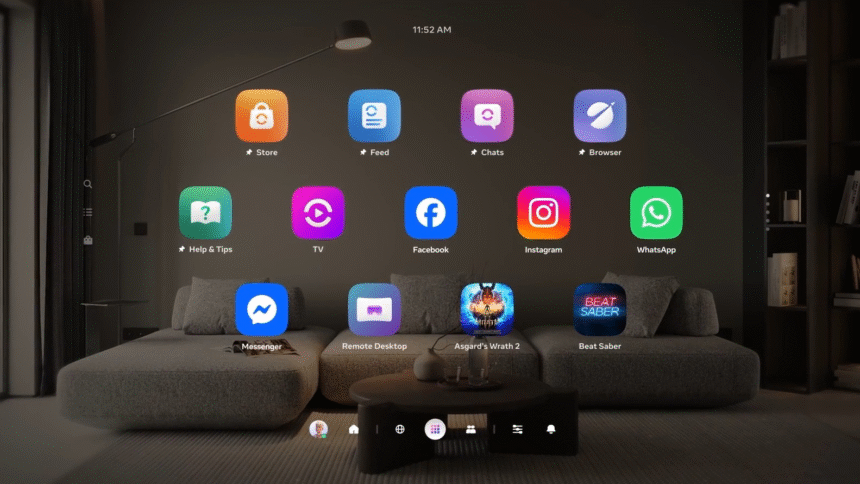
“Starting” in Horizon OS v85, the new ‘Navigator’ UI will become the default, and Horizon Feed will be “gradually” removed from the OS.
In a Meta Community Forums post, a ‘Community Manager’ with the handle h.taylor announced the upcoming changes, set to arrive in the next version of the Horizon OS of Quest headsets:
As announced during Connect, we’ve been testing Navigator and will ramp up the rollout later this year, starting in v85. As Navigator rolls out, we’ll also begin gradually sunsetting the Horizon Feed in VR.
What’s changing
• Navigator will become the default landing experience when users turn on their headset.
• Navigator brings experiences, friends and settings together in one place.
• As part of this shift, we’ll be sunsetting the Horizon Feed in VR.
Horizon OS v83 started rolling out in November, and there’s no set date for the arrival of v85.
Navigator Becoming Default
Since the release of Oculus Go over seven years ago, Meta’s standalone VR operating system has seen numerous visual changes, but the general interface architecture remained essentially the same.
You had a floating horizontal menu bar slightly below you, called the Universal Menu, showing the time and your device battery levels and containing shortcuts to key system interfaces, as well as a combination of your most recent and eventually a few of your favorite apps. All 2D interfaces, including system features like the app Library, Quick Settings, and Notifications, opened as 2D windows, treated like any other.
After One Key Change, Meta’s Quest UI Overhaul Has Gone From Bad To Great
The Quest system UI overhaul launched to testers in May, with key improvements but an ugly semi-opaque grey “cloud” background. Now, Meta has gotten rid of it.
Then, in May last year, Meta started a very slow rollout of a full Horizon OS UI overhaul, called ‘Navigator’, which moves the main system interfaces like Library, Quick Settings, Notifications and Camera into a new large overlay that appears over both immersive and 2D apps.
With Navigator, system interfaces no longer shift around when opening other windows, and it’s easier to launch new apps. Navigator’s library also allows you to pin up to 10 items, somewhat akin to the Start Menu on Windows.
At launch, Navigator also had a murky gray background with an oval shape. It was seemingly intended to improve contrast. But as well as obscuring your view of what was behind it, be it passthrough or a virtual world, it just didn’t look good. So Meta got rid of that and made bringing up Navigator dim the background instead.
Meta presenting the evolved Horizon OS Navigator UI.
With Horizon OS v83 PTC in October, Meta started rolling out an evolved version of Navigator, which it teased at Connect 2025.
The evolved Navigator has a new Worlds tab for Horizon Worlds destinations, and you no longer see worlds in your app Library at all. Speaking of the Library, it now features interleaving offset rows, similar to Apple’s visionOS.
The new Navigator also has a new overlay-level People tab with shortcuts to your friends, as well as a You tab that shows your avatar and lets you change your active status.
Finally, the new Navigator lets you easily hide or show all your 2D windows by double pressing the Meta button on the right Touch controller, or for hand tracking, opening your right palm and double tapping your thumb to your index finger.
Horizon Feed Being Removed
Horizon Feed is the default 2D app that launches when you cold boot your Quest headset.
Originally simply called ‘Explore’, the feed shows you suggested Horizon Worlds destinations, store apps, VR videos, Instagram reels, and online followers, as well as suggested friends to “catch up” with and apps to “jump back in” to.
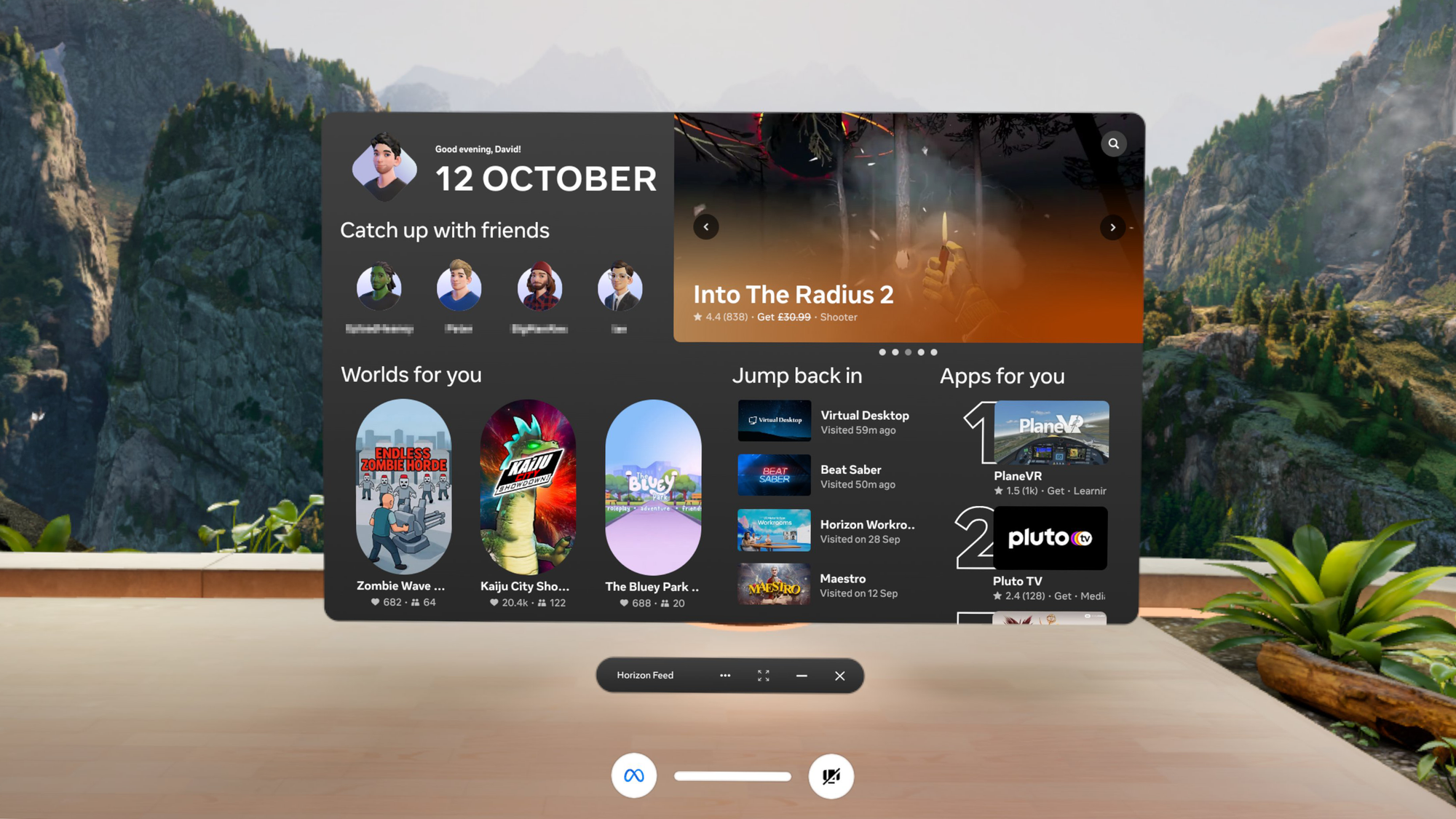
The Community Forums post tells developers that the version of Horizon Feed inside the headset “is not a high-intent surface, and users often see it without a specific intent to browse or purchase apps”.
“Because of that, it historically has not driven strong entitlement conversion, and we don’t expect significant revenue impact for the vast majority of developers”, the post reads.
That essentially seems to be Meta admitting that Horizon Feed is something that most Quest owners just close immediately on booting the headset, like an unwanted popup, and wasn’t successful at getting people to buy the apps that it suggested.
Meta CTO Explains Layoffs & Strategy Shift: “VR Is Growing Less Quickly Than We Hoped”
In a series of interviews at Davos, Meta CTO Andrew Bosworth explained why the company is reducing its investment in VR.
The coming removal of Horizon Feed from Horizon OS comes as Meta CTO Andrew Bosworth suggested that the company’s repeated push to Quest owners to use Horizon Worlds came at “an expense of user experience”, vowing to “let VR be what it is, what it does” and “focus a lot more on the third-party content library, the ecosystem that’s developed there”.