By using this site, you agree to the Privacy Policy and Terms of Use.
Accept
GamexploreGamexplore
  • Home
  • News
  • PC Game
  • Mobile
  • VR News
  • Hardware
  • Guides
  • Reviews
  • Upcoming
Reading: Quest Update Brings New ‘Surface Keyboard’ Feature, UI Changes & More
Share
Notification
GamexploreGamexplore
Search
  • Home
  • News
  • PC Game
  • Mobile
  • VR News
  • Hardware
  • Guides
  • Reviews
  • Upcoming
Follow US
© 2025 All rights reserved | Powered by Gamexplore
Gamexplore > My Bookmarks > VR News > Quest Update Brings New ‘Surface Keyboard’ Feature, UI Changes & More
VR News

Quest Update Brings New ‘Surface Keyboard’ Feature, UI Changes & More

February 4, 2026 3 Min Read
Share
3 Min Read
Quest Update Brings New ‘Surface Keyboard’ Feature, UI Changes & More
SHARE

Meta released a new update for Quest that brings a host of new features, including a new ‘Surface Keyboard’ that lets you type on any flat surface.

Meta has already started rolling out Quest’s v85 update on the public test channel (PTC), making it the first major update since the company revealed it was shaking up Reality Labs in a bid to shift focus to AI and smart glasses.

According to the v85 patch notes, the update is set to retire ‘Horizon Feed’, which released with v57 in late 2023, bringing a mishmash of user-created Worlds, apps, games, and Reels.

The update is also set to make Navigator the default UI, which overhauls the platform’s dock-based UI for a more mobile-style launcher overlay.

Image courtesy Meta

For years now, if you wanted to type something on Quest you had three main methods: use the floating keyboard, pair a physical keyboard which the headset can actually track, or use voice for text input.

Now, Meta is rolling out ‘Surface Keyboard and Touchpad’ as an experimental feature on Quest 3, which allows users to input text and control a mouse by simply mapping them to a desk or table.
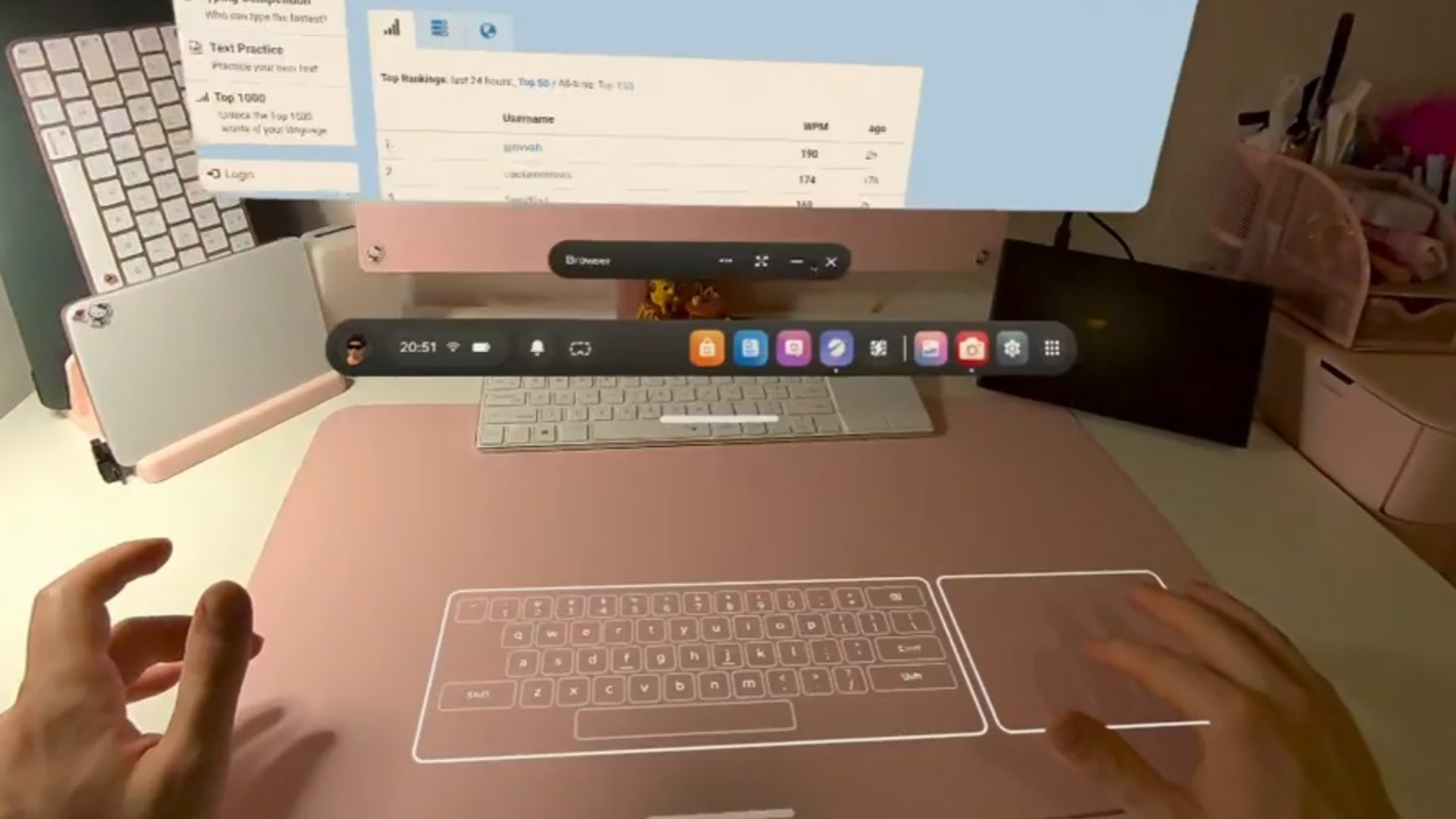
Image courtesy ‘amtexe‘

Meta says the new Surface Keyboard is ideal for “casual productivity, browsing, messaging, and 2D applications,” as it includes a basic key set.

Meanwhile, the virtual touchpad supports index-finger actions like move, click (tap), drag (double tap and move) and two-finger scrolling with your index and middle finger. Meta says however that a physical keyboard “is still advised for high-volume writing.”

Quest 3 users who are enrolled in the PTC can opt into the feature from the ‘Experimental’ section of ‘Settings’. If you’re not already, here’s how to enroll in PTC:

  1. Open the mobile app, tap Menu in the bottom-right corner, then tap Devices.
  2. Tap Headset settings, then tap Advanced settings.
  3. Tap the toggle next to Public Test Channel to try to join Quest PTC.
    • If the toggle doesn’t work, Quest PTC is currently full and not available.

Another feature is the newly redesigned activity bar, which is said to allow for quicker and easier access to controls like recording, calls, and media.

See also  Beyond Frames Sells Off Publishing Rights to Popular VR Shooter ‘Ghosts of Tabor’ in $1M Deal

Other updates include the ability to temporarily hide virtual hands via quick actions, customize the Quest 3S’ action button to trigger preferred system actions with short or long presses, and scan for malware. You can check out the full v85 (PTC) release notes here.


You Might Also Like

Badminton Time VR Arrives Today On PlayStation VR2

What is Fubo? Channels, price, plans, packages, and add-ons

One of Quest’s Most Popular Single-player Games Gets Multiplayer Mode as Social Sandboxes Take Over

Pico’s Next Flagship XR Headset Reportedly Leaks, Showing Some Very Familiar Design

‘BeamXR’ Returns Quest’s Lost Livestreaming Functionality – No PC Required

TAGGED:Virtual RealityVRVR Game
Share This Article
Facebook Twitter Copy Link
Previous Article Aces of Thunder Review: A Visceral & Thrilling VR Combat Flight Sim Aces of Thunder Review: A Visceral & Thrilling VR Combat Flight Sim
Next Article Steam Machine release date on track for "early this year," according to AMD Steam Machine release date on track for "early this year," according to AMD
Leave a comment Leave a comment

Leave a Reply Cancel reply

Your email address will not be published. Required fields are marked *

Latest News

Destiny 2
“We Are Not Done With Destiny,” Says Bungie, Starting With Restoring Destiny 2’s Removed Content
News September 22, 2026
LG Display launches OLED panel with lofty 720Hz refresh rate
Hardware September 22, 2026
Final Fantasy 7 Revelation
Final Fantasy 7 Revelation Reportedly Sees Return of 4K/60 FPS Versatility Mode on PS5 Pro
PC Game September 22, 2026
Watch Snap's CEO Demo Specs True AR Glasses Live On Stage
VR News September 22, 2026
007 First Light_03
007 First Light Targets 30 FPS on Switch 2, Latest Delay to Ensure the “Most Polished Form” for Fans
Upcoming September 22, 2026
tomb raider legacy of atlantis
Tomb Raider: Legacy of Atlantis Drops New Behind-The-Scenes Look At Egypt in Development
News September 22, 2026
final fantasy resonance
Final Fantasy Resonance Showcases Vision Of Terra’s Magical Might in New Showcase
PC Game September 22, 2026
gamexplore gamexplore

Welcome to Gamexplore, your go-to destination for everything gaming. We are dedicated to delivering the latest updates, in-depth insights, and expert analysis from the ever-evolving gaming industry.

Editor Choice

Assassin’s Creed Shadows Collabs With Attack on Titan for Naoe Ackerman Outfit, Potential Titan Boss
This new Corsair mini gaming PC somehow contains two 240mm AIO coolers
Razer finally makes its Synapse configuration software available via a web browser, but there's a catch
EA Sports FC 26 Guide – How To Farm Coins Quickly

Trending News

Double Fine’s Keeper Costs $30, Global Launch Timings Revealed
Fallout: New Vegas dev says Bethesda slammed the game in a PowerPoint
Google Maps Is The Best Software Included With Samsung Galaxy XR
Netmarble’s popular PC/mobile MMO Vampir is coming westward, opens global registrations
  • About Us
  • Contact Us
  • Disclaimer
  • Privacy Policy
  • Terms of Service
Reading: Quest Update Brings New ‘Surface Keyboard’ Feature, UI Changes & More
Share
© 2025 All rights reserved | Powered by Gamexplore
Welcome Back!

Sign in to your account

Lost your password?