By using this site, you agree to the Privacy Policy and Terms of Use.
Accept
GamexploreGamexplore
  • Home
  • News
  • PC Game
  • Mobile
  • VR News
  • Hardware
  • Guides
  • Reviews
  • Upcoming
Reading: Quest Update Brings New ‘Surface Keyboard’ Feature, UI Changes & More
Share
Notification
GamexploreGamexplore
Search
  • Home
  • News
  • PC Game
  • Mobile
  • VR News
  • Hardware
  • Guides
  • Reviews
  • Upcoming
Follow US
© 2025 All rights reserved | Powered by Gamexplore
Gamexplore > My Bookmarks > VR News > Quest Update Brings New ‘Surface Keyboard’ Feature, UI Changes & More
VR News

Quest Update Brings New ‘Surface Keyboard’ Feature, UI Changes & More

February 4, 2026 3 Min Read
Share
3 Min Read
Quest Update Brings New ‘Surface Keyboard’ Feature, UI Changes & More
SHARE

Meta released a new update for Quest that brings a host of new features, including a new ‘Surface Keyboard’ that lets you type on any flat surface.

Meta has already started rolling out Quest’s v85 update on the public test channel (PTC), making it the first major update since the company revealed it was shaking up Reality Labs in a bid to shift focus to AI and smart glasses.

According to the v85 patch notes, the update is set to retire ‘Horizon Feed’, which released with v57 in late 2023, bringing a mishmash of user-created Worlds, apps, games, and Reels.

The update is also set to make Navigator the default UI, which overhauls the platform’s dock-based UI for a more mobile-style launcher overlay.

Image courtesy Meta

For years now, if you wanted to type something on Quest you had three main methods: use the floating keyboard, pair a physical keyboard which the headset can actually track, or use voice for text input.

Now, Meta is rolling out ‘Surface Keyboard and Touchpad’ as an experimental feature on Quest 3, which allows users to input text and control a mouse by simply mapping them to a desk or table.
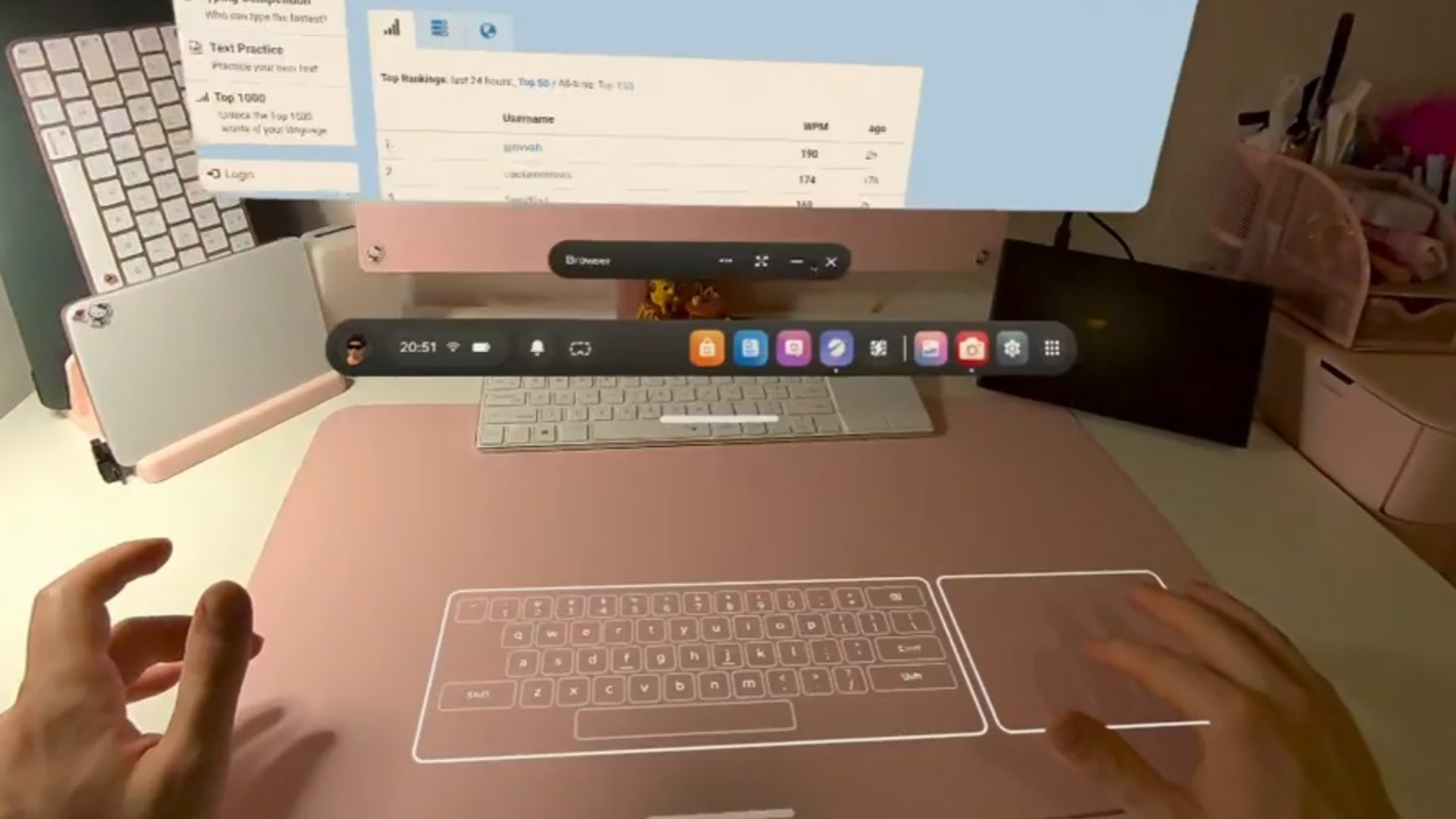
Image courtesy ‘amtexe‘

Meta says the new Surface Keyboard is ideal for “casual productivity, browsing, messaging, and 2D applications,” as it includes a basic key set.

Meanwhile, the virtual touchpad supports index-finger actions like move, click (tap), drag (double tap and move) and two-finger scrolling with your index and middle finger. Meta says however that a physical keyboard “is still advised for high-volume writing.”

Quest 3 users who are enrolled in the PTC can opt into the feature from the ‘Experimental’ section of ‘Settings’. If you’re not already, here’s how to enroll in PTC:

  1. Open the mobile app, tap Menu in the bottom-right corner, then tap Devices.
  2. Tap Headset settings, then tap Advanced settings.
  3. Tap the toggle next to Public Test Channel to try to join Quest PTC.
    • If the toggle doesn’t work, Quest PTC is currently full and not available.

Another feature is the newly redesigned activity bar, which is said to allow for quicker and easier access to controls like recording, calls, and media.

See also  Google's Genie 3 Suggests AI 'World Models' Could Be The Path To Photorealistic Interactive VR

Other updates include the ability to temporarily hide virtual hands via quick actions, customize the Quest 3S’ action button to trigger preferred system actions with short or long presses, and scan for malware. You can check out the full v85 (PTC) release notes here.


You Might Also Like

Vertigo 2: Into The Aether's Story Trailer Teases Friday's PC VR DLC Release

Deadly Delivery Steam Demo Promises Co-Op Courier Comedy

How To God Early Access Review: A Hands-On God Complex

Previously Delisted, All of Insomniac’s Rift Games Are Now Back on the Store

Space Control Coming to Meta Quest & PC VR Soon, Demo Out Now

TAGGED:Virtual RealityVRVR Game
Share This Article
Facebook Twitter Copy Link
Previous Article Aces of Thunder Review: A Visceral & Thrilling VR Combat Flight Sim Aces of Thunder Review: A Visceral & Thrilling VR Combat Flight Sim
Next Article Steam Machine release date on track for "early this year," according to AMD Steam Machine release date on track for "early this year," according to AMD
Leave a comment Leave a comment

Leave a Reply Cancel reply

Your email address will not be published. Required fields are marked *

Latest News

Autodesk VRED Gets Immersive Mode That Streams To Apple Vision Pro
VR News March 22, 2026
The story of Minecraft and its creator Notch is one of the saddest in gaming history
PC Game March 22, 2026
Starfield Free Lanes_04
Starfield’s Free Lanes Update Might Give Players The Wrong Picture, Says Lead Creative Producer
Upcoming March 22, 2026
Maid of Sker VR Review: A Tense But Middle-Of-The-Road Conversion
VR News March 22, 2026
Crimson Desert's lousy controls made me commit these 13 accidental atrocities
PC Game March 22, 2026
Crimson Desert Guide – How To Unlock And Use Abyss Cores/Gears
PC Game March 22, 2026
the elder scrolls 6
The Elder Scrolls 6 Director Says “We Have Millions of People Playing Our Other Games”
Upcoming March 22, 2026
gamexplore gamexplore

Welcome to Gamexplore, your go-to destination for everything gaming. We are dedicated to delivering the latest updates, in-depth insights, and expert analysis from the ever-evolving gaming industry.

Editor Choice

Battlefield Studios on bringing squad play to the Battlefield 6 campaign, fulfilling class fantasies with missions, and whether we can expect a Warzone-like ongoing narrative
Elden Ring Nightreign Guide – Best Relics And Where To Find Them
Silent Hill f Writer Was Told by Producer that Silent Hill is a Phenomenon, Not Just a Town
Final Fantasy 7 Remake Intergrade Adds Streamlined Progression to Xbox Series X/S, Switch 2 Versions

Trending News

Viture's 'The Beast' Display Glasses Have Industry-Leading FOV & Brightness
Battlefield 6's battle royale mode is borrowing some of the worst aspects of Call of Duty: Warzone, but at least its ring of fire instantly kills you
Nintendo Denies Using GenAI in My Mario Promotional Images
This new $59 Logitech wireless gaming headset just blew my mind
  • About Us
  • Contact Us
  • Disclaimer
  • Privacy Policy
  • Terms of Service
Reading: Quest Update Brings New ‘Surface Keyboard’ Feature, UI Changes & More
Share
© 2025 All rights reserved | Powered by Gamexplore
Welcome Back!

Sign in to your account

Lost your password?