Verdict
Blink and you could miss the multitude of small improvements that make the Razer Viper V4 Pro a significant upgrade over the the V3 Pro, and a truly fantastic esports-focused gaming mouse overall. It’s lighter, more durable, and has much better battery life. Indeed, it’s battery life is class-leading. It is expensive, though, and its cable is not nice to use for wired gaming while charging.
- Supremely comfortable and light
- Simple but stylish design
- Fantastic overall performance
- Class-leading battery life
- Expensive
- Cable is thick and stiff
- No RGB
- Not as light as some
Razer’s back with the latest update to its long-running Viper gaming mouse series. Its symmetrical shape has been a favorite of many gamers for many years, and that core shape is retained here, but now the Viper is lighter, faster, and longer-lasting than ever before, and it adds up to the Razer Viper V4 Pro being a truly great gaming mouse.
So great is it, in fact, that Razer’s latest leaps to the top of our best gaming mouse guide as the single mouse I’d recommend above all others. If you aren’t into the lightweight mouse thing, and prefer a gaming mouse with more buttons, this won’t be the one for you. However, if performance, looks, and longevity matter to you, it’s fantastic, though not without some issues. Hint: if you’re not a fan of loud, clicky keyboards, you might not have the ears for this mouse.
Specs
| Razer Viper V4 Pro specs | |
| Sensor | Razer Focus Pro 50K Optical Sensor Gen-3 |
| Buttons | Five |
| Switches | Razer Optical Mouse Switches Gen-4 |
| DPI | 100 – 50,000 |
| Weight | 49g (black) or 50g (white) |
| Connections | Razer HyperSpeed Wireless Gen-2, USB-C |
| Polling rate | Up to 8kHz wireless and wired |
| Battery | Up to 180hrs at 1kHz polling rate |
| Extras | USB-C wireless dongle, USB-A to USB-C cable, |
| Price | $159.99 / £159.99 |
Features
As we’ve come to expect from the majority of gaming mice these days, there isn’t too much to the Razer Viper V4 Pro in terms of external features. It’s just about as simple as it gets, with just three main buttons on the top – left, middle/scroll, right – and two side buttons. On the underside, there is a further button for powering the mouse on, switching DPI settings, and even adjusting DPI settings – more on that in a moment – but otherwise that’s it.

RGB and other extras are largely absent, too. There’s a single LED just in front of the scroll wheel, but this is generally off, and only comes on to indicate status changes – power, DPI, etc.
There’s not even much included in the box with this mouse. It doesn’t have a dock, like the old Razer Viper Ultimate, and there’s no cover plate for a wireless charging system like on the Logitech G Pro X2 Superstrike. There’s just the USB-C wireless dongle and the USB-A to USB-C cable.
The former of these is the same one we saw introduced with the Razer Deathadder V4 Pro, and instead of a typical compact USB-A dongle that you plug into your PC or laptop, it has a USB-C socket into which you plug the included cable. It’s a little less convenient for travel, but this is, ultimately, a mouse aimed at focused, at-home, competitive (or at least somewhat fast-paced and accurate) gaming, not a do-it-all companion rodent.

The dongle is nicely weighted so it stays firmly sat on your desk, and it incorporates three little LEDs that indicate connection status, battery life, and polling rate.
The cable is 6ft long (just over 180cm) and feels nice and robust, thanks to it being fairly thick and braided. This is nice to see from a longevity point of view, but it does mean that when you need to plug the mouse in to charge it, the wired gaming experience isn’t great. There’s far more cable pushback and extra weight on the front of the mouse than I’m used to with many modern lightweight cable designs – it’s good that the battery life is so long, so you don’t often need to use the cable.
All the rest of the features, then, are internal upgrades. Razer has switched from its Focus Pro 35K Optical Sensor Gen-2 to the Focus Pro 50K Optical Sensor Gen-3, bringing with it a boost of maximum DPI from 35,000 to 50,000. As ever, such high numbers aren’t much use for most gamers, but the sensitivity and accuracy increase is technically there.
Also changed are the two main switches under the left and right buttons. These have moved to the company’s fourth-generation optical switch, which are rated to 100M clicks and should be completely free of any possible switch double-clicking issues – as compared to mechanical switches that can sometimes bounce and need a debounce delay to avoid this.

Another change is the scroll wheel, which has moved to using an optical encoder (the bit that registers the rotation of the wheel). This, Razer says, makes it 3.3x more reliable than a mechanical encoder, ensuring it lasts longer and has no issues with the encoder sometimes slipping between different values.
Another change is that the wireless connection now moves from Hyperspeed Wireless to Hyperspeed Wireless Gen-2, which offers improved click latency compared to the previous connection. More importantly, for many users, it also comes with a 60% reduction in power consumption.
This power saving in part allows for the huge improvement in battery life between the Viper V3 Pro and V4 Pro. The old mouse topped out at 95 hours between charges, when running at a 1,000Hz polling rate, whereas the new one hits 180 hours. Not only is this a huge improvement, but it puts the Viper V4 Pro well ahead of many competitors. The ultra-light Corsair Sabre V2 Pro is rated to just 70 hours, and the Logitech G Pro X2 Superstrike to just 90 hours, for instance.
Speaking of polling rate, this mouse can hit up to 8,000Hz over both wired and wireless connections, but, as ever, this is more of a bragging right than a meaningful advantage. In my tests, I’ve never been able to tell the difference between 4kHz and 8kHz while gaming, and anything over 1kHz is hardly a major advantage in most situations anyway. Still, the option’s there.
Razer Synapse Web
This mouse launch coincides with the launch of Razer Synapse Web, which lets you configure your mouse through a browser, rather than needing to install any extra software. It offers up options such as changing DPI settings, button assignments, polling rate, surface calibration, and Dynamic Sensitivity.

Not only does this service not need you to download software, but you don’t even need to log in to use it. Just have your mouse connected, navigate to https://synapse.razer.com/, and add your device. Any changes are automatically saved to the mouse.

Design and comfort
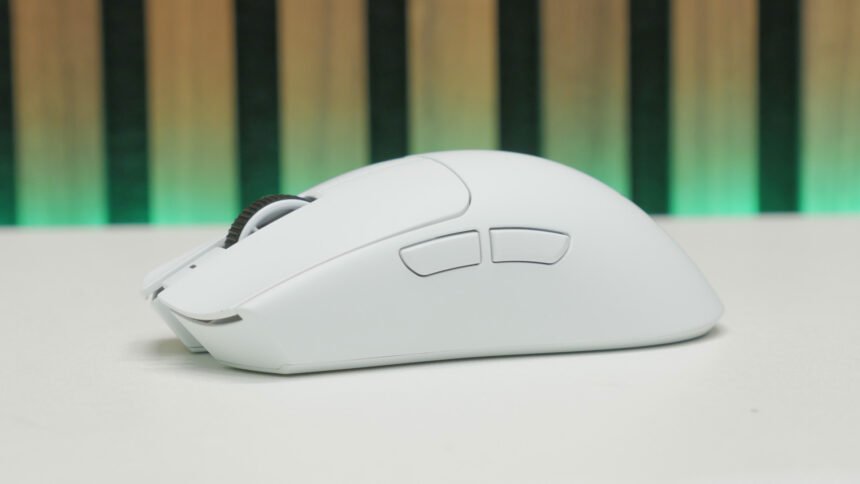
A key part of what has made the Razer Viper lineup so popular over the years is its design and shape. It’s a shame the company moved away from the truly ambidextrous Viper Ultimate, but the symmetrical shape here still looks effortlessly sleek. I’ve been testing the white version, and, I have to say, it’s made me a bit of a convert, despite the white version being a whole 1g heavier than the black version.
You don’t get any RGB to jazz up the look of this mouse any further, but when it looks this clean anyway, why would you want it?

Not only does it look great, but this mouse design is really comfortable for a wide variety of grip styles and hand sizes. It’s definitely more suited to fingertip and claw grip, rather than palm grip, but it’s surprisingly universal otherwise.
Not only is it a great shape but Razer has used an excellent-quality coating for the mouse to aid grip. There are no long-lasting rubber side pads, again like on the old Viper Ultimate, but the smooth, matte coating here is remarkably grippy. These sorts of thin coatings do tend to wear through fairly quickly over time, but no coatnig at all tends to make for a slippery mouse (looking at you SteelSeries Aerox 3 Wireless Gen 2), while the avoidance of thicker rubber side grips keeps the weight down.
Weight is actually an area I was impressed by with this mouse. Despite a relatively conservative approach to the design – it’s not full of holes and doesn’t obviously have a thin and flimsy shell – Razer has managed to shave 4-5g off the weight of this mouse, compared to the Viper V3 Pro’s 54g. Again, the white version is 1g heavier, so it sits at 50g, rather 49g, but it’s still a welcome saving. This makes it feel fantastic for high-speed mouse maneuvers when gaming.

Indeed, it’s this extra weight saving that adds to why the Viper V4 Pro is so good that it knocks off the Viper V3 Hyperspeed off top spot in our best gaming mouse guide. That mouse was never particularly light, at 82g, and it was always more about value than pure performance. However, the step up in so many areas with the V4 Pro means we can no longer hold up the Viper V3 Hyperspeed as the best overall.
Performance
As expected, the Viper V4 Pro’s overall performance is fantastic. As I always say these days, the actual sensor difference between modern top-tier mice is all but nonexistent, but this one is nonetheless truly excellent. Likewise, its wireless performance is ultra-reliable and lightning-fast.

I also particularly liked the feel of the main buttons in this mouse. Unlike the Sabre V2 Pro, there’s no excess flex in the buttons, and the switches are very crisp-feeling. Unfortunately, that crispness comes at the expense of noise. Like the Deathadder V4 Pro, this mouse has ludicrously loud switches that almost remind me of the famous Garand ping, so high-pitched and reverberant are they. If you share a gaming space/office or otherwise have someone close by that you could disturb, they might not approve of your new mouse upgrade.
The new scroll wheel also feels excellent. Unlike some scroll wheels, there’s no slight delay or inconsistency in when the scroll action happens as you pass the point of most resistance in the detent. It’s just precisely where you expect it every time. The detents themselves feel really nicely balanced, too. Precise and distinct enough to feel in control, but with it feeling like a cog rattle.

Battery life is also excellent, with Razer’s claimed 180 hours being reflected in my usage. Realistically, you’ll get two weeks of use between charges if used as your daily work and play mouse while running at 1kHz. Even at 8 kHz, you can play for up to 45 hours, which translates to most of a week’s gaming if just used in the evenings.
Price
Price is often a sticking point for flagship gaming mice from the likes of Logitech and Razer, with their top products now pushing well over $150. That’s the case here as well, as the Razer Viper V4 Pro price is $159.99. For a mouse that externally is lacking in extra features, it doesn’t leap out as good value. You can grab the Sabre V2 Pro for under $80, and there are plenty of less well-known brands offering equally cheap options with similar specs on paper.
However, if you want the reassurance of a bigger brand and the knowledge that this mouse does deliver on performance, it’s worth paying the extra. Plus, when set against the prices of other big brands, this one isn’t pushing the bar even higher – premium gaming mice have been this price for a few years.
Alternatives
Corsair Sabre V2 Pro
Offering a similar symmetrical shape and lightweight design to the Viper V4 Pro, the Corsair Sabre V2 Pro is even lighter, at just 36g. It’s otherwise not as premium-feeling a mouse, with notably not as nice a surface finish. However, it’s also much cheaper at under $80. Read our full Corsair Sabre V2 Pro review for more details.
Logitech G Pro X2 Superstrike
Again offering a symmetrical shape, the Logitech G Pro X2 Superstrike trades lightness for class-leading click speed. Its haptic inductive button mechanism makes for clicks that are far, far faster than any other mouse on the market. It’s clever tech that also makes for a quiet and highly tunable click feel. However, it’s not essential for any games other than those where high clicks per second really count. Read our full Logitech G Pro X2 Superstrike review for more.

Verdict
Razer has surprised me with how much the Viper V4 Pro feels like a major improvement over the V3 Pro. The lower weight and longer battery life alone are significant upgrades. The fact that you also get a better sensor, faster wireless, and the new optical scroll wheel encoder all sweeten the deal further.
This all adds up to the Viper V4 Pro being my new favorite symmetrical wireless gaming mouse, which in turn makes it my favorite overall. It’s light, stylish, and performant, and feels like a quality, easy-to-grip item in the hand.
I’m less of a fan of the new thick cable that I would avoid using at all costs for actually playing with, instead relying on it for overnight charging only. It’s a good thing, then, that the battery life of this mouse is so good that you only need to charge it once every couple of weeks.
It is an expensive mouse, especially considering its modest feature set, but that’s the price you pay for top-tier gear.