By using this site, you agree to the Privacy Policy and Terms of Use.
Accept
GamexploreGamexplore
  • Home
  • News
  • PC Game
  • Mobile
  • VR News
  • Hardware
  • Guides
  • Reviews
  • Upcoming
Reading: Duskwood Hill Ruins puzzle walkthrough in Crimson Desert
Share
Notification
GamexploreGamexplore
Search
  • Home
  • News
  • PC Game
  • Mobile
  • VR News
  • Hardware
  • Guides
  • Reviews
  • Upcoming
Follow US
© 2025 All rights reserved | Powered by Gamexplore
Gamexplore > My Bookmarks > PC Game > Duskwood Hill Ruins puzzle walkthrough in Crimson Desert
PC Game

Duskwood Hill Ruins puzzle walkthrough in Crimson Desert

March 25, 2026 5 Min Read
Share
5 Min Read
Duskwood Hill Ruins puzzle walkthrough in Crimson Desert
SHARE

To solve the Crimson Desert Duskwood Hill Ruins puzzle, also known as the Duskwood pillar puzzle, you must burn the vines, stab a stone, and rotate a mechanism in the correct order and direction. It’s a tricky challenge, but in the end, this Duskwood ancient ruins puzzle will reward you with an abyss artifact.

As there are two ancient ruins puzzles in the Duskwood, don’t confuse this one with the Duskwood Waterside Ruins puzzle (the checkerboard). Got the right one? Here’s how to untangle the vines and pillars and find the Crimson Desert Duskwood Hill Ruins puzzle solution.


How to solve the Duskwood Hill Ruins puzzle in Crimson Desert

The Crimson Desert Duskwood Hill Ruins puzzle, which falls within the “ancient ruins” puzzle category, is located southwest of Hernand Castle and just north of The Witchwoods. It’s a short walk east from the Fort Warspike abyss nexus location. As always, the puzzle area will initially be marked as a “mysterious energy” spot.


On the right side, an arrow points to the Crimson Desert Hill Ruins Duskwood puzzle location on the map, while Kliff removes the vines with Blinding Flash on the left.
Graphic: Marloes Valentina Stella/gamexplore | Source image: Pearl Abyss via gamexplore

The first step to solving this puzzle is to burn the vines. To do so, use Blinding Flash, hold it, and use Concentrate Light while aiming at the vines — it will take a few seconds to create a fire. On PC, you must press Ctrl plus the left mouse button, then hold the left mouse button and press Ctrl or the side button on your mouse. On a controller, press LB/L1 plus RB/R1, hold RB/R1, and press LB/L1 again.

See also  Split Fiction Creative Director Hopes Publishers Don’t Abandon AAA Games to Chase AA Trend

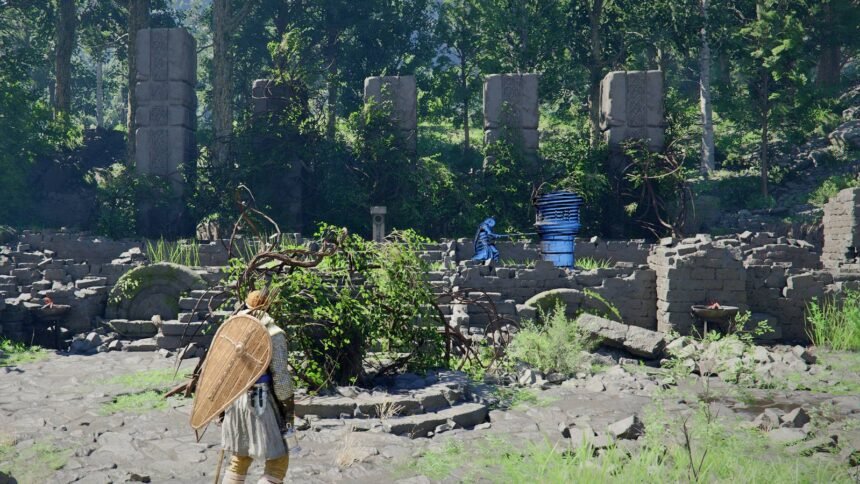
When the five rectangular pillars and the rotation device in the center are free of vines, the pillar on the left will glow yellow. To solve this Crimson Desert Duskwood puzzle, you must adjust the height of the remaining four pillars to match the glowing one. When they’ve reached the correct height, they’ll start glowing too.

To make the pillars taller or shorter, turn the rotation device clockwise or counterclockwise, respectively. As the rotation device doesn’t have a handle, you must aim for one of the four slots on the side and use the Stab ability. Make sure you’ve unlocked this skill in the skill menu (it’s in the “stamina” category). To use Stab on a keyboard, press Shift and the left mouse button. To use it on a controller, press RB/R1 and Y/Triangle. Now you can use your weapon as a lever.


Kliff rotates a device to adjust the large pillars in the Crimson Desert Duskwood puzzle.
Graphic: Marloes Valentina Stella/gamexplore | Source image: Pearl Abyss via gamexplore

Beware that placement matters, as each pillar responds to different slots. To make it easier, we’ve numbered the slots on the rotation device in the picture below (facing the pillars). To solve the Duskwood Hill Ruins puzzle, follow these steps:


A numbered rotation device that forms the solution to the The Crimson Desert Duskwood puzzle.
Graphic: Marloes Valentina Stella/gamexplore | Source image: Pearl Abyss via gamexplore

  • Use slot 2 to make the pillars taller. Push them 45 degrees clockwise (only half a quarter). The three pillars on the right should be slightly higher than before, but not yet glowing.
  • Use the slot between position 3 and 4 (the former slot 3) and push it 45 degrees clockwise. Let go when the third and fourth pillar start to glow.
  • Us slot 1 and push 45 degrees clockwise again, until the second and fifth pillar start to glow.
See also  'Contradiction' quest walkthrough in Crimson Desert

Don’t forget to grab the abyss artifact from the abyss cresset pillar before you leave this part of the Crimson Desert Duskwood.


Just starting out in Crimson Desert? We have guides to help you learn the basics and refresh your memory on how some of its systems work. The world of Pywel is huge, so you might have a hard time deciding where to go first, but you can make your journey a little easier with the help of our interactive map. Along the way, make sure to learn a few life skills like fishing, logging, cooking, and mining, all of which can help you make money.

We also have walkthroughs for puzzles in the Abyss like the Root’s End and Precipice of Truth, as well as ancient ruins like the Dragon’s Stone Chamber.


You Might Also Like

All fish, insects, and recipes in Heartopia's 'Dreamlight Cinematics' event season

Tokyo Xtreme Racer Studio Expects More Growth in Sales in the Future

Lost in Random: The Eternal Die Launches on June 17th, New Gameplay Revealed

Clair Obscur: Expedition 33’s Composer Was Discovered Through Soundcloud and a Gaming Forum

Sekiro: No Defeat Announced – New Anime Based on Sekiro: Shadows Die Twice

TAGGED:PC GamePC Online
Share This Article
Facebook Twitter Copy Link
Previous Article replaced 4 Replaced Aiming for 4K/60 FPS on Xbox Series X, Average Playtime is About 8 Hours, Says Developer
Next Article Forefront  1.0 Launch Date, Price & New Map Revealed Forefront 1.0 Launch Date, Price & New Map Revealed
Leave a comment Leave a comment

Leave a Reply Cancel reply

Your email address will not be published. Required fields are marked *

Latest News

Open-World Piloting Adventure Compass Coming To Quest 3 & PC VR This Month
VR News May 10, 2026
Amberspire review: a sci-fi city-builder that knows when enough is enough
PC Game May 10, 2026
Steam Machine release window, specs, and price estimate
Hardware May 9, 2026
Subnautica 2 Gameplay Trailer Teases the Mysterious Tree Ahead of Early Access
PC Game May 9, 2026
PS5 Slim_02
PlayStation’s First-Party Studios Are Using Generative AI for QA, 3D Modeling, Animations
Upcoming May 9, 2026
Beat The Beats Level Editor Coming Soon To Steam Workshop
VR News May 9, 2026
Before Alien: Isolation 2, the underrated Aliens: Fireteam Elite is getting a sequel
PC Game May 9, 2026
gamexplore gamexplore

Welcome to Gamexplore, your go-to destination for everything gaming. We are dedicated to delivering the latest updates, in-depth insights, and expert analysis from the ever-evolving gaming industry.

Editor Choice

‘Echoes of Time’ quest steps and walkthrough in The Sims 4
I'm not Valentino Roserade, but Pokemon and Honda's "almost life-size" motorbike is a Koraide I reckon I could win a MotoGP title on
Resident Evil Requiem Will Receive A “New Look” At The Game Awards
‘Bartender VR’ Studio Releases Weapon Restoration Sim ‘BattleCrafter’ on Quest

Trending News

Death Stranding 2: On the Beach is Getting More Modes and Features on PC and PS5
PS5 Consoles Only Sold 13,539 Units in Japan Last Week, Nintendo Switch 2 Sold 59,543 Units
DarkSwitch Review – Holding the Line
Assassin’s Creed Shadows Guide – How To Fully Upgrade Rations
  • About Us
  • Contact Us
  • Disclaimer
  • Privacy Policy
  • Terms of Service
Reading: Duskwood Hill Ruins puzzle walkthrough in Crimson Desert
Share
© 2025 All rights reserved | Powered by Gamexplore
Welcome Back!

Sign in to your account

Lost your password?