By using this site, you agree to the Privacy Policy and Terms of Use.
Accept
GamexploreGamexplore
  • Home
  • News
  • PC Game
  • Mobile
  • VR News
  • Hardware
  • Guides
  • Reviews
  • Upcoming
Reading: Quest Update Brings New ‘Surface Keyboard’ Feature, UI Changes & More
Share
Notification
GamexploreGamexplore
Search
  • Home
  • News
  • PC Game
  • Mobile
  • VR News
  • Hardware
  • Guides
  • Reviews
  • Upcoming
Follow US
© 2025 All rights reserved | Powered by Gamexplore
Gamexplore > My Bookmarks > VR News > Quest Update Brings New ‘Surface Keyboard’ Feature, UI Changes & More
VR News

Quest Update Brings New ‘Surface Keyboard’ Feature, UI Changes & More

February 4, 2026 3 Min Read
Share
3 Min Read
Quest Update Brings New ‘Surface Keyboard’ Feature, UI Changes & More
SHARE

Meta released a new update for Quest that brings a host of new features, including a new ‘Surface Keyboard’ that lets you type on any flat surface.

Meta has already started rolling out Quest’s v85 update on the public test channel (PTC), making it the first major update since the company revealed it was shaking up Reality Labs in a bid to shift focus to AI and smart glasses.

According to the v85 patch notes, the update is set to retire ‘Horizon Feed’, which released with v57 in late 2023, bringing a mishmash of user-created Worlds, apps, games, and Reels.

The update is also set to make Navigator the default UI, which overhauls the platform’s dock-based UI for a more mobile-style launcher overlay.

Image courtesy Meta

For years now, if you wanted to type something on Quest you had three main methods: use the floating keyboard, pair a physical keyboard which the headset can actually track, or use voice for text input.

Now, Meta is rolling out ‘Surface Keyboard and Touchpad’ as an experimental feature on Quest 3, which allows users to input text and control a mouse by simply mapping them to a desk or table.
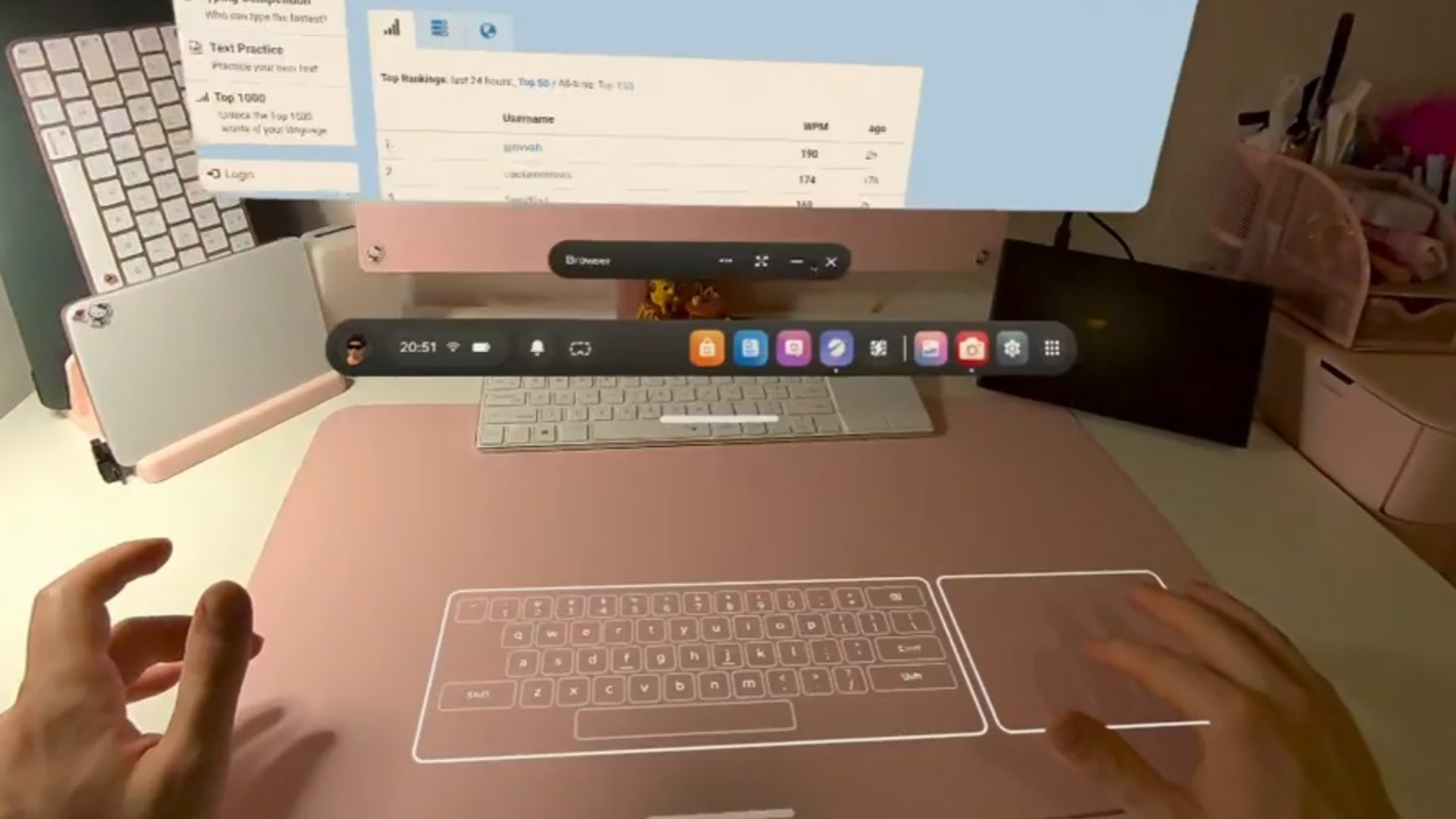
Image courtesy ‘amtexe‘

Meta says the new Surface Keyboard is ideal for “casual productivity, browsing, messaging, and 2D applications,” as it includes a basic key set.

Meanwhile, the virtual touchpad supports index-finger actions like move, click (tap), drag (double tap and move) and two-finger scrolling with your index and middle finger. Meta says however that a physical keyboard “is still advised for high-volume writing.”

Quest 3 users who are enrolled in the PTC can opt into the feature from the ‘Experimental’ section of ‘Settings’. If you’re not already, here’s how to enroll in PTC:

  1. Open the mobile app, tap Menu in the bottom-right corner, then tap Devices.
  2. Tap Headset settings, then tap Advanced settings.
  3. Tap the toggle next to Public Test Channel to try to join Quest PTC.
    • If the toggle doesn’t work, Quest PTC is currently full and not available.

Another feature is the newly redesigned activity bar, which is said to allow for quicker and easier access to controls like recording, calls, and media.

See also  Heroes Together VR Is A New Roguelite Co-Op Dungeon Crawler

Other updates include the ability to temporarily hide virtual hands via quick actions, customize the Quest 3S’ action button to trigger preferred system actions with short or long presses, and scan for malware. You can check out the full v85 (PTC) release notes here.


You Might Also Like

Quest v74 Brings Web Shortcuts, DisplayPort Out, Improved Casting & More

Crossings Anticipated Co-Op Mode Launches Alongside Steam Version In February

Bow Course – Archery Golf Enters Early Access On PC VR

Reach Promises Cinematic VR Action Adventure This Year

How to Watch Meta Connect for All Things XR, Kicking Off Today @5PM PT

TAGGED:Virtual RealityVRVR Game
Share This Article
Facebook Twitter Copy Link
Previous Article Aces of Thunder Review: A Visceral & Thrilling VR Combat Flight Sim Aces of Thunder Review: A Visceral & Thrilling VR Combat Flight Sim
Next Article Steam Machine release date on track for "early this year," according to AMD Steam Machine release date on track for "early this year," according to AMD
Leave a comment Leave a comment

Leave a Reply Cancel reply

Your email address will not be published. Required fields are marked *

Latest News

Resident Evil Requiem’s “Leon Must Die Forever” Mode is Live, Adds a Timed Combat Gauntlet
PC Game May 8, 2026
Tackling the Unique Challenges of Moderating Social VR at Scale
VR News May 8, 2026
FlatOut 4: Total Insanity VR Impressions - A Rough Ride In The Best Possible Way
FlatOut 4: Total Insanity VR Impressions – A Rough Ride In The Best Possible Way
VR News May 8, 2026
Path of Exile 2's 'Return of the Ancients' update improves the endgame
PC Game May 8, 2026
Dracula: The Disciple Announced by Cyanide Studio – First-Person Puzzler Coming in 2027
News May 8, 2026
Endurance Motorsport Series
Endurance Motorsport Series Trailer Shows Off New Galeao Track
PC Game May 8, 2026
the mound omen of cthulhu
The Mound: Omen of Cthulhu Outlines Tense Co-op Gameplay in New Overview Trailer
Upcoming May 8, 2026
gamexplore gamexplore

Welcome to Gamexplore, your go-to destination for everything gaming. We are dedicated to delivering the latest updates, in-depth insights, and expert analysis from the ever-evolving gaming industry.

Editor Choice

Galaxy XR to expand internationally in 2026, report claims
Aphelion Gets New Trailer Showcasing Gameplay, Out This Spring
FunFitLand Is A Compelling Workout On Quest With Mixed Reality & Hand Tracking
Make games look loads better on your old AMD Radeon GPU with this new FSR 4 mod

Trending News

Win an Nvidia GeForce RTX 5060 graphics card, with ten up for grabs
Prince of Persia: Sands of Time remake canceled amid wider Ubisoft shakeup
Xbox Partner Preview Announced for March 26th, Includes In-Depth Look at Stranger Than Heaven
How to respec in Clair Obscur: Expedition 33
  • About Us
  • Contact Us
  • Disclaimer
  • Privacy Policy
  • Terms of Service
Reading: Quest Update Brings New ‘Surface Keyboard’ Feature, UI Changes & More
Share
© 2025 All rights reserved | Powered by Gamexplore
Welcome Back!

Sign in to your account

Lost your password?