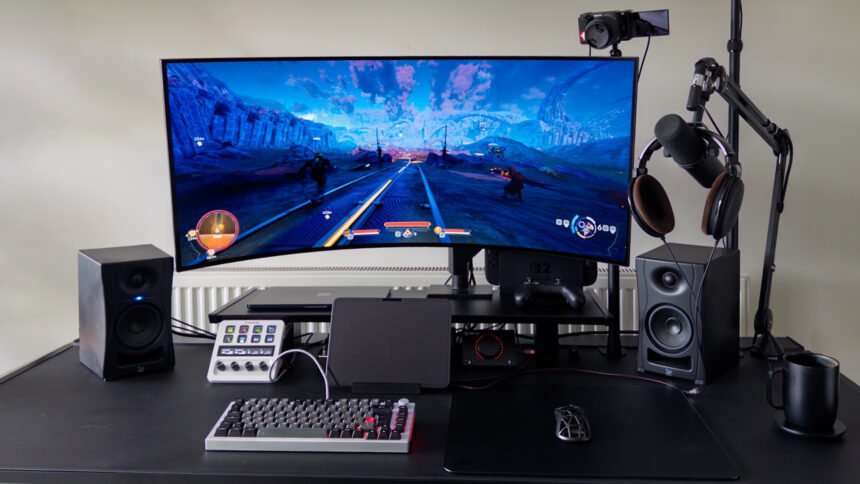
They said it couldn’t be done, and even if it could be done, why would Secretlab, of all companies, be the ones to do it? After all, don’t they just make chairs? I am, of course, talking about the evolution of the humble desk. What used to be a plank of wood attached to some legs has been transformed by the Secretlab Magnus Pro. It might not be the very first metal desk, or the first with integrated cable management, but this is the desk that has single-handedly addressed the problems I’ve been having with my setup for years.
I love PC gaming with all my heart, but there’s one thing no one ever talks about, and that doesn’t get the hate it deserves: cable management. I’ve wasted countless hours in pursuit of perfection, trying to get my desk to look just right. While there are ‘solutions’ to this (trust me, I’ve tried them all), it’s a time-consuming process that forces you to spend hours neatly routing wires that will ultimately need to be undone the minute you decide to add something new to your desk. And don’t even get me started on how to manage cables inside your PC.
I’ve recently made some pretty big upgrades to my setup with new monitors and GPUs, but the Magnus Pro might just take the crown as my favorite addition in years. Not that I ever doubted our Secretlab Magnus Pro review, but to finally experience just how transformative it could be was a revelation.
Just like practically everyone on the Battlestation subreddit, I had the classic Ikea Karlby desk and Alex drawers setup, giving my living room a touch of class that only a walnut veneer kitchen countertop can provide. While everything looked great on the surface, every time I switched on my computer, I was reminded of the mess I had always struggled to contain.

There’s no doubt this issue hurts me more than the average person, as I love trying out new PC hardware. As a result, I’m under my desk every few weeks, swapping out cables and components. This used to be a nightmare with my old desk, even with the desk-mounted cable trays and velcro straps that were supposed to help make things easier. Enter the Magnus Pro.
There are several key cable management extras included in Secretlab’s flagship desk. However, the most impactful is a full-width cable management area that runs along the back edge of the desk and is accessed via a flip-up panel.

Inside this section is a tray into which you can dump cables, power supplies, chargers, and more, then you can simply close the lid and forget all about the mess it contains. Initially, I didn’t think much of this, as it went against everything I thought you were supposed to do with your cables. I’ve been conditioned into believing that you need to bunch all of your cables together to make them look perfect, when in reality, they just need to be concealed. Out of sight, out of mind.

Also, unlike some cable trays that hang under desks, this one isn’t full of holes that snag the cables or allow them to spill out. Instead, it’s a solid sheet metal trough (other than one hole along the top back edge) that keeps everything neatly contained.
What’s more, inside this trough there’s an integrated power strip. The power for this can be routed through the desk’s leg – there’s a socket on the leg that you can then plug into a wall outlet – keeping not just your on-desk cable clutter down but removing cables running up to your desk too.
All this convenience is taken to another level thanks to the tabletop being made from steel. This allows the top to be used with all sorts of magnetic cable management accessories (sold separately) to hold any important wires in place. I use mine to hold a spare USB-C cable, since everything uses that these days, in addition to my monitor’s USB-C cable, if I ever want to use my devices with an external display.
Any cable that needs to be on the desk can be, without looking cluttered, as the wires feed into the tray. You can tell the designers at Secretlab understood how annoying this issue can be, and their solution has made it so my desk always looks perfect, no matter what I end up adding to it.

It also helps that I’m using the Desk Riser attachment (also sold separately), which not only provides my monitor with additional height to rise above my large studio monitors, but also provides me with a handy shelf. Speaking of things that are sold separately, the Magnus Monitor Arm is another attachment I’ve been using, holding up my new 45″ ultrawide monitor without any signs of wobble. To top it off, I also picked up the Premium PC Mount to help secure the case to my desk, saving me from having to purchase extra-long cables whenever I use the stand functionality.
When combined, the overall ability of this desk to hide, contain, and manage clutter is quite unlike most other options on our best gaming desk guide. This even extends to the controls for the sit-stand height-adjusting motors. These sit in a panel that’s integrated into the middle of the metal top, rather than hanging awkwardly below it.
This desk, of course, isn’t perfect, but I’m willing to put up with some flaws for what it has to offer. The main problem I ran into with the Magnus Pro is that the tray area isn’t big enough to support conventional mounts for devices such as monitors or microphone arms. Considering Secretlab sells its own monitor mounts, you can start to imagine why the tray might intentionally be not the right size for competing options, but the reality is that most gamers like to and will mix and match their gear.

One example of this incompatibility is my Elgato microphone mount that I use to hold a camera for video meetings. It has a lengthy handle that simply doesn’t have room to turn inside the tray section, so I was forced to take drastic measures. The only way to attach the mount securely to the desk was to cut off more than half of the clamp’s handle. This is an especially annoying process when you don’t have access to a saw… Anyway, it’s fine; as long as I don’t tell my partner what I did to the bread knife, it’s all good.
One major reason this desk is so expensive is its ability to rise to standing height at the press of a button. Standing desks are supposed to be better for your health as they help with your posture, among other things. I can’t say that I use this feature as often as I should, but at the very least, it makes plugging things in easier, saving me from having to crawl under the desk like a rat. While the Magnus Pro is supposed to have collision detection, I managed to ram my monitor arm into my shelf, so be warned if you have any potential hazards in the way.

The cost of the Magnus Pro, with its most useful accessories, is a tough pill to swallow, with the final price tipping over the $1,000 mark. You could spend a third of that for a standard sit/stand desk from Ikea, and you could spend even less if you just bought a regular desk. After all, a desk is just a plank of wood attached to some legs… most people will be happy to spend a tenth of the price on something that simply does the job. However, this desk isn’t for most people.
If you’ve ever experienced the pain of undoing bunches of perfectly managed cables, I can assure you that you’ll come to think of the cost of this desk as a small price to pay in the long term. With the Magnus Pro, I will never again have to endure the worst woes of cable management.