Verdict
The Novablade Pro ticks every box for competitive players while also satisfying casual players with the inclusion of 2.4GHz functionality across PC and PS5. If you’re sick of dealing with trailing cables across your living room floor, this is a no-brainer option.
- Highly customizable to fit your preferences
- Virtually flawless 2.4GHz wireless support
- Programmable actuation keys adds customization
- Lacks iCUE software support
- No manual/legend for showing what extra keys do
- Begging for an OLED screen to help adjust settings
Corsair has stepped into the ring with its take on the leverless controller trend and landed some heavy blows to its competition. Introducing the Novablade Pro, a new competitor sporting 2.4GHz wireless functionality and Hall effect switches for record-breaking response times. Designed with esports competitors in mind, this leverless controller is natively compatible with both PlayStation 5 and PC, making it well-suited for playing on the road and at home.
Corsair has taken aspects from the best fight sticks and blended them with its expertise in the gaming keyboard space to create a real market disruptor. The Novablade Pro is undoubtedly the most feature-packed option available, and priced at £230 / $250, it’s set to give the competition a real run for its money.
Specs
| Corsair Novablade Pro specs | |
| Compatibility | PS4, PS5, PC (Windows) |
| Power | 7500mAh rechargeable battery |
| Connection | USB-C, Bluetooth, 2.4GHz |
| Switches | Corsair MGX Hyperdrive magnetic keyswitches |
| Weight | 1,442g |
| Dimensions | 226mm x 46mm x 6.9mm (W x H x D) |
| Price | $250 / £230 |

Features
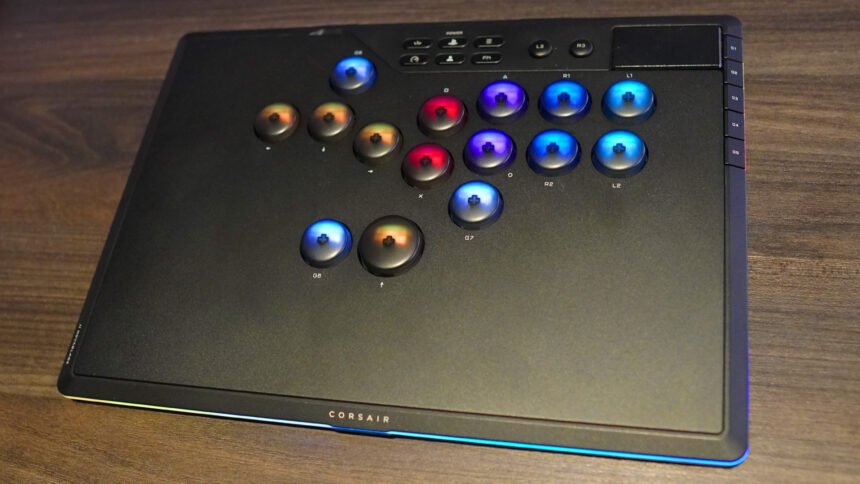
Building on the traditional 12-button leverless controller layout, Corsair has added three additional programmable buttons, one above the movement keys and two located on each side of the Up key. Unlike the Victrix Pro KO’s extra buttons, these cannot be removed and replaced with spacers to fill the void. I never once accidentally pressed these buttons, but I could see this being a point of contention for some players who aren’t interested in using them.
Located above the main buttons are six function buttons, L3 and R3, and the touchpad, while along the right edge of the controller are five G Keys that allow you to change the RGB lighting effect, brightness, SOCD settings, enable Rapid Trigger, and adjust the actuation point of the buttons. Speaking of which, arguably the big selling point of the Novablade Pro is its Hall effect switches, a feature that Corsair claims will help deliver “quicker, cleaner inputs.”

One of the proposed advantages of Hall effect switches is the ability to choose the perfect actuation point for each switch, ranging from 0.1mm to 4.0mm. You can change the actuation point in five predefined steps, or you can get granular with 0.1mm increments using the dedicated function key. Corsair doesn’t advertise the option to replace the stock switches with alternatives, but they can, in fact, be replaced with third-party Hall effect switches. Corsair doesn’t sell replacement MGX Hyperdrive switches, though, so you’re on your own if they happen to break.
You can pull off the Novablade Pro’s magnetic top plate to reveal switches that change the platform compatibility as well as the connection method. It also houses the wireless USB receiver, which can be used with PS5 and PC, for low-latency, wire-free sessions. The Novablade Pro supports a 1,000Hz polling rate when using the 2.4GHz wireless and wired connections, but not Bluetooth. The Novablade Pro also comes with a sturdy plastic cover to protect the controller’s buttons whenever you’re traveling.
The bottom of the Novablade Pro is lined with a grippy rubber material to stop the controller from slipping off your lap or desk during gaming sessions. It also has a locking mechanism to ensure your USB cable doesn’t fly out at a crucial moment, though I have come to dislike these as they don’t play nicely with different USB cables. The argument for them is in tournament settings where you don’t want someone accidentally stepping on your cable, but I don’t think I’ve ever seen that happen in real life.

As for the buttons, they are RGB backlit, though bizarrely, you can’t manually assign the colors, which is also the case for the light strip surrounding the device. These RGB buttons also serve a purpose aside from being aesthetically pleasing to some people; they’re used to determine the settings for the controller. For example, the light strip changes size to show the actuation point of your buttons, and the buttons will repeatedly flash before triggering a specific action.
Design
Most companies take a similar approach to the design of leverless controllers as they do for keyboards, which is to say they all look largely the same. That said, even without the brand name printed on the device, this is unmistakably a Corsair product, sporting a minimalist design with a plain black aesthetic, and it uses Corsair’s current signature tripoint pattern on the trackpad. Corsair provides a template for printing custom artwork for the top plate, but be warned that you will have to deal with the nightmare that is applying vinyl prints.
The minimalist look draws attention away from the Novablade Pro’s feature set because you can’t see at a glance what it can do. Though there are eight G Keys in total, the five on the side have specific actions, and they cannot be reassigned. After two months of use, I still couldn’t tell you what each of the side G Keys does without referring to the manual. Crucially, because Corsair hasn’t made this controller compatible with its iCUE software, or any software, for that matter, you can’t quickly check these via your PC.
Corsair could, though, have included a key under the top panel to explain what everything does; that way, they could maintain the Novablade Pro’s sleek look while providing additional information as to what the controller can do. As mentioned earlier, the buttons and light strip will react when you’re adjusting settings, but that doesn’t mean anything to you unless you have the manual open.

The magnetic top plate that hides away the connection settings is a good idea, though I’ve found it difficult to lift out just using my short fingernails. The gap is too small to fit a finger underneath, forcing you to use something thinner to remove the plate. Understandably, there isn’t a lot of space to work with, so there’s not a lot Corsair could’ve done here, but it’s still slightly irritating.
To avoid any accidental button presses, I would’ve liked to see the G Keys hidden under the plate, as they’re largely a set-and-forget feature. It doesn’t matter whether you change the lighting effect or brightness while playing, but you will feel a difference when you mistakenly press the SOCD, Rapid Trigger, or Actuation Cycle G Keys.
The wireless functionality contributes to the Novablade Pro’s weight; coming in at 1.4kg, it’s considerably heavier than its rivals. It’s just light enough that I don’t have any issues carrying it in my backpack, but it’s on the upper end of what I would consider acceptable. As for the size, even with the plastic cover on to protect the buttons, it can comfortably fit in any laptop pocket.
Performance
You won’t ever catch players at a tournament using their controllers wirelessly, due to concerns regarding potential interference, which can result in dropped inputs. So, despite the Novablade Pro performing exceptionally well in 2.4GHz mode – I found it practically indistinguishable from wired play in my testing of the device – there’s something almost reprehensible about the idea of doing so in a competitive setting. At home, however, this is by far the most convenient way to play fighting games from the comfort of a sofa.

I found myself somewhat conflicted about the buttons on the Novablade Pro because they’re so different compared to everything else I’ve used. Whereas most fight stick buttons tend to be flat with very little travel distance, Corsair has decided to go in the opposite direction, opting for comparatively tall, domed buttons.
The travel distance feels twice as long compared to traditional buttons, but the customizable actuation points mean you don’t have to bottom them out to trigger an input. I found the default setting of 1mm to be the perfect actuation point, but I still would’ve preferred if the total travel distance had been reduced by half.
The Rapid Trigger feature that lets you reset a key without having to wait for the button to fully pop back up is helpful, particularly when the buttons have such a long travel time. That said, it’s a solution to a problem that only affects these specific buttons, as conventional fight stick buttons tend not to have long travel times anyway. Additionally, while these buttons feel satisfying to press, they’re some of the loudest I’ve ever used, which could be a concern for some people.
Also, while Hall effect switches are undeniably faster compared to mechanical ones, especially when set to 0.1mm actuation distance (which Corsair doesn’t recommend due to their extreme sensitivity), they’re not a game-changer that will suddenly make you play better. Opting for such a high sensitivity can lead to more mistakes, and the last thing you want is to have to blame your controller because you accidentally skimmed over a button and it ruined your round. It’s simply a very different use case from how Rapid Trigger has transformed keyboard inputs for some games.

This leverless controller has so many customizable settings that you can adjust on the fly, from SOCD options, creating macros (PC only), and changing individual profiles, that it ends up being both a blessing and a curse. I always appreciate having the choice to tweak granular settings to my exact preference. However, the Novablade Pro really could’ve benefitted from a tiny OLED screen, similar to Haute42’s premium offerings.
Without a screen to see what you’re adjusting, it’s possible to tweak an important setting and not realize what you’ve done. I once managed to change my actuation point accidentally during a session, completely throwing me off my game. Since then, I’ve kept the controller in Game Mode to disable the G Keys and keep the settings as standardized as possible. Likewise, the Novablade Pro could benefit from software like Victrix Control Hub or Razer Synapse to give you an overview of all your adjustments. Integration with Corsair’s own iCUE software seems like a strange omission from a device that would’ve greatly benefited from it.
Battery life
Corsair claims the battery in the Novablade Pro should last 40 hours when using 2.4GHz wireless, and with the brightness set to 100%, and that you can get up to 200 hours if you turn off the RGB lighting entirely. After two weeks of wireless-only sessions, I can confirm the battery lasted around 40 hours with the light show running at full blast.

You can check how much battery is remaining using the Function key, displaying the percentage range by setting the light strip to a specific color. It’s worth noting that you can use the Novablade Pro wirelessly while charging it with a cable, so if your console’s USB port is too far away, you can always rely on a battery bank instead.
Price
The Corsair Novablade Pro price is $249.99 / £229.99, making it the cheapest option of the premium leverless controllers. You can expect to pay over $200 for any PS5 leverless controller, and that remains the case with Corsair’s offering. We’ve seen the Novablade Pro reduced to as low as $199.99 / £159.99 already, though, making it one of the best deals on the market if you’re looking for a tournament-ready device with wireless functionality across PC and PS5.
Alternatives
Victrix Pro KO Leverless Fight Stick
The Victrix Pro KO is a great option if you’re hyper-focused on tournament-level play, thanks to its built-in button replacements that allow you to change a problematic button within minutes, using the tools inside the fight stick. The Pro KO supports different mechanical switches if you want to adjust the feel of the buttons, and it may also be a better choice if you prefer the layout of the Pro KO’s additional buttons.
Razer Kitsune
The Razer Kitsune is the most no-frills option of the bunch, featuring everything you need for high-level play and not much else. Like the Novablade Pro, the Kitsune doesn’t officially support having hot-swappable switches, but they can be replaced if you ever experience any issues. It’s also the lightest option, weighing in at just 800 g, less than half the weight of the Novablade Pro. The buttons are also considerably quieter than both the Pro KO and the Novablade Pro, making it more suitable for late sessions when living with roommates.

Verdict
Corsair has covered every base with the Novablade Pro, matching the high standards set by Razer and Victrix, and in some aspects, going even further than the competition with its cutting-edge Hall effect switches and faultless wireless functionality. The level of customization on offer with the Novablade Pro is seriously impressive, though it’s up for debate just how necessary some of the fine-tuning really is. The Novablade Pro could greatly benefit from an app to verify exactly how it’s been set up, but even without that, it’s still an excellent choice for anyone looking to pick up a premium leverless controller.