Android XR’s major update brought an AI feature to make any windowed content 3D, hand occlusion in the home space, and the ability to pin windows to your walls to Samsung Galaxy XR.
The first major update for Google’s XR operating system started rolling out to Samsung’s standalone headset in April, bringing three massive features and other notable changes.
And given that Xreal’s Project Aura headset will run the same Android XR operating system via a compute puck with the same Snapdragon XR2+ Gen 2 chipset, these features should also be available on Aura when it launches later this year.
Here’s a rundown of what exactly arrived in the update, with details on what each feature actually does.
Auto-Spatialization For 2D Windows
Google actually pre-announced the biggest feature of Android XR’s major update back in December: Auto-spatialization.
Android XR Getting AI System Feature To Turn Any 2D Window 3D
Google’s Android XR is getting an AI feature that can turn any 2D content, including games streamed from your PC, into 3D.
When enabled in the “Labs” section of the Android XR system settings, Auto-spatialization makes the operating system constantly run a machine learning model on whatever 2D window is currently in focus that synthesizes stereoscopic 3D depth at 1080p 30FPS.
That means that images, videos, games, websites and whatever other visual content you’re looking at automatically becomes 3D, with a sense of depth, without any implementation from the developer or creator of said content.
Auto-Spatialization on Android XR
It’s a remarkable feature that no other standalone VR/MR headset has, though Xreal and Viture have a similar feature for their virtual monitor glasses, with Xreal’s handled by its X1 chip and Viture’s through the smartphone companion app.
Google notes that enabling Auto-spatialization will use extra energy, making the headset last less long between charges, and that the operating system will sometimes disable the feature when the chipset is under heavy load or too hot. It will automatically enable again when these conditions no longer apply.
Hand Occlusion In Home
At launch, when you brought your hand up such that it should be in front of content (such as 2D apps) in the Android XR home space, you instead saw only an outline, as you would in a Quest 3 or Pico 4 Ultra. Among standalone headsets, Apple’s Vision Pro headsets were unique in cutting out your hands to display them in front of virtual content.
With the major Android XR update, Google has added a “Labs” feature to enable the same kind of hand occlusion as Apple.
Hand occlusion on Android XR
Just like on Apple Vision Pro headsets, it works similarly to adding a virtual background to your PC’s webcam on a platform like Zoom; the system runs a tailored 2D hand segmentation model on each passthrough camera and superimposes this on virtual content.
And also as with Apple Vision Pro, it doesn’t work well in low light, and will cut back to the hand outlines.
Pin Windows To Physical Walls
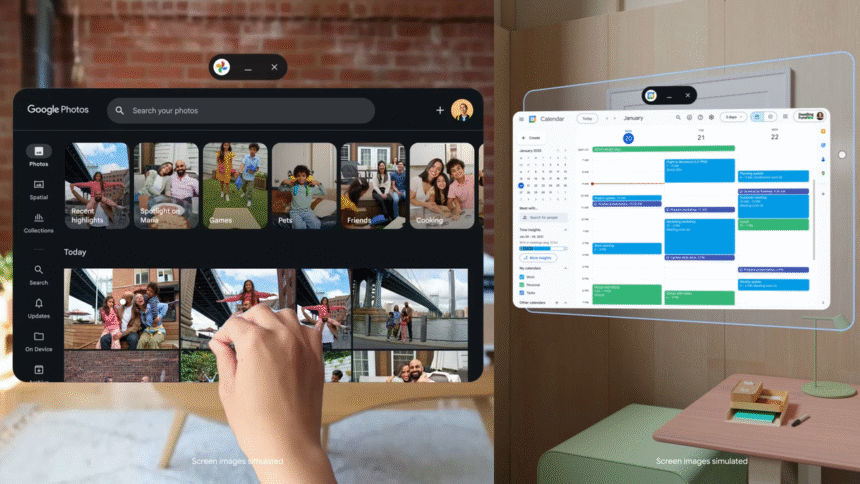
You can now pin any windowed app to a wall in your physical environment, your real-life room. To do so, simply drag the window near the wall and it will snap in place.
For example, you can pin Google Calendar to your office wall, or a Netflix window bigger than your physical TV to your living room wall.
Windowed app pinning on Android XR
This feature has been available on Apple Vision Pro since visionOS 26, and the Horizon OS of Quest 3 headsets since February of this year.
However, while Apple’s visionOS and Meta’s Horizon OS support full persistence for pinned windows (and widgets), Google’s Android XR currently does not. If you reboot your Samsung Galaxy XR, your pinned windows will be gone.
Session Restore
That’s not to say that Android XR has no window persistence at all. With the update, Google says up to 3 previously used windowed apps will reopen in the position you last left them after rebooting.
It’s unclear why this 3-window limit exists, given that neither Apple’s visionOS nor Meta’s Horizon OS has one.
Android Enterprise
With the update, Android XR now supports Android Enterprise. Google said it’s collaborating with “leading EMM partners” including ArborXR, ManageXR, Microsoft Intune, Omnissa Workspace ONE, Samsung Knox Manage, and SOTI to make Samsung Galaxy XR and future Android XR headsets “workplace-ready”.
This support includes key mass device management features such as zero-touch enrollment, allowing headsets to be “pre-configured and shipped directly to end users for immediate use”, as well as Managed Google Play for centralized app distribution, letting businesses silently install and update the specific apps they require on those headsets.
I’m actively writing on UploadVR again, and this article is one in a series of “catch up” pieces where I report on some of the interesting things that have been happening in the industry in recent months. And yes, VR Download is coming back very soon!