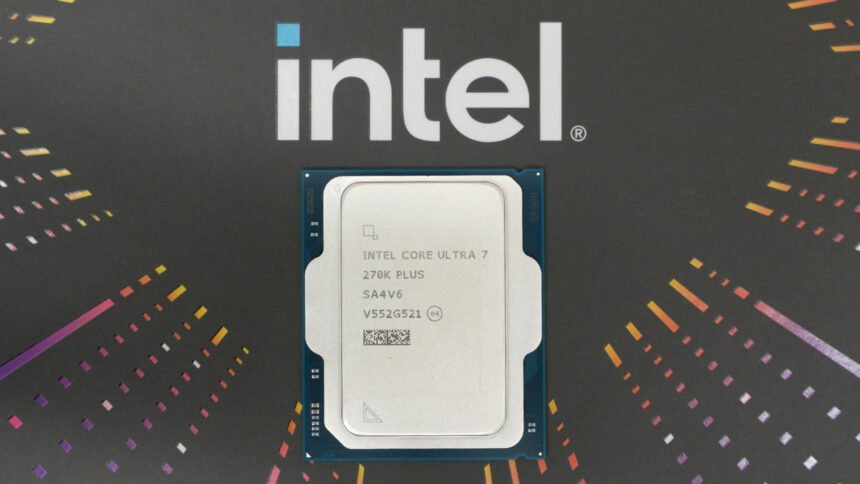
Verdict
For under $300, the Intel Core Ultra 7 270K Plus is an absolute revelation. It’s the fastest consumer grade chip out there for single-core and multi-core productivity benchmarks, and has massively improved gaming performance over the much-maligned 265K. AMD’s top X3D CPUs still reign supreme for pure gaming, but for a balance of gaming, productivity, and value, the 270K Plus is king.
- Chart-topping single-core and multi-core performance
- Much improved gaming performance over the 265K
- Intel’s fastest gaming CPU ever
- Not overly high power consumption
- Works on existing LGA 1851 motherboards
- Still lags behind AMD’s top X3D chips for gaming
- Can get quite hot
- More reliant on fast RAM than AMD X3D chips
If you’re in the market for an all-around powerful gaming CPU but don’t want to stretch your budget too far, the new Intel Core Ultra 7 270K Plus is a surprisingly compelling option. It’s essentially just a clock speed-tweaked version of the entirely lackluster Core Ultra 265K, but what a difference those tweaks have made. Not only is this, on average, Intel’s fastest gaming CPU ever, but it competes reasonably well with the best from AMD, and does so while delivering masses of multi-core performance.
AMD’s latest X3D chips still reign supreme on our best gaming CPU guide, when it comes to raw gaming performance, but the Ultra 7 270K Plus gets within touching distance and obliterates those chips when it comes to multi-core workloads. It’s also reasonably power-frugal, considering its performance, and competitively priced, making it undoubtedly the new price/performance winner.
Specs
| Intel Core Ultra 7 270K Plus specs | |
| P-Cores | 8 |
| E-Cores | 16 |
| P-Core peak boost clock | 5.5GHz |
| P-Core base clock | GHz |
| P-Core L2 cache | 24MB (3MB per core) |
| E-Core boost clock | GHz |
| E-Core base clock | GHz |
| E-Core L2 cache | 12MB (4MB per cluster of four cores) |
| L3 cache | 30MB shared with P-Cores and E-Cores |
| GPU | Intel Xe, 4 x Xe cores, 4 x RT cores, 2GHz boost clock, 300MHz base clock |
| Hyper-Threading | No |
| Memory support | Dual-channel 7,200MT/s DDR5, up to 192GB |
| PCIe lanes | 24 |
| Base power | 125W |
| Max turbo power | 250W |
| Neural compute engines | 2 x Gen 3 |
| Claimed NPU performance | 13 TOPS |
| Socket | LGA1851 |
| Price | $299 |
The Intel Core Ultra 7 270K Plus, and its cheaper sibling, the Core Ultra 5 250K Plus, are the only two new CPUs in Intel’s newest lineup of 200S Plus chips. They distinguish themselves from the likes of the Core Ultra 7 265K primarily by having some faster internal clock speeds that result in much better gaming performance. However, Intel has decided to make things more confusing than they seemingly needed to.
Despite Intel’s claims of the 270K Plus being its fastest CPU ever, and it having the same number of cores as the 285K, Intel has given it a lower model number and is making all its own performance comparisons to the 265K for the launch of this chip.

What ultimately matters, though, is that you get a massive total of 24 cores in this chip, consisting of eight higher-performance P-Cores and 16 lower-performance E-Cores. That’s the same number as in the 285K and four more E-Cores than the 265K. Meanwhile, the most you’ll get in AMD’s competing chips is 16 cores in the 9950X3D and 9950X, though each of these cores can handle two threads at once, making them appear like 32-core chips.
In terms of the main competitors to the 270K Plus, though, the price-matched AMD Ryzen 7 9700X has eight cores (16 threads) while its gaming performance champions, the 9800X3D and 9850X3D, also have just eight cores but cost $170 and $200 more than the 270K Plus, respectively.

As to the clock speed increases mentioned above, the max turbo boost speed of the 270K Plus is actually slightly lower than the 285K, at 5.5GHz compared to 5.7GHz, and it matches the 265K. However, Intel has managed to increase the all-P-Core clock speed of the 270K Plus by 300MHz, meaning that it’s able to maintain a higher clock speed under a wider range of workloads.
What’s more, Intel has squeezed a massive 900MHz extra speed out of the die-to-die (D2D) interconnect, which allows the CPU cores to communicate much faster internally than before. This unlocks some significant improvement in the responsiveness of the chip to more variable workloads, such as gaming.

Beyond this, there’s not much new to note with these chips. They still use the LGA 1851 socket, so can drop into any existing Z890 or B890 motherboard (so long as you perform a BIOS update). Peak power rating is still the same 125W as the 265K and 285K, so you’ll need a decently powerful cooler, but this chips is nowhere near as toasty and power-hungry as the likes of the 14900K.
Intel has also slightly increased peak memory speed compatibility, with this chip officially rated to be used with DDR5 of up to 7,200MT/s, up from the 6,400MT/s of previous 200 series processors.
How we test
I’ve put the Intel Core Ultra 7 270K Plus through our usual benchmark suite, which consists of a range of gaming tests, some pure CPU performance tests, and we check for power consumption and peak temperature while under load too. All games are tested at 1080p, as this reduces the load on the GPU, exposing whether the CPU is holding back performance. We also then test at some other resolutions and sometimes at a range of graphical settings, to showcase how this can change the difference in performance across CPUs.
I mounted the 270K Plus in an Asus Z890 TUF Gaming Plus WiFi motherboard and paired it with 32GB of (2 x 16GB) G.Skill TridentZ 5 Neo RGB 7,200MHz, CL34 RAM, as well as a 2TB PCIe 5 SSD, and an Nvidia GeForce RTX 4080 Founders Edition graphics card. The system is powered by a Corsair RM1000x Shift PSU, and the CPU is cooled by a Corsair H100x 240mm AIO cooler.

All our tests were conducted using Windows 11, with the motherboard flashed to the latest BIOS version. The comparison Intel CPU tests in the graphs below were conducted using an Asus Z790 Dark Hero motherboard for LGA1700 CPUs, and an Asus X870E ROG Crosshair Hero was used to test the AMD AM5 chips.
Game benchmarks
As ever, Cyberpunk 2077 kicks off our testing, as it remains a strong test for any CPU or GPU. Our first test has the game’s detail settings cranked up to the Ultra ray tracing preset, which puts quite a lot of demand on the GPU, but still showcases some clear differences between CPUs. As you can see from the chart below, the Core Ultra 7 270K is solidly middle of the pack in this test, still behind all AMD’s X3D 7000/9000 series chips, but comfortably ahead of most other options, and a clear distance in front of the 265K. And it’s worth pointing out that the 265K’s numbers are vastly improved on when it first launched, thanks to the 200S update that Intel released last year.

Turning down the graphics settings to High with no ray tracing and the performance difference between CPUs actually tightens up, despite the much higher overall frame rates and increased dependence on CPU speed as a differentiating factor. Nonetheless, we see the Core Ultra 7 270K sits in an almost identical position, well ahead of the 14900K and 265K, but behind the X3D chips.

The next game test I fired up is Total War: Warhammer 3, which can put quite a strain on CPUs thanks to its massive number of onscreen characters. Thanks in part to its massive amount of multi-core performance, the 270K Plus puts in a solid perforamnce in the highly CPU-taxing Mirrors of Madness test. It fell behind the 14900K and a couple of AMD’s top X3D chips, but outpaced the likes of the 9950X3D and 7800X3D, as well as pulling comfortably ahead of the 265K.

In the less demanding Battle benchmark, scores were far closer, to the point of almost being within margin of error, so the fact the 270K Plus is second-last in this test isn’t overly significant, considering it’s only 2% slower than the fastest chip on test. Notably, Intel’s latest has a particularly solid minimum frame rate that’s well ahead of the aging 14900K.

Moving on to F1 24, and the 270K Plus puts in another solid showing. Again, the margins are particularly close in this title, but Intel’s latest does technically come in third overall, ahead of the 14900K, 265K, and 7800X3D.

Our final test game is CS2, and this one, more than any of our other tests, pulls back from any pretense of trying to balance CPU and GPU load. Instead, it’s so undemanding in terms of graphics that it runs at incredibly high frame rates, and really highlights the difference between certain CPUs when running at hundreds of fps. It’s under this testing scenario where we really see the 270K Plus struggle, and where AMD’s latest X3D chips really show what they can do.

The 270K Plus delivers a solid enough 321fps average, which will be fine for anyone using a 240Hz or lower monitor. However, if you’re rocking a 360Hz+ display, such as the LG 32GS95UE or MSI MPG 271QRX, and want to ensure you’re maximizing its capabilities, the 270K Plus simply doesn’t cut it, falling over 200fps behind the fastest options available.
Application benchmarks
Where the 270K Plus really shows what it can do is in application benchmarks. Thanks to its high peak clock speed and massive core count, it leaps straight to the top of our charts for both single and multi-thread performance. In the Cinebench R24 single-core test, it is matched by the 9850X3D, but otherwise pulls well ahead of many other key competitors. This should translate to generally snappy, fast-reacting performance in many applications.

Meanwhile, in the Cinebench R24 multi-core test, the 16 extra E-Cores in this chip really show what they can do, putting the 270K Plus comfortably ahead of the 16-core/32-thread AMD Ryzen 9 9950X3D and miles in front of the 14900K, 265K, and 7950X3D. If you want a chip that’s great for most gaming (just not ultra-high frame rates in competitive games), and that’s also great for basically anything else, this chip is it.

Power draw
The 270K Plus is, for the most part, impressively power efficient, with Intel’s 200 series architecture already well known for being frugal, and the latest tweaks made to the 200S Plus chips improving things further. However, it’s still a 24-core chip with some boosted internal clock speeds compared to the 265K, so it ultimately does draw quite a lot of power under full load. Crucially, though, it’s still nowhere near as much as the 14900K, despite this being a faster chip overall.

Reflecting the more modest draw of this chip when it’s not having all of its cores fully loaded up, the 270K Plus sits right towards the bottom of our gaming power consumption test results. The total power figures are high, thanks to the RTX 4080 in our test rig drawing so much power while gaming, but the extra power added by the 270K Plus CPU is only 20W above the 9800X3D, and just 47W above the 7800X3D.

Temperature
Testing the peak temperature of this chip under load, it again showed that, when really pushed hard, it can draw a fair amount of power and get quite hot as a result. In our Cinebench multi-core test, it hit 94°C, which is well above the 265K, and only just shy of the 14900K.

However, during gaming, this temperature dropped back a decent amount, even if it’s still a little on the high side. At 80°C during gaming, this is a CPU that will require at least a 240mm AIO CPU cooler, or a very high-end air cooler, such as the Noctua NH-D15, to keep its temperature in check.

Price
The Intel Core Ultra 7 270K Plus price is $299, making it incredible value for the power it offers. For comparable gaming performance, you’ll be looking at a 7800X3D, which, despite being three years old and superseded by the 9800X3D and 9850X3D, still sells for $369. Meanwhile, the latest top AMD X3D chips are well north of $400.
Crucially, while those AMD chips are more expensive, they’re also far less capable when it comes to non-gaming workloads. The 270K Plus is the fastest chip out there for such applications, so if you need a chip that provides a good balance of performance for a great price, it’s a clear leader.
Alternatives
AMD Ryzen 7 7800X3D
For similar gaming performance at a somewhat similar price, the Ryzen 7 7800X3D is AMD’s nearest alternative to the 270K Plus. It’s a touch faster in most games, and far faster in CS2, so if peak gaming performance is your priority, it’s the better bet for around $70 more. However, the 7800X3D is less than half as fast in multi-thread workloads.
Read our full AMD Ryzen 7 7800X3D review.
AMD Ryzen 7 9700X
If you’re looking for a direct price-match for the 270K Plus, the 9700X is bang on the money. However, it’s not the most compelling option, given that it’s slower in games and much slower in multi-threaded workloads. However, it’s slightly better for the latter than the 7800X3D, and opens the pathway for an upgrade to the very fastest gaming chips at a later date.
Intel Core Ultra 7 265K
Thanks to its 200S boost mode that arrived last year, the 265K is a much more tempting option than it was at launch. The 270K Plus is still fast enough in enough areas that I’d recommend spending the extra $40 to get it instead, but if you’re really on a tight budget, the 265K is a decent option.
Read our Intel Core Ultra 7 265K review and our 200S boost tests.

Verdict
Intel has played a blinder with the Intel Core Ultra 7 270K Plus. It doesn’t entirely set the gaming CPU performance charts alight, and has its shortcomings in some games, but it’s a significant improvement over the 265K and is indeed Intel’s fastest gaming CPU ever.
Crucially, if you want a CPU that’s generally powerful in a lot of situations, with good single-core speed, excellent multi-core performance, and decent gaming performance, it’s the best available right now.
All this, and Intel has been super-aggressive with the price of this chip. It’s over $150 cheaper than AMD’s fastest gaming chip, the 9850X3D, and less than half the price of that company’s most powerful chip overall, the 9950X3D. Considering the 270K Plus beats the latter in productivity workloads while coming close in gaming performance, it’s an absolute no-brainer which to get.
There is one big caveat, though. My CS2 tests show this chip is still miles behind AMD’s top X3D chips for maximum frame rate in competitive gaming titles. If your monitor maxes out 240Hz, or you don’t indulge in ultra-fast competitive titles, it’s not a problem, but if you own a 360Hz or faster monitor and want to maximise your competitive gaming performance, this isn’t the chip for you.