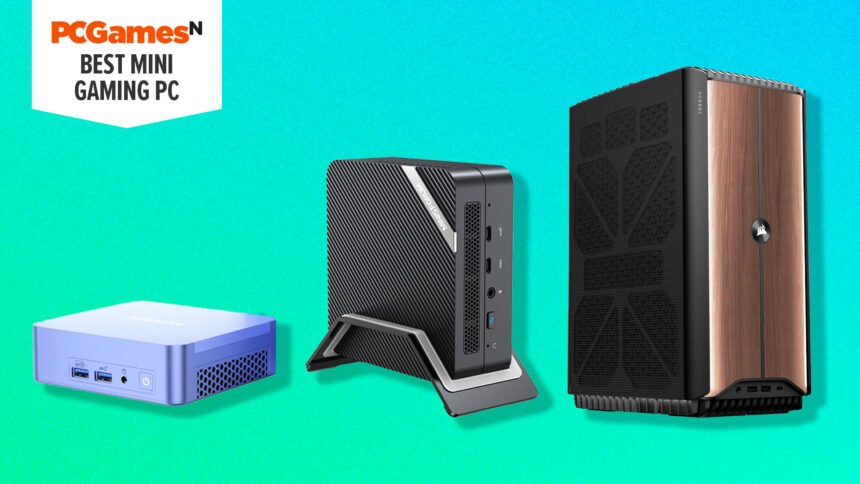
What is the best mini gaming PC? The traditional image of a custom gaming PC is a hulking behemoth of a machine, with frantically spinning fans, blazing rainbow RGB LEDs, and a monstrously large graphics card. However, the best mini gaming PCs can be compact, quiet, and elegant, all while providing performance that can rival full-size desktop rigs.
We’ve tested a wide range of options from ultra-compact ones, which are similar to small laptops in performance, to true powerhouses. Our top choice overall is the Geekom AX8 Pro, thanks to its incredibly small size, decent gaming power, and fair price. For more serious power and stunning design, we’ve picked the fantastic Corsair One i500, while for a budget option, the Blackview MP200 is great value for under $500. Also check out the mini gaming PC FAQ section at the bottom of this list to answer all your burning small PC questions.
Why you can trust our advice ✔ At , our experts spend hours testing hardware and reviewing games and VPNs. We share honest, unbiased opinions to help you buy the best. Find out how we test.
Best mini gaming PCs in 2026:
Recent updates
02/11/2026: I’ve updated this guide with current pricing and buying advice, in light of the latest availability of each model, and the increase in RAM prices recently.
Blackview MP200
Best mini PC under $500/£500

| Graphics | Intel Ultra-HD Graphics |
| CPU | Intel Core i5-11400H |
| RAM | 16GB DDR4 3200MHz |
| Storage | 512GB M.2 |
| Connectivity | USB 3.2 Gen 2 x 4, HDMI 2, USB type C, 3.5mm Headphone Jack, Wifi 6, 1000Mbs LAN |
| Dimensions | 183.2 x 150 x 75.5mm |
| Weight | 1.52lbs (690g) |
- One of the cheapest mini PCs
- Good for daily tasks
- Noisy fans during medium loads
- No dedicated graphics card
The Blackview MP200 is the ideal mini PC for those who want to spend as little as possible. Its competitive pricing makes it our top cheap option, but that price does mean limitations with performance.
Inside the MP200, the Intel Ultra-HD Graphics hinder gameplay considerably. It’s not impossible to play the best PC games on it, but you’ll have to run them at very low resolutions, and modern AAA titles likely won’t run well if at all.
There are enough ports to add three displays with USB 3.2 connectivity, and the storage and RAM can both be doubled if you want to add second modules and upgrade the machine further down the line. We’d recommend the Blackview MP200 if you want one of the cheapest Windows 11 PCs on the market, but if gaming is your priority, then the lack of a graphics card and cooling will let you down.
Read our Blackview MP200 review.
Minisforum AI X1 Pro
Most powerful mini gaming PC

| Graphics | AMD Radeon 890M |
| CPU | AMD Ryzen AI 9 HX 370 |
| RAM | 32GB / 64GB (tested) / 96GB Crucial DDR5-5600 User upgradable up to 128GB |
| Storage | 1TB (tested) / 2TB NVMe M.2 2280 SSD (PCIe 4.0) |
| Connectivity | 2 x USB-A 3.2 Gen 2, 1 x USB-C 4, 3.5mm headphone jack, 1 x OCuLink, 1 x USB-C 4, 1 x USB-A 2, 3.5mm headphone jack |
| Dimensions | 7.67 x 7.67 x 1.67 inches (195 x 195 x 42.5mm) |
| Weight | 3.3lbs (1.5kg) |
- Powerful specs
- Premium design
- Lots of connections
- Integrated fingerprint reader
- Expensive
- Larger than many mini PCs
The Minisforum AI X1 Pro is an ultra powerful mini PC that’s ideal for those seeking a really small PC that can play some games and also turn its hand to high-level workstation-like duties such as local AI model use.
It includes a powerful 12-core AMD CPU that also houses a capable AMD Radeon 890M GPU. What’s more, you can pack it full of up 128GB of memory making it useful for local AI models and other workstation uses, such as running many virtual machines. Though at current RAM prices, that much RAM is probably out of reach for most.
All of which is to say that the AI X1 Pro’s actual gaming performance is somewhat secondary to its CPU power. The Radeon 890M can deliver reliable, if unexceptional, 1080p gaming performance, with it hovering around 45-80fps when running typical modern titles in our tests, but only when graphics settings are set to low.
With this compact aluminum machine also tending to spin up its fans quite readily when under even moderate load, it’s neither the ultra compact day-to-day desktop machine that other Mac mini-style machines can be (look to the AI X1 non-Pro for that) nor the larger, more powerful gaming machines that systems like the Corsair i500 can offer.
Still, if you need the processing power but still want a PC that’s hardly larger than a hardback book, it’s an option to consider.
Read our full Minisforum AI X1 Pro review for more details.
Corsair One i500
Most powerful mini tower gaming PC

| Graphics | Nvidia GeForce RTX 4080 Super |
| CPU | Intel Core i9 14900K |
| RAM | 32GB (2 x 16GB) Corsair Vengeance 6,000MHz DDR5 |
| Storage | 2TB Samsung PM9A1 SSD |
| PSU | 1,000W Corsair SF1000L |
| Connectivity | 2 x USB-A 3.0, 1 x USB-C 3.2 Gen 2, mic/headphone jack (front), 4 x USB 2, 3 x USB-A 3.2 Gen 2, 1 x USB-C 3.2 Gen 2×2, Ethernet, 6 x audio jacks (rear) |
| Cooling | Corsair custom AIO liquid cooler |
| Dimensions | 11.8 x 7.6 x 15.3 inches (18.7 x 30 x 39.3cm) |
| Weight | 15.8 lbs (7.2 kg) |
- Gorgeous, premium design
- Superb gaming pace
- Can be noisy under load
- Very premium price
The Corsair One has become a PC design icon since the original debuted in 2017, and we’ve been fans ever since. The One i500 is a slightly larger version of the standard One, with a deeper chassis that enables it to house the most powerful components, but it’s still a comparatively small gaming PC and it arguably looks better than ever with its wood paneled finish.
Inside,you can get up to an Intel Core i9 14900K CPU and a choice of various Nvidia GPUs, up to and including the GeForce RTX 4090.
Despite its compact sizing, there’s no sacrifice in gaming performance. We tested the RTX 4080 Super version and it ran Cyberpunk 2077 at 2,560 x 1,440 with the Ultra ray tracing preset at 106fps, thanks to some help from the frame-generation tech in Nvidia DLSS 3. F1 23 at 4K with Ultra High settings averaged 94fps in our tests.
In terms of downsides, the 120mm AIO cooler on the CPU doesn’t have enough power to enable the Core i9 14900K to hit its peak boost speeds, and it can make quite a lot of fan noise when running games at full load. But that’s a fair compromise for a PC this small housing such powerful hardware. It’s also an expensive machine when fully specced up. Otherwise, this is the most beautiful mini gaming PC on our list; perfect if design is your priority no matter the cost.
Read our Corsair One i500 review.
Asus ROG Ally X
Best portable mini gaming PC
| Graphics | AMD 780M |
| CPU | AMD Z1 Extreme APU 8 core |
| RAM | 16GB LPDDR5 6400Mhz Dual channel |
| Display | 7 inch IPS 1080p 120Hz (VRR) |
| Storage | 512GB PCIe 4.0 NVMe SSD, microSD |
| Connectivity | ROG XG Mobile Interface, USB 3.2 Gen 2 Type-C |
| Dimensions | 11.02 x 4.37 x 0.83 ~ 1.28 inches (28.0 x 11.1 x 2.12 ~ 3.24 cm) |
| Weight | 1.34 lbs (0.61 kg) |
- Inexpensive
- Very powerful
- Highly portable
- Armory Crate software needs improving
- Windows 11 isn’t the best portable OS
Ok, so the Asus ROG Ally X isn’t really a mini gaming PC by any traditional measure. However, if you really want the most portable way to easily game on the move, the ROG Ally X is the current best option, outside of grabbing one of the best gaming laptop options.
We’ve specifically chosen the ROG Ally X over the Steam Deck OLED as the Ally X not only has a much faster CPU and GPU and larger, higher resolution screen, but the fact that it runs Windows makes it a far more accessible true PC for most gamers. The Steam Deck’s Linux-based SteamOS can do tasks other than play Steam games, but it won’t run other game launchers or familiar Windows apps.
Meanwhile, if you’re thinking one of the best gaming handhelds isn’t the ideal way to work or do desktop gaming, just remember that you can use a Steam Deck dock to mount the Ally X on your desk, then plug it into your monitor, keyboard, mouse, and more.
Switch the device to run at its highest power mode – a mode that would normally chew through the onboard battery – and you’re getting an 8-core CPU with a 720p-1080p-capable gaming GPU that’s plenty powerful enough for desktop tasks and gaming. You can even use one of the Ally X’s USB4 ports to connect an external GPU.
At $799, the Ally X isn’t a cheap device when compared to a handheld like the Nintendo Switch, but when you consider it can also be a proper mini PC as well, it seems like a lot better value.
Read our Asus ROG Ally X review for more information.
Best mini gaming PC FAQs
Is a mini PC good for gaming?
Yes, a mini PC can be good for gaming, but you’ll need to have a good look at the GPU specs. Larger mini PCs based on mini-ITX motherboards can often accommodate a seriously powerful graphics card, just like a desktop PC, but the smallest mini PCs often rely on integrated graphics, such as on many laptops. This is where the GPU is inside the CPU, as the small case doesn’t have the physical room to accommodate the cooling system for a full-size graphics card.
If you want one of these tiny PCs, then you need to compromise on gaming performance, but that doesn’t mean you can’t play games at all. If you can find a mini PC that uses one of AMD’s G-series CPUs, such as the Ryzen 5 8600G, then it will have a half-decent Radeon GPU built into it. This won’t be able to play the latest games at high graphics settings, but in our tests, they can often handle running games at 1080p with low settings.
Can a mini PC replace a full-size desktop?
Yes, a mini PC can replace a desktop. In fact, the latest high-end mini PCs, such as the new Corsair One i500, can offer exactly the same components you would find in the best gaming PCs, including a 24-core Intel Core i9 14900K CPU and a mighty Nvidia GeForce RTX 4090 GPU. You really can have your mini PC cake and eat it now.
However, you won’t have the same room for expansion as a full-size machine. Most mini-ITX motherboards only have a single PCIe slot, which will be used for your graphics card, and there are usually only two DIMM slots for RAM too. Most people don’t have multiple PCIe cards, though, and you can still get plenty of memory into a pair of DIMM slots.
Why are some mini PCs so tall?
Mini PCs come in all shapes and sizes to suit various needs, but if you want one that can handle a high-end CPU and graphics card then it needs to make room for them. That doesn’t just mean you need physical room for the components; you also need room for airflow to cool them, or for radiators if they use liquid cooling.
That’s why some high-end gaming PC cases have instead been built upwards rather than outwards. This means the PC still has a small footprint, so it doesn’t take up too much space on your choice of gaming desk, but it can still contain powerful PC components, such as a large graphics card. A mini PC based on the new Fractal Design Mood case, for example, will be 453mm tall, so it can house a water-cooled CPU and decent graphics card, but its footprint is a neat 212 x 212mm square.
Can you upgrade a mini PC?
Yes, you can upgrade a mini PC, but the extent to which you can upgrade it depends on the PC in question. Some mini PCs are based on mobile components intended for laptops, and you won’t be able to change the CPU or GPU, but you may well be able to upgrade the memory if it’s installed in standard DIMM or SODIMM slots, or the SSD if it uses is a standard M.2 or SATA connector.
Also, even some mini PCs based on standard desktop components can be a hassle to upgrade, as they’re designed to accommodate specific components that line up with the case and cooling system. For example, you can easily upgrade the SSD and RAM in the Corsair One, but not the motherboard or graphics card.
If you think you might want to upgrade the core components, such as the CPU or GPU, in your mini PC later, it’s best to go for one based on a standard mini-ITX case and motherboard that doesn’t use proprietary components, such as the Origin Chronos V3.